indox.org
  • Convert Tools
  • Pricing
  • Blog
  • Support
  • Docs
Ctrl K
Get started
Indox

Encrypted in transit. Free-tier files auto-deleted within 24 hours. No tracking.

  • Encrypted in transit
  • Auto-delete within 24h
  • No training on your files

Convert documents

  • DOCX to PDF
  • PDF to DOCX
  • XLSX to PDF
  • PDF to JPG
  • EPUB to PDF
  • XLSX to CSV
  • HTML to PDF

Convert images

  • HEIC to JPG
  • JPG to PDF
  • AVIF to JPG
  • WEBP to JPG
  • SVG to PNG
  • JPG to PNG

Convert video and audio

  • AVI to MP4
  • WAV to MP3
  • MOV to MP4
  • M4A to MP3
  • MKV to MP4
  • MP4 to MP3
  • WEBM to MP4
  • OGG to MP3

Tools

  • Convert
  • Edit
  • Organize
  • Sign & secure
  • Compress & repair
  • AI
  • PDF converter
  • All conversions

Apps

  • AI Extract
  • Chat with a doc
  • Translate documents
  • Office
  • Form reader
  • Fill & Sign
  • PDF viewer
  • Scan to PDF
  • Unit converter

Font formats

  • TTF
  • OTF
  • WOFF
  • WOFF2
  • EOT
  • SVG
  • PFA
  • PFB

Company

  • Blog
  • Pricing
  • Support
  • Feedback
  • Terms of Use
  • Privacy Policy

IRS forms for individuals

  • Individual income tax
  • Payments, refunds & disputes
  • Tax pros & free filing help
  • IRS notices & requests
  • Records, IDs & e-file
  • Estates, gifts & trusts
  • Retirement & savings plans

IRS forms for businesses

  • Employment & payroll
  • 1099s & information returns
  • Business & corporations
  • Charities & nonprofits
  • Excise tax
  • International

USCIS family and status

  • Green cards
  • Citizenship
  • Family petitions
  • Adoption
  • Travel & status changes
  • Asylum & humanitarian relief

USCIS work and filings

  • Work authorization
  • Investors & entrepreneurs
  • Records & requests
  • Fees & payments
  • Waivers
  • Appeals & motions

Developers

  • Documentation
  • API Reference
  • Python SDK

Products

  • Businesses
  • IndoxHub
  • Pencilly

Apps and extensions

  • WebEase (Extension)
  • AI Summarizer (Extension)
  • KeyNest (Extension)
  • KeyNest (Android App)

© 2026 Nemati AI LLC. All rights reserved.

Private. Secure. Encrypted. Auto-deleted within 24 hours.

Updated on 2026-10-13, v0.26.0

PDF form reader and editor workspace

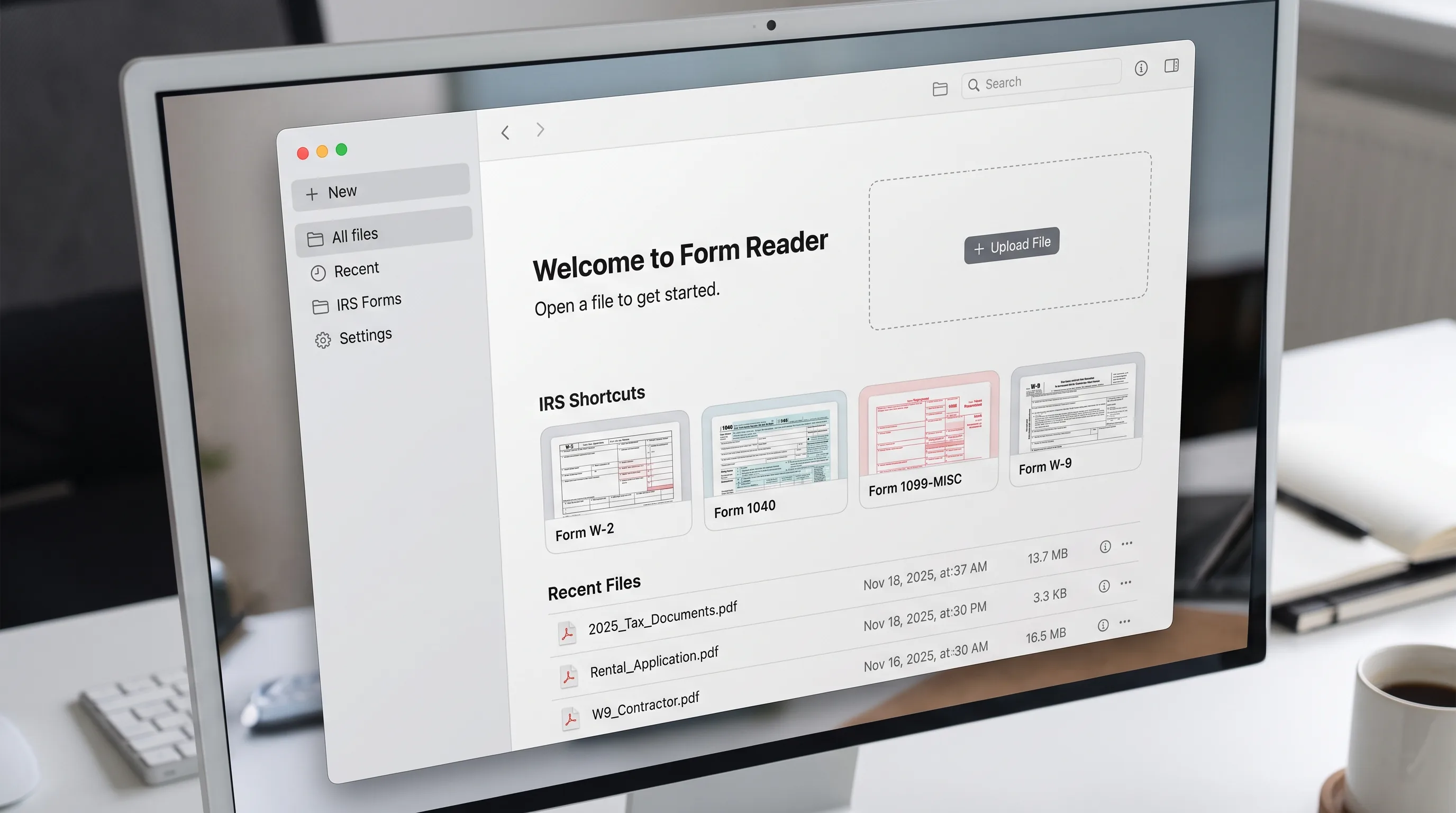
Drop any file to start

Choose a PDF, Word, Excel, PowerPoint, image, HTML, email or text file from your device, a link or the clipboard.

Files other than PDF are converted first. Signing in raises the size limit.

Or start from a blank IRS form

  • W-9Taxpayer ID
  • W-4Withholding
  • 1040Income tax return
  • 1099-NECContractor pay
Browse all IRS forms →
  1. Home
  2. Edit
  3. Form Reader

PDF form reader and filler

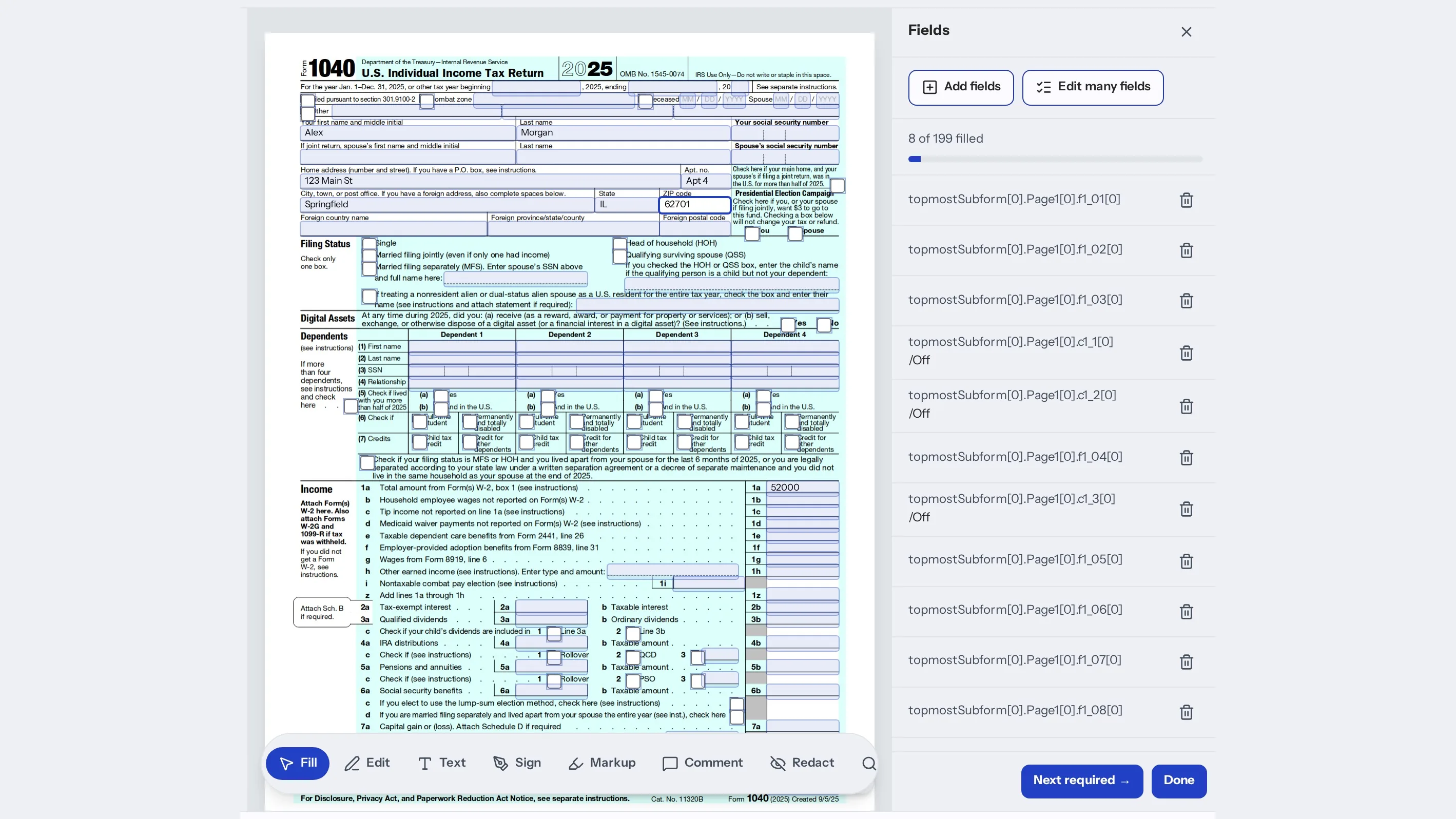
Form Reader opens a PDF in your browser and finds its fields so you can fill them by typing on the page. Press Tab to move to the next field, watch the count of fields left and sign when you reach the signature line. You can also edit text, mark up, redact, organize pages and ask AI to fill or check the form. Open your own file or start from a blank IRS form, then download the PDF when you finish.

Why use indox to fill and edit PDF forms?

Open a file from where it is

Open a file from where it is

Choose a PDF from your device, paste a link or paste from the clipboard, or scan pages with your phone. Start from a blank IRS form such as a W-9, W-4, 1040 or 1099-NEC, or open a recent file.

Fill the form on the page

Fill the form on the page

Type directly on the page and press Tab for the next field. The fields panel shows how many are filled, how many need a check and how many are required, and a click jumps to the field.

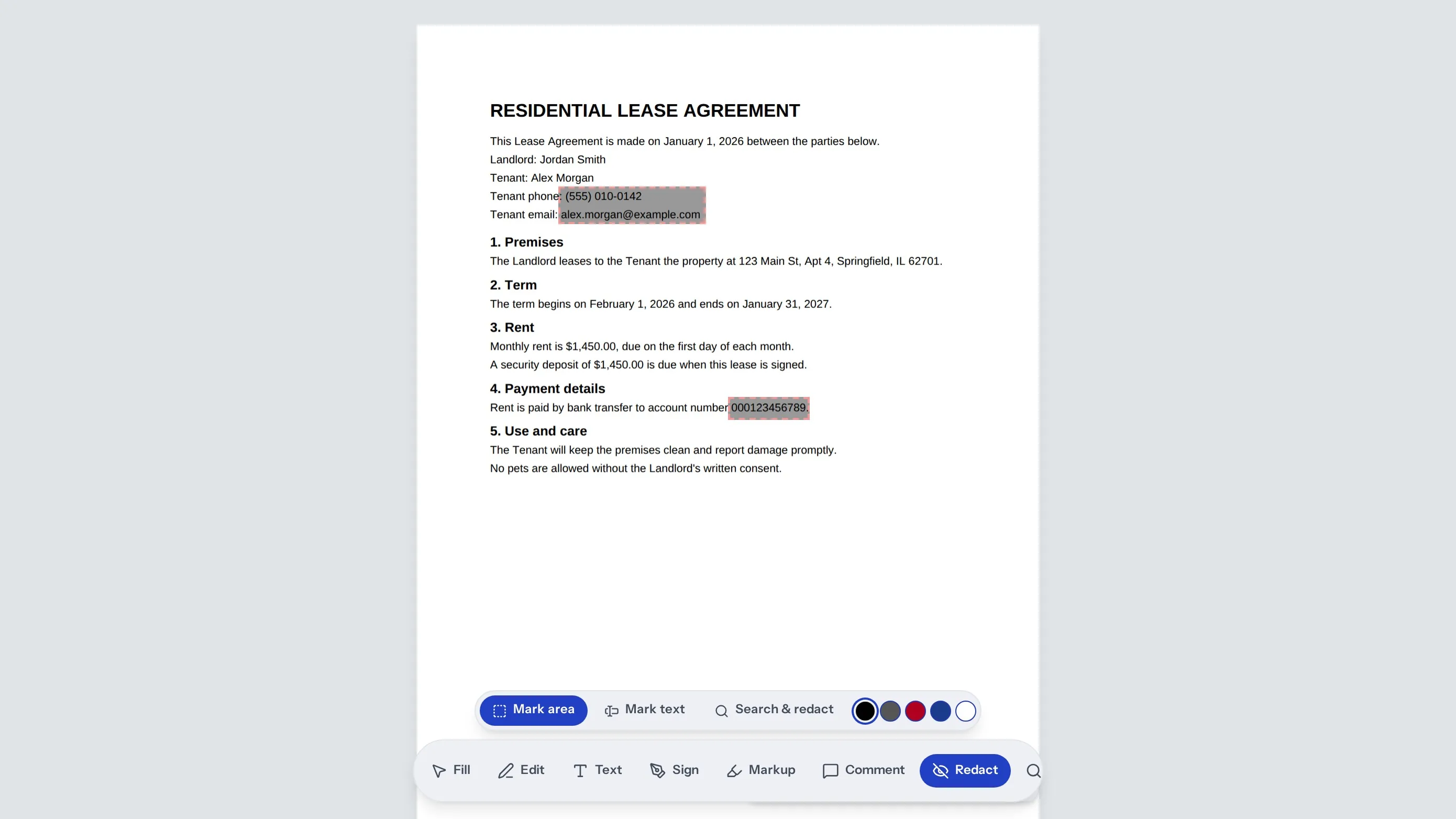
Sign, mark up, comment and redact

Sign, mark up, comment and redact

Sign with a drawn, typed, uploaded or camera signature. Highlight, underline or strike text, leave comments, search the document and redact what should not be shared, all in the same editor.

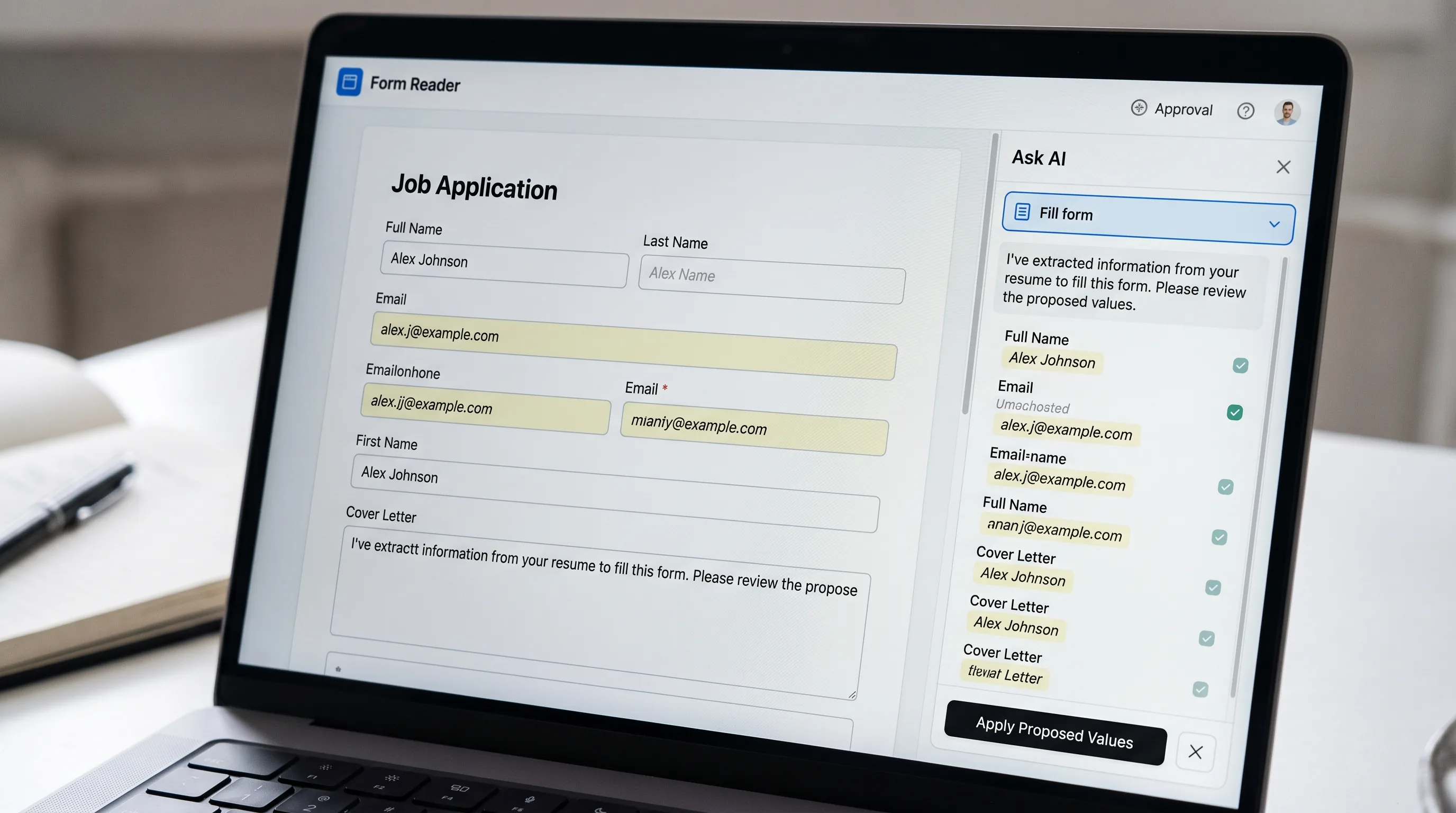
Let AI fill or check it, then review

Let AI fill or check it, then review

AI can fill a form from a W-2, last year's return or a few answers, suggest comments or check the numbers. It only suggests. You accept each value, and every AI change can be undone.

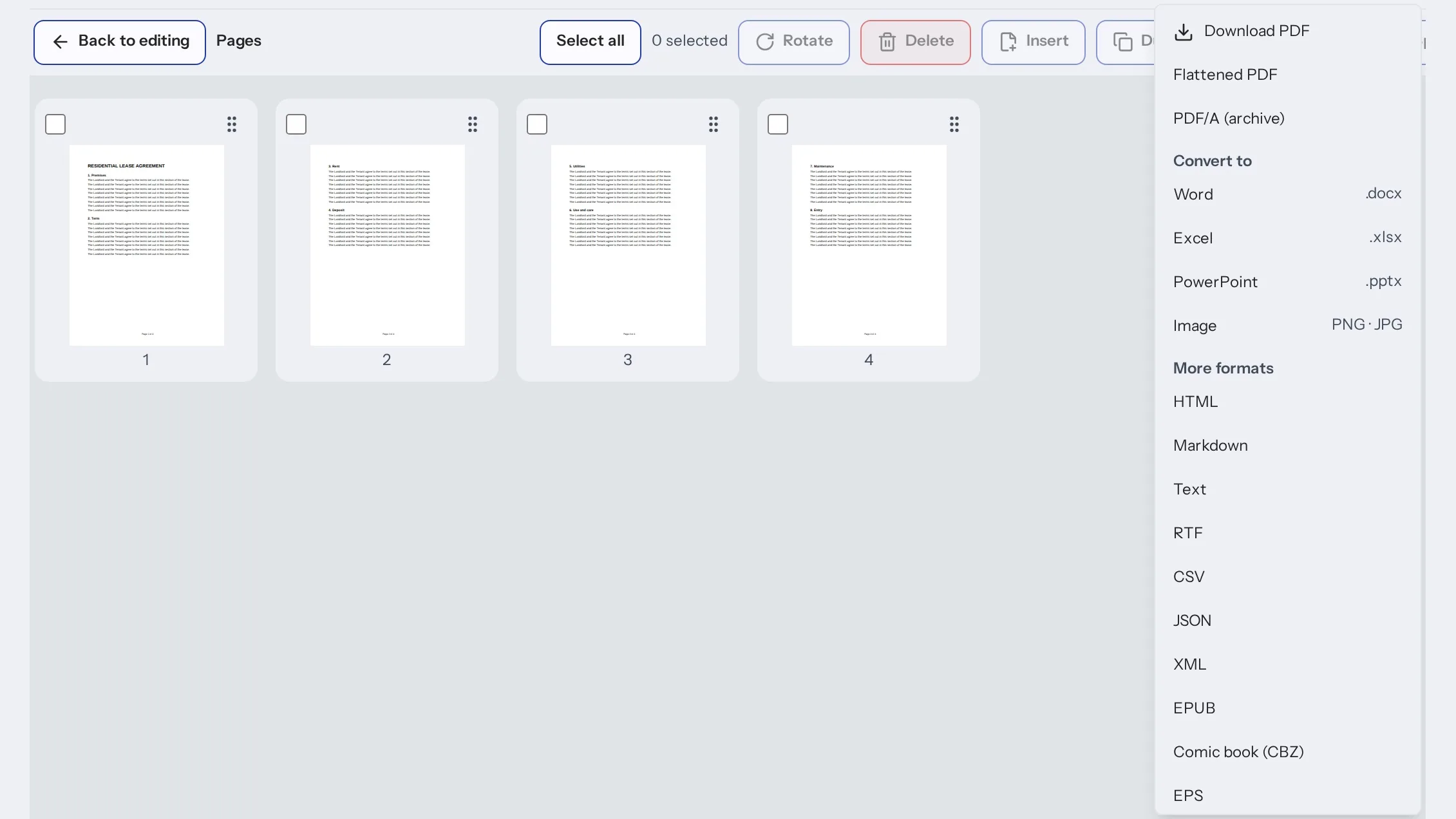
Organize, compress and download

Organize, compress and download

Reorder, rotate, delete or split pages, compress the file with a size estimate and compare two PDFs. Then download the PDF or export it to another format from the Download menu.

How do I fill out a PDF form?

  1. 1

    Open your PDF

    Choose a file, paste a link, scan with your phone or start from a blank IRS form.

  2. 2

    Fill, edit or sign on the page

    Type in the fields, press Tab for the next one and use the toolbar to sign, mark up or redact.

  3. 3

    Check and download

    Review the fields panel for anything marked to check, then download the PDF.

What do I get from indox's form reader?

Everything happens on the page you are looking at. The fields panel keeps count of what is filled, what needs a check and what is required, so you can see what is left before you sign.

  • Type on the page and press Tab between fields
  • The fields panel shows what is filled, required or needs a check
  • Sign, mark up, comment and redact in the same editor
  • AI suggests values and you accept or undo them
  • Start from a blank IRS form
What do I get from indox's form reader?

What should I check before I rely on the form?

Fill with AI proposes values from the documents you add. Nothing counts until you accept it, and every AI change can be undone. Read each value against the source before you sign or submit.

AI can be wrong. When it answers a question about the PDF, check the page it cites, and check the numbers yourself on tax and legal forms.

Before AI reads a PDF, you are asked to allow it. The pages are sent to indox AI to answer, suggest or propose edits. You can turn AI off in settings.

Some files will not open. A password-protected PDF asks for the password. A damaged PDF can be repaired into a new copy, and your original is not changed. Other file types are converted to PDF first, and a file that is too large or protected can fail to convert.

A PDF with no fillable fields has nothing to detect. Draw a box on the page to add a field.

Form Reader does not file your return or check that a form is the right one for your situation.

What else can I do with PDF forms?

The forms library lists IRS and USCIS forms by topic. Open one in Form Reader and fill it online.

Related tools
What else can I do with PDF forms?

Who can use a PDF form filler?

  • Someone completing a tax or immigration form

    Someone completing a tax or immigration form

    You have a W-9, a W-4 or a government form to complete. Fill it on the page, check the fields panel and download the finished PDF.

  • A freelancer or small business

    A freelancer or small business

    You send and receive forms often. Fill, sign and redact in one place without printing anything.

  • Someone with a locked or damaged PDF

    Someone with a locked or damaged PDF

Form Reader FAQs

A form is password-protected or will not open cleanly. Unlock it with the password or repair it into a new copy, then fill it in.

Can I fill out a PDF form without printing it?

Yes. Open the PDF, type on the page, press Tab to move between fields, sign if the form needs it and download the finished PDF.

Which forms can I start from?

Your own PDF, or a blank IRS form such as a W-9, W-4, 1040 or 1099-NEC from the shortcuts in the editor. The forms library lists IRS and USCIS forms by topic.

Which files can I open?

PDFs open directly. Word, Excel, PowerPoint, JPG and PNG images, HTML, Markdown, email, eBooks, comics, SVG and text files are converted to PDF first.

How does Fill with AI work?

You add a W-2, last year's return or answer a few questions, and AI proposes values for the fields. You review every value before it counts, and each AI change can be undone.

Is my PDF sent to AI?

Only if you allow it. Before AI reads a PDF you are asked first, and the pages are then sent to indox AI. You can turn AI off in settings.

What if my PDF is password-protected?

The editor asks for the password. Enter it to open the file, or choose another file.

What if my PDF is damaged?

Press Repair. indox tries to rebuild it as a new copy and leaves your original file unchanged.

Can I sign a PDF here?

Yes. Use the Sign tool in the toolbar and place your signature on the signature line. The fields panel shows whether the form is still unsigned.

Can I redact information?

Yes. The Redact tool marks the areas to hide, and you can search the document to find every place a name or number appears.

What else can I do with a PDF?

Edit text, mark up, comment, search, organize pages, compress the file, compare versions, ask AI about the document and download the result.

Do I need an account?

You can open a PDF directly without one. Other file types are converted first, and signing in raises the size limit for conversions.

Does indox file my form for me?

No. Form Reader helps you fill and sign the PDF. You submit it yourself, and you are responsible for checking that it is correct.

Browse forms

Forms library

Blank IRS and USCIS forms you can open and fill online.

Doc Chat

Ask questions about a PDF and read answers from its pages.

Sign PDF

Add your signature to a PDF.

OCR PDF

Make a scanned form searchable.

Fill PDF Form
Edit PDF
Redact PDF
Merge PDF
Compress PDF
All edit tools

Where can I read more about editing PDFs?

  • Docs

    Editing a PDF

    Change a PDF with server-side operations, or save a file you edited yourself.

  • Docs

    Document formats

    Format families, and how to check one pair before you convert.

  • Docs

    Limits

    File size, credits and retention for free and paid use.

  • Docs

    Error codes

    The error shape and the HTTP status codes, with free-quota and no-credits examples.

Do it all with indox

View all 123 tools

No tool matches that search.

Sign & secure

  • Sign PDF
  • Protect PDF
  • Unlock PDF
  • Redact PDF
  • Watermark PDF
  • Redact Text
  • Sanitize PDF
  • Certificate Sign
  • Remove Signature
  • Unlock Forms
  • Timestamp PDF
  • Change Permissions

Convert

  • PDF to Word
  • Word to PDF
  • PDF to Excel
  • PDF to JPG
  • JPG to PDF
  • Excel to PDF
  • PDF to PowerPoint
  • PowerPoint to PDF
  • PDF to CSV
  • PDF to HTML
  • Markdown to PDF
  • PDF to Markdown
  • HTML to PDF
  • PDF to Text
  • Text to PDF
  • PDF to JSON
  • JSON to PDF
  • PDF to EPUB
  • EPUB to PDF
  • Email to PDF
  • RTF to PDF
  • ODT to PDF
  • PDF to XML
  • PDF to PDF/A
  • PDF to Video
  • HEIC to JPG
  • SVG to PNG
  • CSV to Excel
  • JSON to CSV
  • PDF to EPS
  • EPS to PDF
  • PDF to PS
  • PS to PDF

Edit

  • Edit PDF
  • Fill PDF Form
  • Add Stamp
  • Edit PDF Metadata
  • Flatten PDF
  • Add / Extract Images
  • Remove Annotations
  • Adjust Contrast
  • Invert Colors
  • Replace Colors
  • Get PDF Info
  • Add Attachments
  • Show JavaScript
  • Analyze PDF
  • List Attachments
  • Extract Attachments
  • Rename Attachment
  • Delete Attachment
  • Remove Images

Organize

  • Merge PDF
  • Split PDF
  • Rotate Pages
  • Reorder Pages
  • Remove Pages
  • Extract Bookmarks
  • Single Long Page
  • Scale Pages
  • N-up Layout
  • Booklet
  • Add Page Numbers
  • Crop PDF
  • Extract Pages
  • Edit Table of Contents

Compress & repair

  • Check PDF
  • Compress PDF
  • OCR PDF
  • Repair PDF
  • Decompress PDF
  • Compare PDFs
  • Auto Rename
  • Scanner Effect
  • Pipeline
  • Multi-Tool
  • Read & Annotate

AI

  • AI Extract
  • Chat with a doc
  • Translate documents

Apps

  • Office
  • Form reader
  • Fill & Sign
  • PDF viewer
  • Scan to PDF
  • Unit converter

Image

  • Compress Image
  • Resize Image
  • Crop Image
  • Convert Image
  • Remove Background
  • Upscale Image
  • Watermark Image
  • Rotate & Flip
  • Image to Base64
  • Remove EXIF

Video

  • Convert Video
  • Compress Video
  • Trim Video
  • Video to GIF
  • Extract Audio
  • Add Subtitles
  • Video Thumbnail
  • GIF to MP4

Audio

  • Convert Audio
  • Compress Audio
  • Trim Audio
  • Merge Audio
  • Audio to Text
  • Change Speed
  • Normalize Audio
  • Record Audio

Fonts

  • Font Converter
  • TTF to WOFF2
  • OTF to WOFF2
  • WOFF to WOFF2
  • TTF to OTF
  • OTF to TTF
  • WOFF2 to TTF

What do the free and paid plans add?

Free

  • All converters
  • Daily credit refresh
  • Email support

Basic

  • Access to all features
  • AI Extract & Doc Chat
  • Priority conversions
  • Email support
Highest priority

Premium

  • Everything in Basic
  • Highest priority queue
  • Larger file limits
  • Priority support

Pay-As-You-Go

  • No subscription
  • Credits never expire
  • Opt-in auto-refill
  • Access to all features
See prices