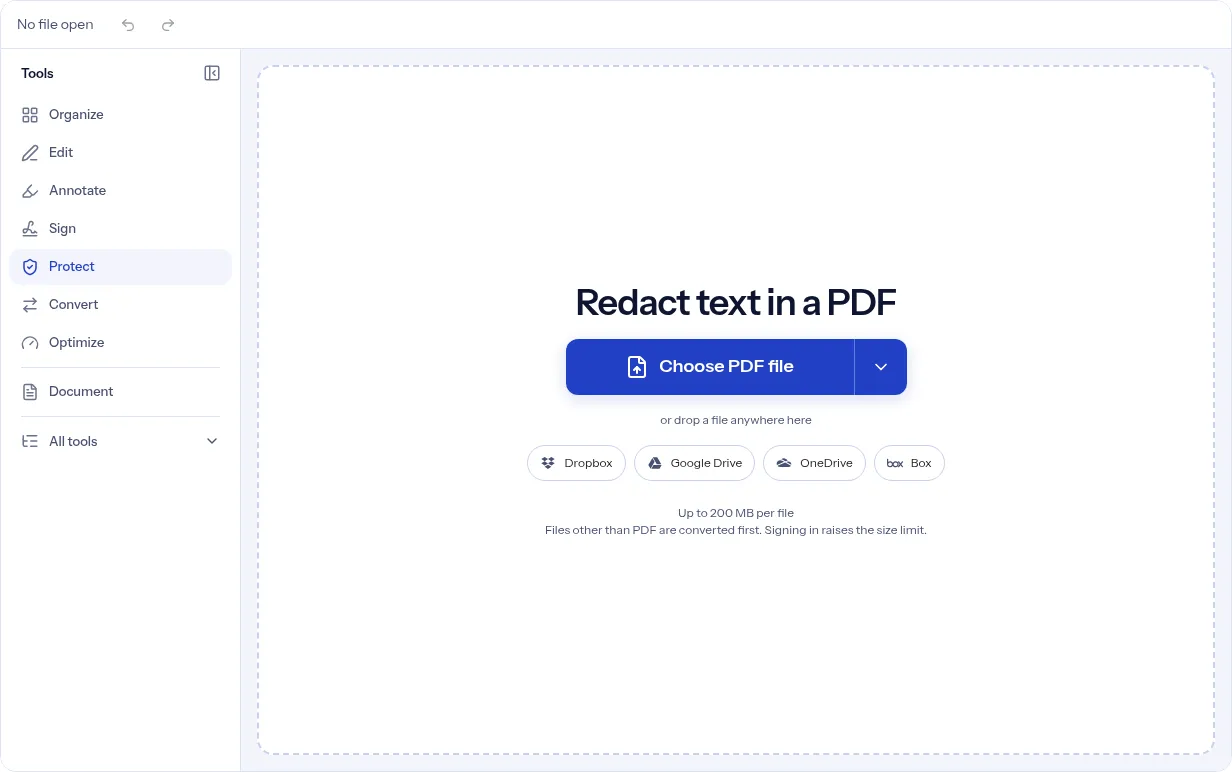
Files other than PDF are converted first. Signing in raises the size limit.
You add
One PDF
You set
The words, numbers or patterns to find, plus any areas to cover
You get
A PDF of page images with boxes
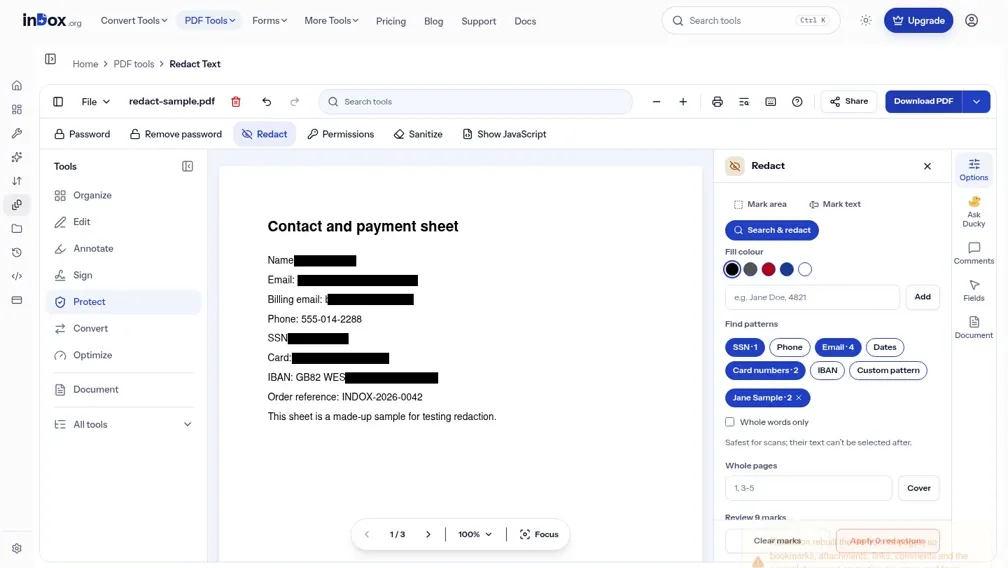
Redacting text means covering it so a reader cannot see it, and removing it from the file underneath. On this page you search one PDF for what has to go: type a name or a number in Find words or numbers, or pick a preset under Find patterns for SSN, Phone, Email, Dates, Card numbers and IBAN, or write a Custom pattern. Every match lands in a review list with its page, where you keep or uncheck it, and Whole words only stops a short term matching inside longer words. The same panel also lets you drag over an area, mark text by hand and black out whole pages. Redactions are applied in the file when you download. Every page becomes an image, so its text can't be selected or searched afterwards, and text under the boxes is gone for good. It suits someone who has to share a PDF with names, emails or ID numbers covered throughout and can accept a copy made of page images. It costs nothing and needs no account.
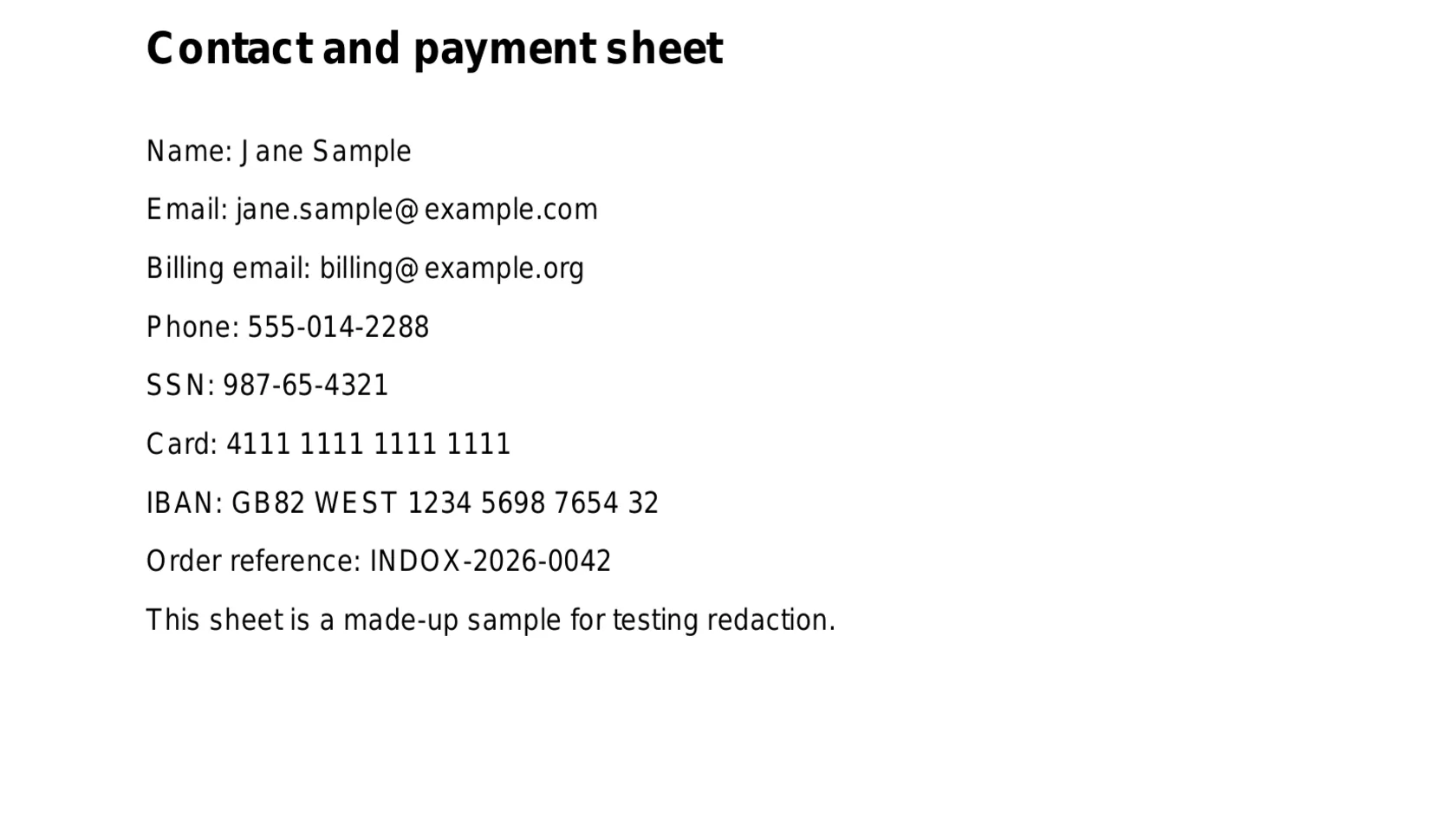
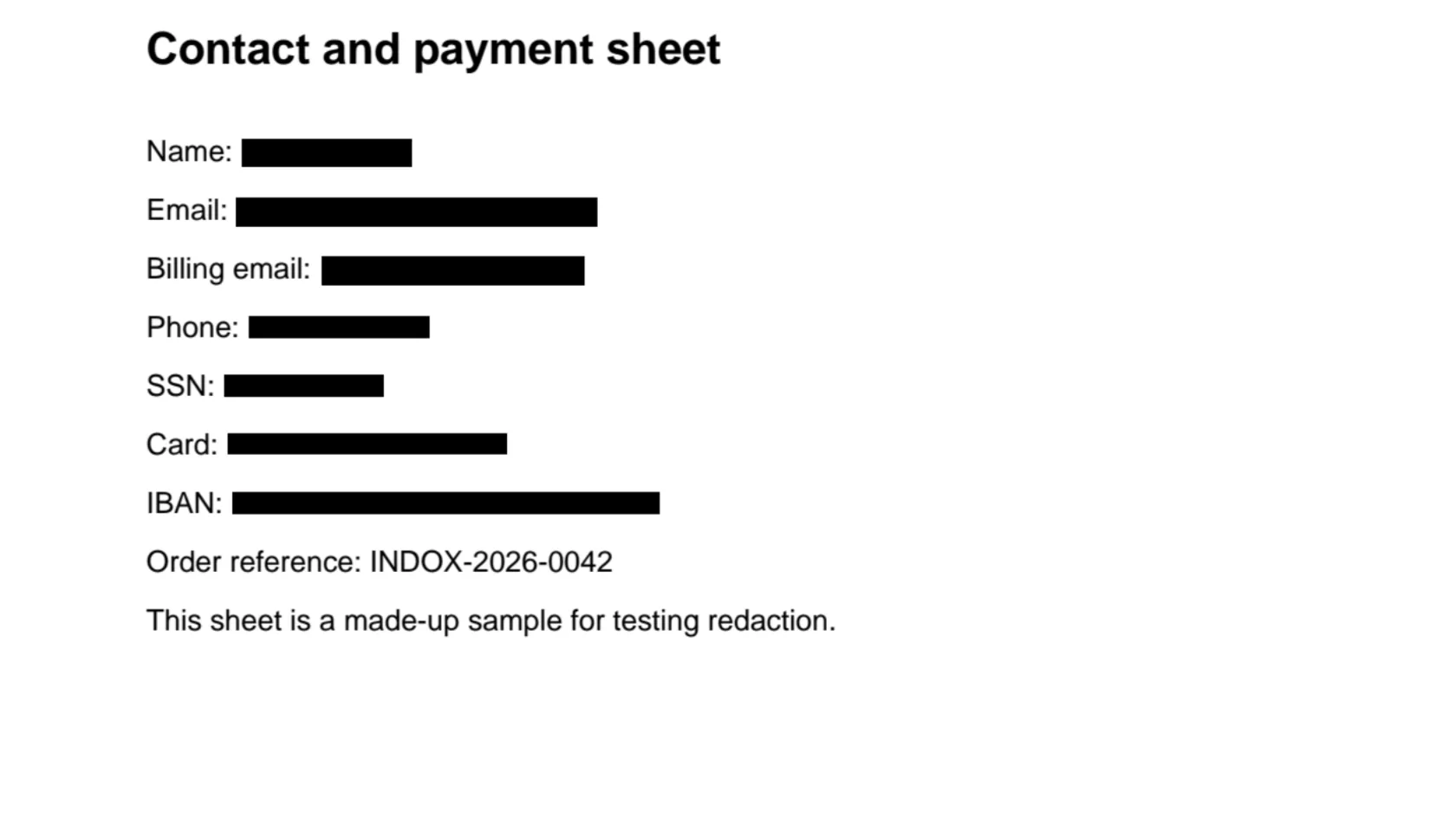
Our own 3-page A4 sample with made-up data: a name, example.com emails, a test card number and an IBAN, redacted on indox.org
Original PDF3 pages, 573 characters of text
3.7 KB
Output, terms and presets11 marks, 3 images at 150 dpi
107 KB29 times the input
Output, pattern and whole-page cover3 images at 300 dpi
212 KB58 times the input
Text characters, originalread with pdftotext
573
Text characters, outputboth outputs; a byte search for all 12 terms in the first found none
0
Original PDFRedacted output
Measured on indox.org on 5 November 2026: our sample before and after. Drag the handle to compare the top of page 1 at 200 dpi. The output is page images with boxes, so it is larger than the input.
What can you do when you redact text in a PDF?
Search words and phrases
Type words or numbers in Find words or numbers and press Add. Tick Whole words only when a short term, such as a surname, also appears inside longer words. If a search finds nothing, the panel says to check the spelling and, for scans, to run Make searchable first.
Use preset patterns
Find patterns offers SSN, Phone, Email, Dates, Card numbers and IBAN, and a Custom pattern for a regular expression of your own. Each preset shows how many matches it found.
Add areas and text by hand
Search misses something drawn rather than typed, such as a logo or a signature. Drag over it to mark the area, or use Mark text on a line. Each mark joins the same review list.
Black out whole pages
Type pages in Whole pages, like 1, 3-5, and press Cover. Those pages are blacked out completely. Use Stop covering these pages to take them back.
What redaction keeps and changes
Stays the same
The page count and the page order.
How the pages look outside the boxes. The text you did not list is still readable as an image.
The PDF on your device. The job works on the uploaded copy.
Changes
Every mark you keep is covered by a filled box, black by default.
When you download, every page becomes an image, so no text is left behind the boxes.
Text in the whole document stops being selectable or searchable, including text far from any box.
The file size changes, because the pages are now pictures.
The file is rebuilt from its pages. Form fields become part of the page, and bookmarks, attachments, links, comments and the original document properties are removed. A warning appears when the file had any of them.
Which options for which terms
You want to cover
Use
Check after
A name or a phrase
UseFind words or numbers, then Add
Check afterCheck the review list, then try to select and search for the covered words in the download.
A short word that also sits inside longer words
UseTick Whole words only
Check afterLook at the neighboring words for boxes you did not want.
A pattern, such as an email address, a card number or an IBAN
UsePick a preset under Find patterns, or write a Custom pattern
Check afterCheck the marks in the review list and keep or remove each one.
A value that follows a fixed label
UseA Custom pattern with a lookbehind
Check afterIn our test (?<=Order reference: )INDOX-\d{4}-\d{4} matched one value and left the label visible. Check the review list.
How to redact text in a PDF in 3 steps
1
Add the PDF to redact
Drop one PDF on the upload box, or use Choose file to pick it.
1 / 3
2
Mark what to hide
Drag over an area, mark text, search words and phrases, pick a preset pattern or type pages in Whole pages. Tick Whole words only if you need it.
2 / 3
3
Review, apply and download
Look through the review list and uncheck any mark you want to keep. Apply the redactions, then download and look at every box before you send the file to anyone.
3 / 3
Why redact text with indox?
The panel shows every mark before anything is applied. You can drag, mark text, search or use a preset pattern, and a review list shows each mark with its page so you can keep or remove it. The panel states the trade before you download: every page becomes an image, so its text can't be selected or searched afterwards, and text under the boxes is gone for good. When the redaction step cannot run, the job fails, because a PDF that still shows what you wanted covered is worse than an error message. In our test on 5 November 2026 the text under the boxes was removed from the file. It is free and needs no account; signed out, a run counts against a daily free allowance. The upload travels over HTTPS, and for visitors who are not signed in it is deleted with the result 24 hours after the job.
Marks reviewed one by one
Search, preset patterns and whole pages
Pages always converted to images
A failed redaction fails the job
One job without an account
What are the limits when you redact text?
File size
A visitor who is not signed in can redact a PDF of up to 200 MB, within a daily free allowance. A signed-in account can upload up to 200 MB per file. One job also has a cap on how many marks it takes.
Where it runs
Your browser finds the matches in the page text for the review list. The redaction itself runs on indox's server, which turns every page into an image and sends the redacted copy back to the editor. If you are not signed in, the upload and the redacted copy are deleted 24 hours after the job finishes. A signed-in account keeps them in its history until you delete them, for at most 180 days, and you can choose 24 hours or 30 days instead. Either way indox keeps a record of the job, such as the file name and its status, not the file.
Limits worth knowing
Areas you drag can cover a picture, a signature or handwriting, but search and the preset patterns match text only. A scan has no text to find until you run Make searchable.
The review list shows each match with its page, and a search that finds nothing says so. Still look at every page of the download. A term the search did not match stays visible. Check the spelling, and check the download page by page.
The review list comes from the text your browser reads on each page. When you keep every match of a word or a pattern, indox searches the file for it again on the server, so it can also cover a copy the list did not show.
Because all text stops being selectable, search and copy no longer work on the result. OCR PDF adds a searchable text layer afterward.
The tool has no password box and no setting for document properties such as the title or author. Edit PDF Metadata is the tool that sets those.
Search ignores upper and lower case, and the page has no switch to change that.
The presets are patterns, not detectors. Card numbers keeps only 13 to 16 digit runs that pass the card checksum (the Luhn check), which rules out most long order numbers and the digits inside an IBAN, but about one random number in ten passes it too. Matching ignores upper and lower case.
Pixels outside the boxes stay readable. In our test the unmatched line Order reference: INDOX-2026-0042 was still visible as part of the page image.
The page has no setting for image resolution. In our test one run came back at 150 dpi (107 KB) and another at 300 dpi (212 KB).
This is not legal-grade or compliance-grade redaction. If a court or records office needs a file that keeps its text layer, use a tool built for that and check the result.
When the redaction is not what you expected
What you see
Why
What to do
A search finds nothing
WhyThe term did not match, or the file is a scan with no text to find
What to doCheck the spelling. If the file is a scan, run Make searchable first so its text can be found.
A word is still visible
WhyThe term did not match, or the word is part of a picture
What to doFix the term. Text inside a scan is a picture, so run OCR PDF first and redact the searchable copy.
A short term covers more than you meant
WhyWithout Whole words only, a term also matches inside longer words
What to doTick Whole words only and search again.
A custom pattern is rejected
WhyThe pattern isn’t a valid regular expression
What to doCorrect the pattern and add it again.
You cannot select or search the result
WhyThe pages were converted to images
What to doRun OCR PDF on the result to make it searchable again.
Redactions marked shows at once
WhyApply only marks the redactions in the editor. The file is processed when you press Download PDF
What to doWait for the download to finish, then open the saved file and check it.
Card numbers boxes more than a card
WhyThe preset keeps any 13 to 16 digit run that passes the card checksum, and some other numbers pass it too
What to doUncheck the extra marks in the review list, or write a Custom pattern for your own number format.
The result is much larger than the PDF you added
WhyEach page is stored as an image. In our test 3.7 KB became 107 KB, and 212 KB when a pattern and a whole-page cover were used
What to doThere is no resolution setting here. Check the size before you send the file.
Box, deleted text or page images: which method do you need?
Compared on
Box drawn over text
Text deleted, page stays text
Pages turned into images
Text under the box
Box drawn over textStays in the file and can be copied
Text deleted, page stays textRemoved from the file
Pages turned into imagesNo text is left. In our test pdftotext read 0 characters
Known weakness
Box drawn over textCourts have seen hidden names recovered by copy and paste
Text deleted, page stays textLeftover character positions can leak names. A 2023 study examined 11 tools
Pages turned into imagesThe file is larger and the unboxed text stays readable as pixels
Text outside the boxes
Box drawn over textStill selectable
Text deleted, page stays textStill selectable
Pages turned into imagesBecomes a picture and is no longer selectable
Used on this page
Box drawn over textNo
Text deleted, page stays textNo
Pages turned into imagesYes. Every page becomes an image
Who redacts text in PDFs?
Office staff sharing records
A report or letter has to go out with a client name or a case number covered. Search for both, review the marks, apply them and read each page of the result.
HR and finance teams
Payslips, invoices and statements repeat one account or ID number across many pages. One search marks it wherever it appears, and you keep or remove each mark in the review list.
Researchers and students
Interview transcripts and survey exports name the people who took part. Cover the names before the document goes into an appendix or a shared folder.
When to redact by term, and when to pick another tool
A name, an email address or a reference number appears throughout a document and has to be covered before you share it.
The value to hide follows a pattern, such as an SSN, an email address, a card number or an IBAN. Use a preset or a custom pattern.
You want a copy for publication and accept that readers cannot select or search its text.
The item to hide is a picture or a handwritten note. Drag over its area to mark it.
You only want to stop readers copying text. Change Permissions sets whether readers may print, copy or edit a PDF.
The file has to stay searchable after redaction. Pages here become images, so this is the wrong tool.
Add the PDF, type each word or number in Find words or numbers and press Add, or pick a preset such as Email. Check the review list, press Apply, then Download PDF. It is free and no account is needed.
Is the text under the box removed from the file?
Yes. A box drawn over text leaves the text in the file, where it can be copied. Here every page becomes an image. In our test on 5 November 2026 the output of a three-page sample had no fonts, pdftotext and pdfplumber read 0 characters, and a byte search for all 12 redacted terms in plain, UTF-16 and hex form found none. That is one measured file, so still try to select and search for the covered words in your download.
Why can I no longer select text in the result?
When you download, every page becomes an image, and this page has no option to keep live text. To make the visible text searchable again, run the result through OCR PDF.
How do I redact several words at once?
Search for each word or phrase and press Add. Each search adds its matches to the review list. Preset patterns and Whole pages work the same way, and you can keep or remove each mark before you apply.
What does Whole words only do?
It makes a search match a term as a complete word, not as part of a longer one. It is off until you tick the box. Search ignores upper and lower case either way.
What happens if my custom pattern is wrong?
The panel says that the pattern isn’t valid and asks you to check it and try again. Correct the pattern and add it again.
Can I redact an image, a signature or an area?
Yes. Drag over the area on the page to mark it, and the box covers whatever is there, including a picture, a stamp or handwriting.
Do I need an account to redact a PDF?
No. Redact Text is free, and in our test we ran four anonymous jobs without signing in. Signed out, each run counts against a daily free allowance and each file can be up to 200 MB.
How long does indox keep my redacted file?
If you are not signed in, indox deletes the upload and the redacted copy 24 hours after the job finishes. With an account they stay in your history instead, as Where it runs explains. The file travels to indox's server over HTTPS and is redacted there.
Does the result still carry metadata, bookmarks or links?
Not in our test. The sample had an Author set to an email address, two bookmarks and a mailto link. The output had only Producer in its document info, no bookmarks, no annotations, no XMP and no encryption. The file is rebuilt from its pages, so bookmarks, attachments, links, comments and the original properties are dropped.
How reliable are the Card numbers, IBAN and SSN presets?
They are patterns, so check the review list. Card numbers keeps only 13 to 16 digit runs that pass the card checksum, so most other long numbers and the digits inside an IBAN are left alone. Matching ignores case, SSN is written with dashes, and Phone is shaped like US numbers.