Nothing to set up
The Timestamp panel has no settings. Open your PDF and press Add timestamp.
or drop a file anywhere here
Files other than PDF are converted first. Signing in raises the size limit.
A trusted timestamp shows that a file existed in exactly this form at a certain time. This page is for people who have a finished PDF with no signatures, such as a report or an invoice, and want a time proof stored inside it. The tool sends the SHA-256 hash of your PDF to a timestamp authority under RFC 3161. The authority signs that hash together with the time, and the signed token is stored in the PDF as a signature field. In our test on 5 November 2026 the authority was DigiCert and the token validated. Do not use the tool on a PDF that is already signed: the existing signature stops validating. On a signed file the panel warns that the signature will no longer be valid, and Add timestamp stays off until you tick Add it anyway. A timestamp proves when the file existed, not who made it. For that you need a certificate signature. indox sets the timestamp authority, so you cannot pick one. It is free and needs no account.
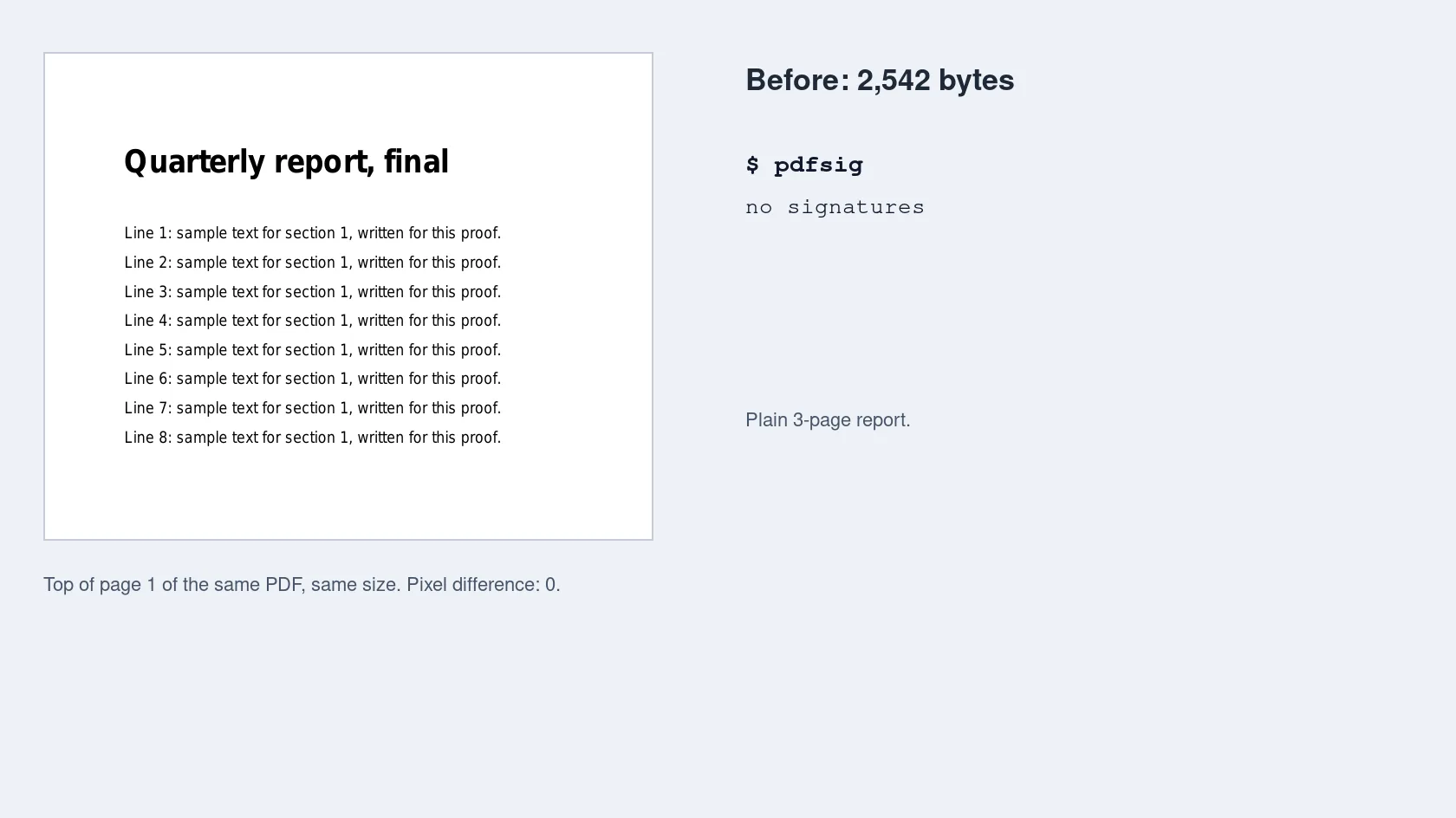
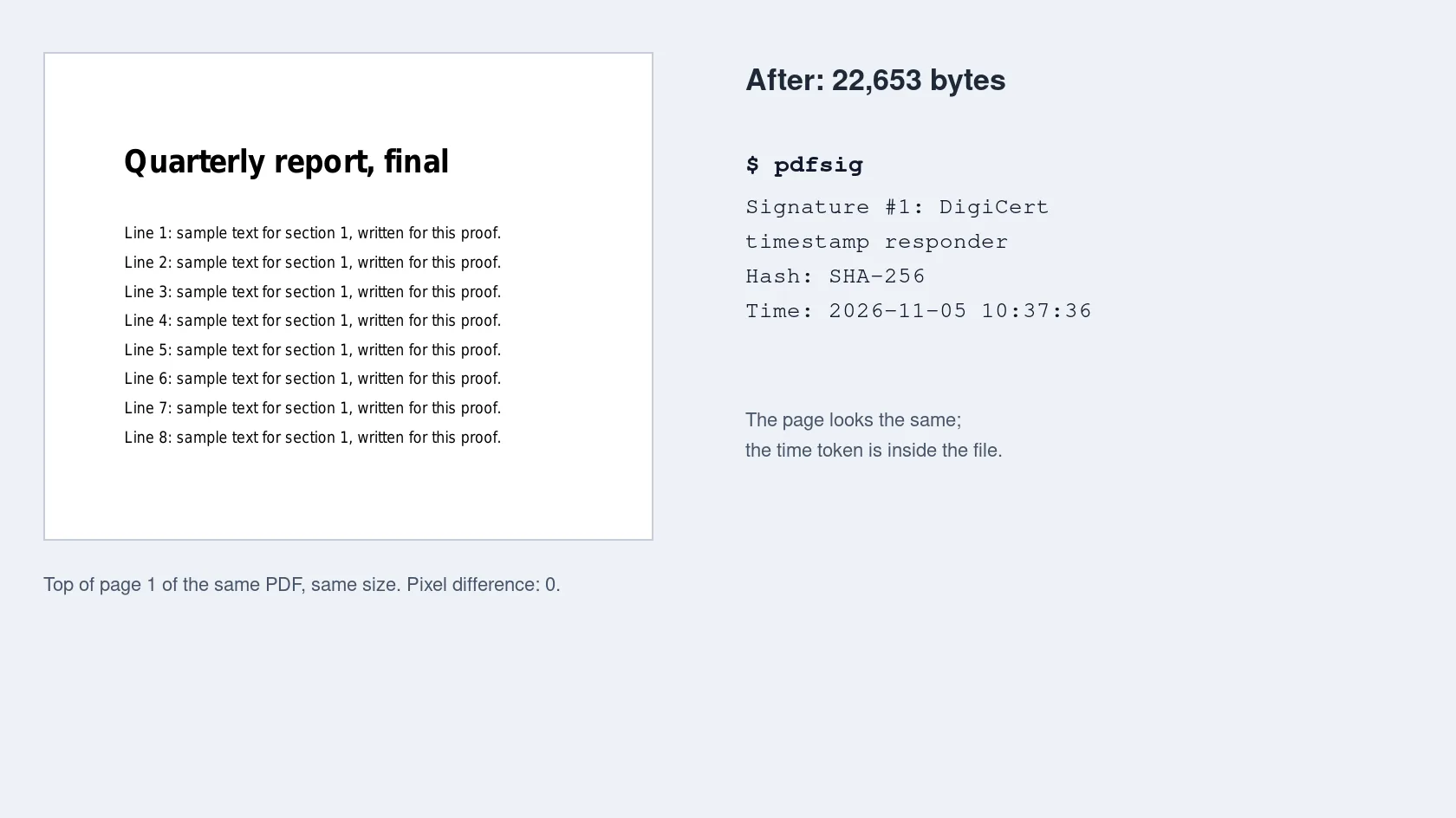
A 3-page text-only report we wrote for this test (2,542 bytes), timestamped on indox.org
The Timestamp panel has no settings. Open your PDF and press Add timestamp.
Only the file's SHA-256 hash goes to the timestamp authority. It returns a signed time token, which indox stores in the PDF as its own document timestamp.
In our test the text of all 3 pages was identical and page 1 rendered with a pixel difference of 0.
If the file already carries a digital signature, the panel says the signature will no longer be valid and asks you to keep the signed original. Add timestamp stays off until you tick Add it anyway.
Drop the file on the upload area or click to choose it. It opens in the indox editor with the Timestamp panel. Use a file that has no signatures.
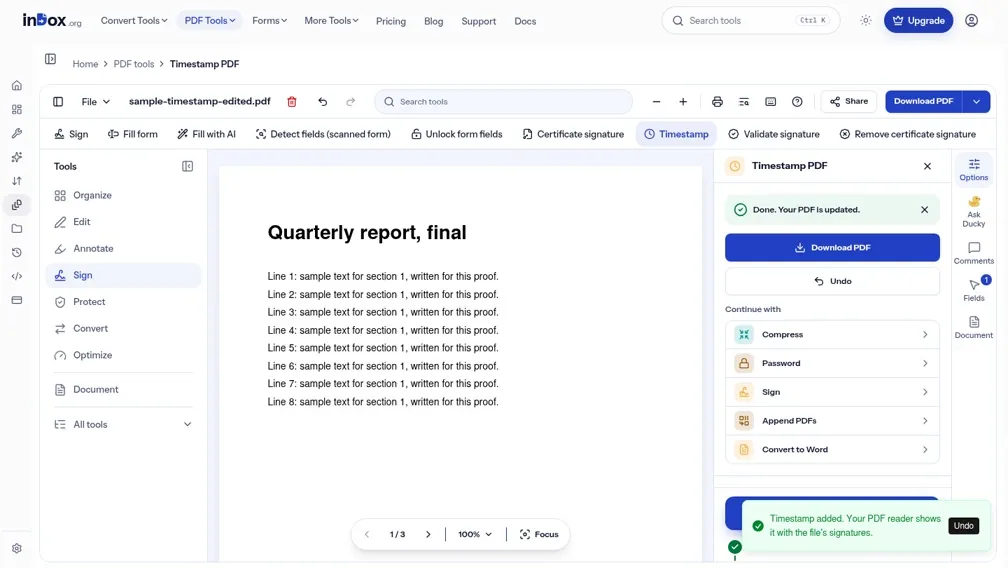
The panel has no settings. In our test the done message appeared about 7 seconds after the click, for a 3-page file of 2,542 bytes. On a signed file, read the warning first.
Open the reader's signature panel to see the timestamp. A reader that does not know the authority's root certificate can show it as not trusted. Press Undo if you want the file without it.
Timestamping needs no account with a timestamp authority and no signing software. indox makes the RFC 3161 request and stores the answer in the PDF for you. Only the file's SHA-256 hash goes to the authority. indox sets the authority, so every request goes to the same place. In our test it was DigiCert. The timestamp sits in the file as its own signature field. If you also need to show who signed, use the Certificate signature tool, which can add a timestamp in the same run. It is free, and signed out a run counts against a daily free allowance. Your PDF travels to indox over HTTPS, and if you are not signed in it is deleted with the result 24 hours after the job, so save your download when it is ready.
| What you see | Why | What to do |
|---|---|---|
| The run fails with an error | The timestamp authority did not answer, or the request failed | Try again in a moment. The message reads Couldn't apply that to this file and does not name the authority. |
| The signature that was in my file now shows as invalid | The tool rewrites the file, so a signature made on the original bytes no longer matches. The panel warns about this before it runs | Use your signed original, not the timestamped copy. Do not timestamp a signed file. |
| Add timestamp stays off and a warning names a digital signature | The file is already signed, and a timestamp would make that signature invalid | Keep the signed original. Tick Add it anyway only if you accept losing the signature. |
| The copy has a different size and bytes from my original | The file is rewritten, not appended to | Keep your original. The pages and their text stay the same. |
| No timestamp is visible on the page | It is stored in a signature field and not printed on the pages | Open your PDF reader's signature panel. |
| The reader says the timestamp is not trusted | Trust depends on the authority's certificate and on the reader's settings | Check the reader's trusted certificates. This page controls neither. |
| The reader cannot check the timestamp years later | The file has no long-term validation data | Keep your original and ask your reader or validation tool for a long-term check. |
| The timestamp is invalid after a later edit | Changing the file after the timestamp can break it | Edit the original, then timestamp again as the last step. |
| The editor asks for a password first | The PDF is protected, and the editor needs the password to open it | Type the password. The copy may come back unprotected; protecting it again changes the file and can break the timestamp. |
| You also need to show who signed | A timestamp does not identify a signer | Use Certificate signature, which can add a timestamp in the same run. |
| Kind | What it shows | Use it when |
|---|---|---|
| Visible date text | Nothing that can be checked. Anyone can type a date. | You want readers to see a date. Use Watermark PDF. |
| Document timestamp (this tool) | The file existed in this form when the authority signed it (RFC 3161). It does not show who made it. | The final file has no signatures and you want a checkable time. |
| Signature timestamp inside a certificate signature | The signature existed at that time, vouched for by the authority. | You need to show who signed and when. Use Certificate signature. |
| Certificate signature without a timestamp | Who signed and that the content is unchanged. The signing time is the signer's own claim. | You need a signer and the time does not need an authority. |
You are about to send a contract, report or invoice that has no signatures. A timestamp lets the recipient check when the file existed in this form.
You archive PDFs and want a signed time stored in each file, not in a separate log. Keep your originals as well, because the timestamped copy is rewritten.
Do not run this tool on it. In our test the signature stopped validating. Keep the signed original, and use Certificate signature if you need a signature and a time together.
Facts checked on November 5, 2026
It is a signed reply from a timestamp authority that links a file's hash to a time. RFC 3161 is the standard that defines the request and the reply.
Add the PDF on this page and press Add timestamp. indox sends the file's SHA-256 hash to a timestamp authority and stores the signed time token in the PDF. There is nothing to configure, it is free, and the page works on a phone as well as a computer.
No. It shows that the file existed in this exact form at that time. To show who signed it, use the Certificate signature tool.
indox sets the authority and you cannot choose another. In our test on 5 November 2026 the token came from a DigiCert timestamp responder, and the setting may change.
Open the timestamped copy in a PDF reader with a signature panel. The timestamp is not printed on the pages.
Not without breaking that signature. In our test on 5 November 2026 the existing signature was reported invalid after the run. The panel warns you and runs only after you tick Add it anyway. Keep the signed original and do not use the timestamped copy in its place.
Do not run this tool on a signed file. If you need a signature and a time together, use the Certificate signature tool, which can add a timestamp as part of signing and has it on by default. If the file needs no signature, timestamp it last.
The run fails with Couldn't apply that to this file. Try other settings or another file. Try again in a moment; the message does not name the authority.
Your file is sent over HTTPS and timestamped on indox's server. If you are not signed in, it is deleted there with the result 24 hours after the job finishes. With an account it stays in your history instead, as Where it runs explains. The timestamped copy replaces it in the editor, and Undo brings back the version without the timestamp.
It is a document timestamp: its own signature field of type ETSI.RFC3161 that covers the whole file, with a SHA-256 hash. Open your reader's signature panel to see it. In our test we also verified it with openssl and pyHanko.
The file carries no long-term validation data. In our test the authority's certificate was valid until 4 November 2037, and the token carries its certificate chain, but no revocation information is stored. Keep your original file as well.