Pages and size at a glance
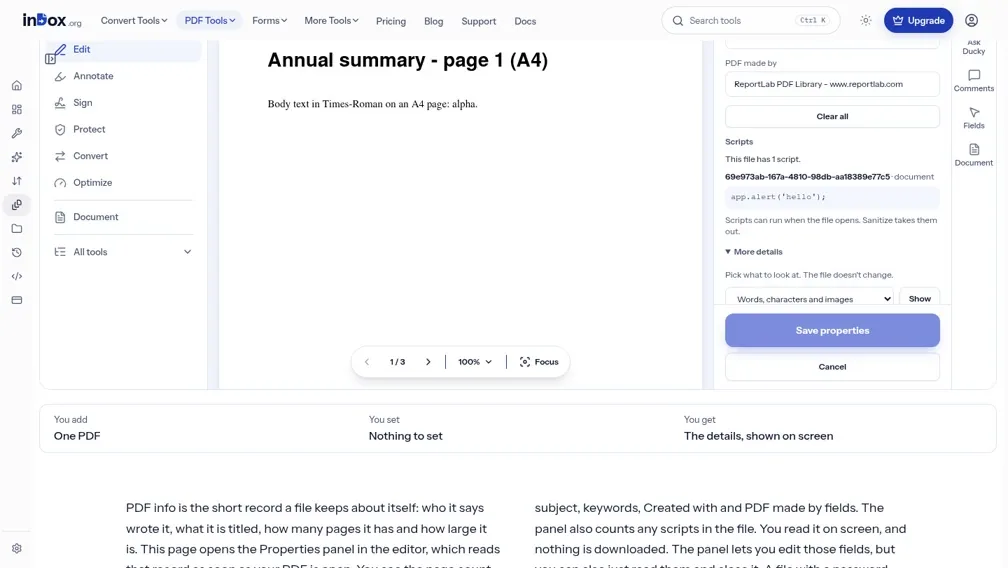
The panel starts with the page count and the file size, shown together, and the number of attached files.
or drop a file anywhere here
Files other than PDF are converted first. Signing in raises the size limit.
PDF info is the short record a file keeps about itself: what it is titled, who it says wrote it, how many pages it has and how large it is. This page is for anyone who wants to check a PDF before sharing it, find out which app made it, or count its pages without installing a desktop reader. It opens the Properties panel in the editor, which reads the file as soon as it is open. You see the page count and file size, the attachment count, the Title, Author, Subject, Keywords, Created with and PDF made by fields, and a Show the scripts button. The panel also lets you edit those fields, but you can just read them and close it. In our test of a 3-page sample, the page count, PDF version, page sizes, attachment and script matched Poppler's pdfinfo, while the creation and modification dates were not shown. A file with a password has to be unlocked first.
Our own 3-page test PDF (4000 bytes), read on indox.org
The panel starts with the page count and the file size, shown together, and the number of attached files.
Title, Author, Subject and Keywords show what the file stores. A field the file does not have shows empty.
Created with names the app that made the original document. PDF made by names the app that wrote the PDF. Both are shown with the other fields.
Press Show the scripts and the panel says whether the file has any, how many, and lists the code of each one on screen.
Pick page sizes, fonts, form fields, annotations or security, then press Show. The basic-info aspect, labelled Words, characters and images, also gives the PDF version. See the limits for what each one returned in our test.
Add the PDF in the upload area. The Properties panel reads it and fills in the pages, size and fields.
Check the page count and size, then the six fields. In our test they appeared 3.7 seconds after the upload. Open More details, pick an aspect and press Show if you want a closer look at one.
Close it when you have what you need. To change a field, edit it and press Save properties.
Most tools make you save a report to read it. Here the information is on screen as soon as the file is open, in labelled fields instead of a block of raw text. It is the same panel you use to edit the details, so a typo you spot can be fixed on the spot. It has gaps, though. In our test on 5 November 2026 it showed no dates and no XMP, and fonts came out as F1, F2 and F3.
| What you see | Why | What to do |
|---|---|---|
| The panel says the file has a password | Properties cannot be read from a locked file. A Password box and an Unlock button appeared in our test | Unlock the PDF first, then open the panel again. |
| A field is empty | The file stores no value for it | Nothing is wrong. You can type a value and press Save properties if you want one. |
| There is no creation date, or no XMP | The panel does not show dates or XMP, even when the file stores them | Use another PDF reader's document properties to see them. |
| Fonts read F1, F2, F3 | The fonts aspect lists resource names from the file, not font names | Treat them as placeholders. Look at a PDF reader's document properties for the real font names. |
| A page size shows no paper name | The size is not within a point of A3, A4, A5, Letter, Legal or Tabloid | Read the size in points, 1/72 of an inch. See Analyze PDF for more on a file's layout. |
| An older build read 3.9 kB for a 4000-byte file | That build divided by 1024 but labeled the result kB. The current code divides by 1000 | If you still see the old value, read it as KiB, where 1 KiB is 1024 bytes. |
| I do not see word or character counts | The aspect labelled Words, characters and images returns only the page count, version and size | Count words in a PDF reader or another tool. |
Each detail lives in a different part of the file. The last two columns say what the indox panel showed in our test and which indox tool to use for the rest.
| Detail | Stored in | In the indox panel | Other tool |
|---|---|---|---|
| Title, Author, Subject, Keywords | The Info dictionary | Shown as editable fields | Edit PDF Metadata to change them |
| Created with, PDF made by (Creator, Producer) | The Info dictionary | Shown as editable fields | Edit PDF Metadata |
| Creation and modification dates | The Info dictionary | Not shown in our test, though the file held them | Another PDF reader's document properties |
| XMP metadata | A metadata stream in the file | Not shown in our test | Another PDF reader's document properties |
| PDF version | The file header | Shown under More details, in the Words, characters and images aspect | Not needed |
| Encryption | The Encrypt dictionary | Security aspect said not encrypted on our plain file; a locked file only asked for a password | Unlock PDF |
| Attached files | The embedded files of the document | A count in the panel | List Attachments |
| Scripts | JavaScript actions | A Show the scripts button that counts and lists them | Show JavaScript |
Look at the author and title before a PDF goes to a client, so a draft name or a colleague's name does not go with it.
Confirm the page count and size of an incoming file, and see whether it has attachments, without opening it in a heavy desktop app.
See whether the file carries scripts, and which app made it, before deciding what to do with it.
Facts checked on November 5, 2026
Add the PDF here. The Properties panel shows the page count, the file size, the number of attached files and six fields: Title, Author, Subject, Keywords, Created with and PDF made by. Show the scripts and More details give the rest.
No. The details are on screen. The file does not change.
It opens the same Properties panel. This page is for reading the details, and Edit PDF Metadata is for changing them.
Yes. Open More details, pick one aspect and press Show. Aspects include page sizes, fonts and security. In our test on 5 November 2026 each answer took about 3 seconds, fonts came back as F1, F2 and F3, and the Words, characters and images aspect gave only the page count, PDF version and file size. Security reported the unprotected sample as not encrypted. Page sizes are grouped by size, with a paper name such as A4 when one fits.
Properties cannot be read from a locked file. Unlock the PDF first. In our test a locked copy gave a Password box and an Unlock button, with no fields.
The file does not store a value for them. Many PDFs leave Subject and Keywords empty.
No. Our sample stored creation and modification dates and the panel still did not show them. Use another PDF reader's document properties for those.
It is sent to indox over HTTPS and read on the server, so it is not read only on your device. If you are not signed in, the upload is deleted 24 hours after the job finishes; with an account it stays in your history until you delete it.
No. The panel works without signing in, within a daily free allowance and a 200 MB cap per file. Signing in raises the cap to 200 MB.
Created with is the Creator entry, the app that made the original document, such as a word processor. PDF made by is the Producer entry, the app that wrote the PDF file. They are often different apps. In our sample both were filled and both matched pdfinfo.
If the file stores them: title, author, subject, keywords, the two app names, attachments and scripts. Dates and XMP are also stored in many files, but this panel does not show them, so check those in another PDF reader before you publish. To change a field, use Edit PDF Metadata.