One ZIP with the document's attachments
Download all attachments gives a single ZIP of the files attached to the document, named after your PDF with -attachments.zip at the end. In our test the files in the ZIP were byte-identical to the originals.
or drop a file anywhere here
Files other than PDF are converted first. Signing in raises the size limit.
Extracting attachments pulls out the files that were stored inside a PDF, such as the spreadsheet behind a report or the scans attached to a form, and saves them as normal files. It is for anyone who holds one PDF whose viewer shows no Attachments panel and who needs the files as ordinary files. This page opens the Attachments panel. It lists the attached files with a count, and Download all attachments gives you a ZIP containing them. The button appears when the PDF has at least one attachment. If there are none, the panel says This file has no attached files. Before you download, you can rename or delete any file from its own row. The ZIP is named after your PDF, with -attachments.zip at the end. Extracting copies the files out and leaves them inside the PDF. It covers files attached to the document, not paperclip notes placed on a page, and two attachments with the same name come out as one.
Our own one-page test PDF with three embedded files and one paperclip file on the page
Download all attachments gives a single ZIP of the files attached to the document, named after your PDF with -attachments.zip at the end. In our test the files in the ZIP were byte-identical to the originals.
The panel lists the attached files by name with a count, so you know roughly what is in the ZIP before you download it.
Rename or delete any file from its row, then download. A rename onto a name already in the file is refused.
If the PDF has no attachments, the panel says This file has no attached files, and no download button is shown.
Drop the PDF into the upload area at the top of the page, or click to choose it. It opens in the editor with the Attachments panel ready. In our test the panel showed the list about 13 seconds after we added the file.
Check the file names and the count. Rename or delete a row if you don't want the file in the ZIP. If you know the PDF carries more files than the count shows, read the limits below first.
Press Download all attachments. The ZIP is saved with your PDF's name followed by -attachments.zip. In our test it took 3.15 seconds from the click to the saved ZIP.
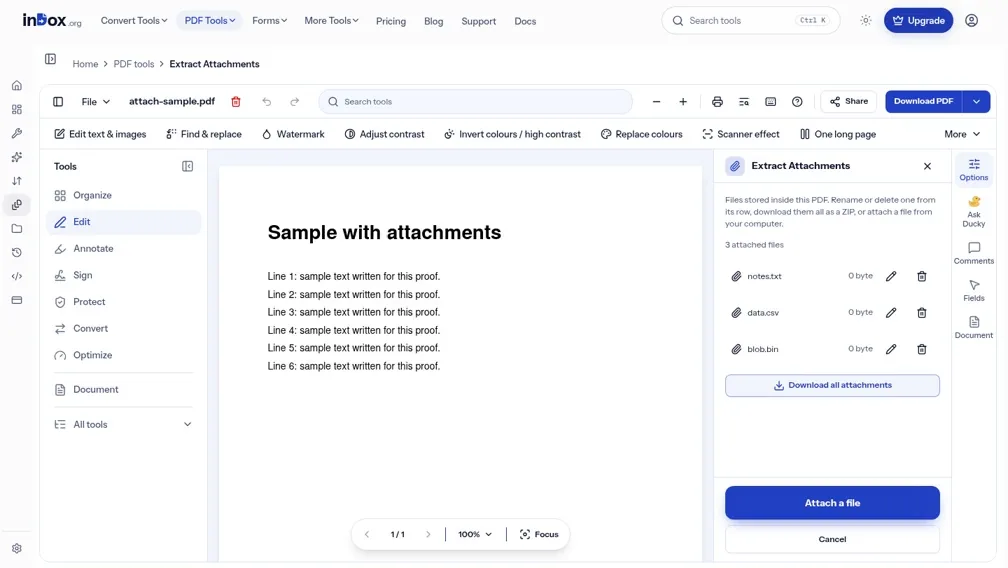
You see the files before you take them. The panel lists each one by name, so you can drop a file you don't want from the list first, then download everything in one go. There is no step where you type a name or pick an option, and if the PDF has no attachments the panel says so instead of producing an empty ZIP. In our test on 5 November 2026 the three files we extracted came out byte-identical to the originals, with names, a UTF-8 byte order mark and Persian text intact. The same panel can add or rename a file, so you can fix up the PDF in the same visit. It runs without an account, files move over HTTPS, and for a visitor who is not signed in the upload is deleted 24 hours after the job finishes.
| What you see | Why | What to do |
|---|---|---|
| There is no download button | The PDF has no document-level attached files | Check the count above the list. If it says This file has no attached files, there is nothing to extract here. A paperclip file on a page is not counted. |
| The ZIP has fewer files than my viewer lists | Two attachments share a name, or one is a page-level paperclip file | Compare names in your viewer. Save duplicates by number with pdfdetach -save, and get paperclip files with pdfdetach or a viewer that shows them. |
| The panel says it couldn't prepare the download | The ZIP could not be made | Press the button again. If it keeps failing, reload the PDF. |
| A file you deleted is missing from the ZIP | It was deleted from the list before the download | Press Undo to bring it back before you download. |
| The PDF will not open the list | A password-protected PDF is refused | Remove the password with Unlock PDF, then try again. |
| Kind | Where it is stored | Does this page return it | What to do |
|---|---|---|---|
| Document-level attachment | In the document's list of embedded files | Yes. In our test the files came out byte-identical | Use this page, then check the count against your viewer |
| Two attachments with one name | The same list, two entries | Only one. In our test the later copy was kept | Save by number with pdfdetach -save, or ask the sender to rename them |
| Page-level paperclip attachment | As a file attachment note on a page | No. In our test it was not counted and not in the ZIP | Use pdfdetach or a viewer that shows page attachments |
Open the PDF and pull out the spreadsheet or source files that came with it.
Take the attached evidence out of a PDF so it can be stored as normal files.
Delete the others from the list, download the ZIP, and unzip it for the one you want.
Some viewers have no Attachments panel. Open the PDF here to see its document-level files and save them as a ZIP.
Facts checked on November 5, 2026
Open the PDF here, check the list in the Attachments panel, and press Download all attachments. You get a ZIP of the files attached to the document.
The button appears only when the PDF has at least one attachment. If there are none, the panel says This file has no attached files. If the download fails, the panel says Couldn't prepare that download. Try again. Press the button again.
Not directly. Download all attachments gives all of them. Delete the ones you don't want from the list first, or take what you need from the ZIP. You can also rename a file from its row before you download; a name already in the file is refused.
No. Downloading copies them out. They stay inside the PDF unless you delete them from the list.
Press the delete button on the attachment's row, once per file, then choose Download PDF to save the copy without them. To strip every attached file in one go, along with any JavaScript, use Sanitize PDF.
The attached files, each under its name. The pages of the PDF are not included. In our test on 5 November 2026, three files of 185, 65 and 1,000 bytes came out with matching SHA-256 hashes, and the names were kept exactly.
Only one comes out. In our test the ZIP held the later copy and the earlier one was dropped without a warning. See the limits above for what to do.
A PDF Portfolio keeps its files as files embedded in the document, so they appear in this list and come out in the ZIP like any other attachment. Check the count against your viewer, since files with the same name come out as one.
A file can be attached to the document or placed on a page as a paperclip note. This page handles document-level attachments only. In our test the paperclip file was not counted and not in the ZIP.
They are not scanned. An attachment can be an executable, a script or an Office file with macros. Open only files from a sender you trust.
No. Listing and extracting work without signing in, within a daily free allowance and a 200 MB cap per file. Signing in raises the cap to 200 MB.
The list and the ZIP are made on indox's server. If you are not signed in, the uploaded PDF and the ZIP are deleted 24 hours after the job finishes; with an account they stay in your history until you delete them. The PDF on your device is not changed.