No file open

Tools

View the attachments in a PDF

or drop a file anywhere here

Dropbox
Google Drive
OneDrive
Box

Files other than PDF are converted first. Signing in raises the size limit.

You add
One PDF
You set
Nothing to set: the list opens by itself
You get
Names, sizes and a count of the document-level attached files

A PDF can carry other files inside it, such as a spreadsheet, an image or a contract draft, without showing them on the pages. Many viewers hide the attachments panel, so you can open a PDF and never know. This page is for anyone who received a PDF, or is about to send one, and wants a quick look at which files travel with it. It opens the Attachments panel, which lists the document-level attached files with their sizes and shows a count such as 3 attached files. If there are none it says This file has no attached files. It does not list every kind of attachment: files attached to a single page as a paperclip note are not shown, so an empty list is not proof that a PDF holds nothing. The list gives names and sizes; it does not open the files or tell you whether they are safe. From a row you can rename or delete a listed file, Download all attachments gives a ZIP, and Attach a file adds one from your computer. You can use it only to look and close it without changing anything.

A one-page PDF we built with 3 document-level and 2 page-level attached files, listed on indox.org

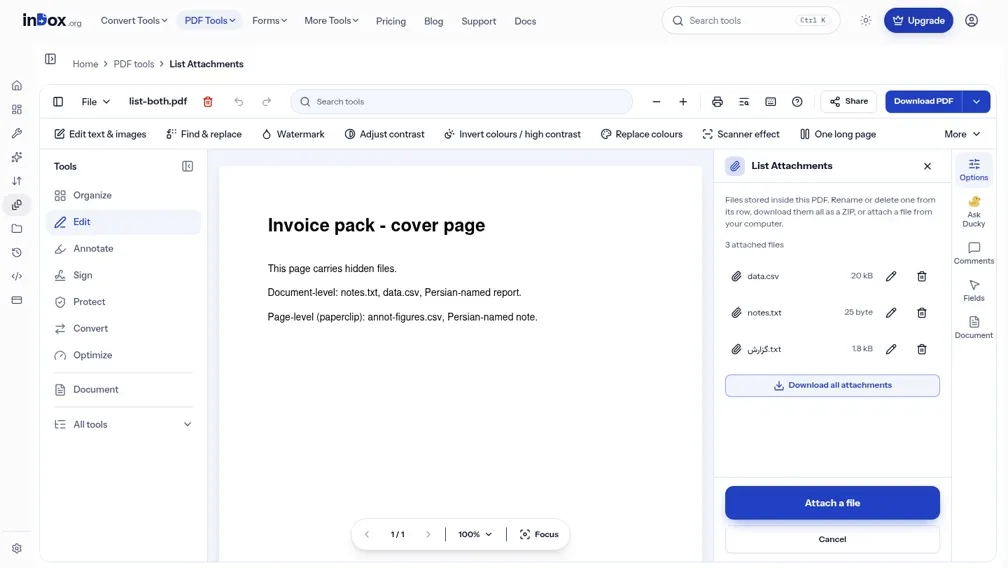
data.csvlisted, 20 kB shown for 20,480 bytes
20 kB
گزارش.txtlisted, Persian name intact, 1,830 bytes
1.8 kB
notes.txtlisted, 25 bytes
25 B
annot-figures.csvpage-level, not listed
700 B
یادداشت-پیوست.txtpage-level, not listed
350 B
Measured on indox.org on 5 November 2026: the sizes the list showed for the three files it found, and the two page-level files it did not list. pdfdetach found all five.

What can you do when you list PDF attachments?

Every document-level file, with its size

Each row shows the file name and its size. The count above the list says how many files it found. In our test on 5 November 2026 the sizes matched the real file sizes and a Persian file name came through intact.
A clear answer when there are none

If the PDF carries no document-level attachments, the panel says This file has no attached files, and no download button is shown. Read this together with the first limit below.

Rename or delete from a row

The rename and delete buttons sit on each row. A rename onto a name already in the file is refused.

Download them, or add one

Download all attachments gives a ZIP of the listed files. In our test the ZIP held the same three files with the same byte sizes as the originals. Attach a file adds one file from your computer; a name that is already attached is refused.

What listing attachments keeps and what you get

Stays the same

  • Every page and every attachment, if you only look.
  • The text, images and layout.
  • The file on your device.
  • Page-level attachments, which the list neither shows nor changes.

Changes

  • Nothing, if you only read the list.
  • If you rename, delete or attach, the PDF is updated and the editor says Attachments updated.
  • The list and the count refresh after every change.
  • The ZIP from Download all attachments holds the listed files only: 3 files and 8,599 bytes in our test.

Which tool for which job with attachments?

You want toUseBasis
See names and sizes of document-level attached filesList Attachments, this pageIn our test on 5 November 2026 it listed 3 of 3 document-level files with correct sizes
Get the files out as a ZIPExtract AttachmentsReturns the attached files as a ZIP. In our test it left out the page-level ones
Add a file to the PDFAdd AttachmentsAdds a file to the document-level list, the same list this page shows
Remove page-level attachmentsRemove annotationsA file attachment on a page is an annotation. Check the result afterwards
Read other facts about the PDFPDF Info or Show JavaScriptSeparate panels for document details and for scripts

How to list PDF attachments in 3 steps

  1. Add your PDF

    Drop the PDF into the upload area at the top of the page, or click to choose it. It opens in the editor with the Attachments panel ready.

  2. Read the list

    The panel shows the count and one row per document-level attached file, each with its size. A PDF with none says so; remember that page-level attachments are not counted.

  3. Act on it, or leave it alone

    Close the panel to leave the file as it is. Or rename, delete or attach from the rows, download the listed files with Download all attachments, and save a changed PDF with Download PDF.

Screenshot of the List Attachments panel showing 3 attached files with their sizes: data.csv 20 kB, notes.txt 25 bytes and a Persian-named file 1.8 kB

Why list PDF attachments with indox?

Checking a PDF for attached files is a single step here: add the file and the list is already open. In our test on 5 November 2026 the list appeared about 4 seconds after we chose the file, with a count, correct sizes and a Persian file name intact, and we ran it without an account and saw no limit message. The same panel can then rename, delete, add or download, and Undo brings the previous file back after a change. The list covers document-level attachments only, so it is a first look and not proof that a file is clean.

  • The list opens by itself
  • Names, sizes and a count
  • A plain message when there are none
  • Rename, delete and add in place
  • Undo after any change
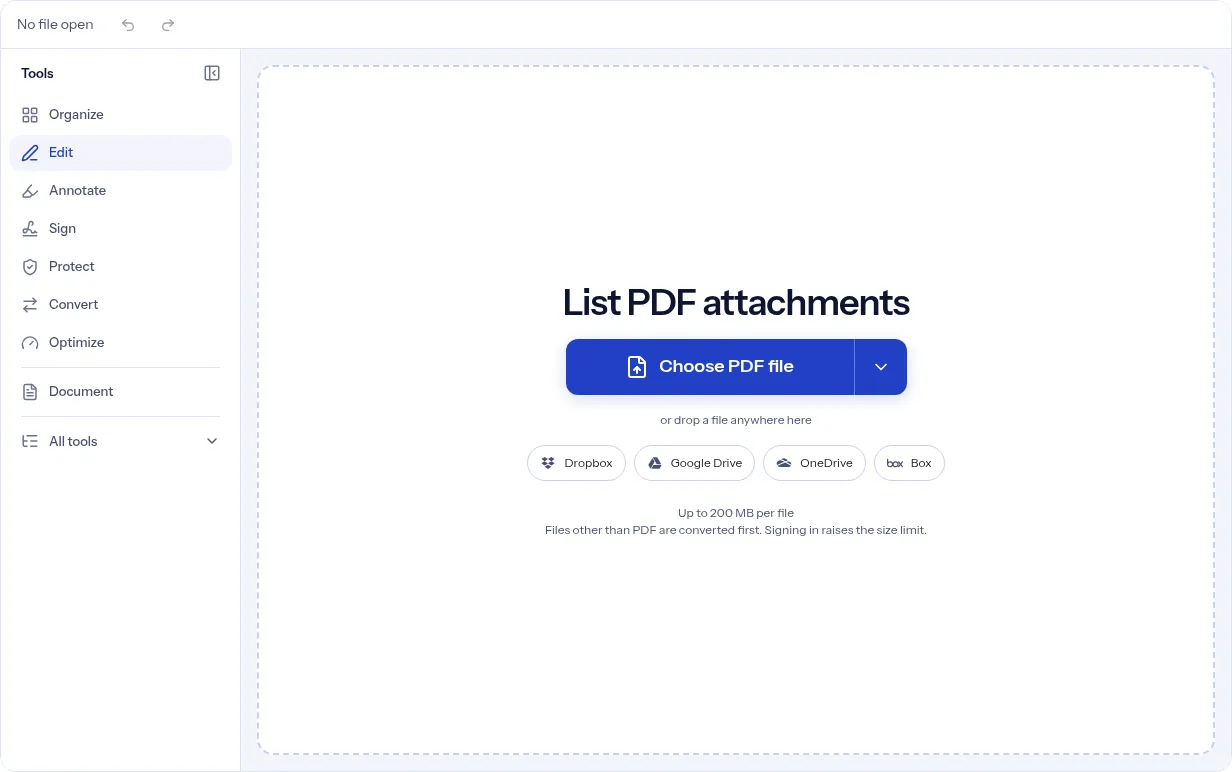
The indox List Attachments page: the PDF editor with the Attachments panel and the area where you add a PDF

What are the limits when you list PDF attachments?

Page-level attachments are not listed
In our test on 5 November 2026 we uploaded a PDF with 3 document-level attached files and 2 page-level ones (paperclip notes on a page). The panel said 3 attached files and the ZIP held the same 3, while the command-line tool pdfdetach listed all 5. Do not rely on this tool to find every hidden file. Instead, open the PDF in a viewer that shows page attachments, or remove them with Remove annotations, because file attachments on a page are annotations, and then check the result.
An empty list can be wrong
In our test on 5 November 2026 a PDF holding only 2 page-level attached files gave This file has no attached files, while pdfdetach listed both. That message means no document-level attachments; it does not mean nothing is hidden. Instead, check the file in a viewer that shows page attachments, or run Remove annotations and check the result.
File size
A visitor who is not signed in can open a PDF of up to 200 MB, within a daily free allowance. A signed-in account can upload up to 200 MB per file.
Where it runs
The list is read on indox's server, so the PDF is uploaded over HTTPS, and the copy on your device is not changed. If you are not signed in, the upload and the result are deleted 24 hours after the job finishes. A signed-in account keeps them in its history until you delete them, for at most 180 days, and you can choose 24 hours or 30 days instead. Either way indox keeps a record of the job, such as the file name and its status, not the file.

Limits worth knowing

  • The panel shows each file's name and size. It does not show the type, a description or dates.
  • The list is a view of the attachments. It does not download a report file; Download all attachments gives a ZIP of the listed files themselves, and in our test it left out the page-level ones.
  • Rename and delete work on the listed files only, so a page-level attachment cannot be removed from this panel.
  • Rename and delete are immediate edits to the PDF. Undo brings back the previous file until you download.
  • A rename onto a name already in the file is refused, and so is attaching a file with a name already used.
  • The panel works on one PDF at a time.

When the result is not what you expected

What you seeWhyWhat to do
The list is empty but you expected filesThe PDF has no document-level attached files, or its files are attached to pages. In our test a PDF with only two page-level files showed This file has no attached filesOpen the PDF in a viewer that shows page attachments, or run Remove annotations and check the result
The count is lower than the paperclips you can seePaperclip notes on a page are page-level attachments, which the list skipsCount them in your viewer and save or remove them there
The ZIP lacks a file you saw in a viewerDownload all attachments packs the listed files onlySave that file from the viewer that shows it
The panel says it couldn't update the attachmentsA rename, delete or attach failedTry again. If it keeps failing, reload the PDF.
You want the files themselvesThe list only shows names and sizesUse Download all attachments, or open Extract Attachments.
You expected a type or a date for each fileThe rows show the name and size onlyOpen the file after you download it to see more.

What do the free and paid plans add?

Free

  • All converters
  • Daily credit refresh
  • Email support

Basic

  • Access to all features
  • AI Extract
  • Priority conversions
  • Email support
Highest priority

Premium

  • Everything in Basic
  • Highest priority queue
  • Priority support

Pay-As-You-Go

  • No subscription
  • Credits never expire
  • Opt-in auto-refill
  • Access to all features
See prices

Document-level or page-level: where is the attached file?

Compared onDocument-level attachmentPage-level attachment
Where it is storedIn the document's EmbeddedFiles name treeIn a file attachment annotation placed on one page, usually drawn as a paperclip or similar icon
Listed by this toolYes, 3 of 3 in our testNo, 0 of 2 in our test
Listed by qpdf and pypdfYes, 3 of 3 in our testNo, 0 of 2 in our test
Listed by pdfdetach (poppler)Yes, 3 of 3 in our testYes, 2 of 2 in our test
Included in Download all attachmentsYes, all 3 in our testNo, 0 of 2 in our test

Who lists PDF attachments?

  • People checking a file before sharing

    A PDF may carry a spreadsheet or a draft you forgot. Look at the list before you send it on, and check a viewer that shows page attachments too.

  • People receiving a file

    Check whether a document came with supporting files before you assume it is all there is.

  • People tidying a document

    Find a listed attachment that should not be there, delete it, then download the cleaned PDF. Page-level attachments need another route, described in the limits.

When to list attachments, and when to pick another tool

  • You want a first look at whether a PDF has anything attached before you send it.
  • A document seems to come with files but the viewer hides them.
  • You need the size of an attached file.
  • You want to count the document-level attachments in a pack.
  • You want to delete an attachment you spot.

Where can I read more?

Sources

Facts checked on November 5, 2026

Do it all with indox

List Attachments FAQs

How do I view the attachments in a PDF?

Open the PDF here. The Attachments panel opens with every document-level attached file listed, each with its size, and a count above.

What if the PDF has no attachments?

The panel says This file has no attached files. That means no document-level attachments: in our test on 5 November 2026 a PDF with only page-level attachments got the same message.

Are paperclip attachments on a page listed too?

No. In our test a PDF with 3 document-level and 2 page-level attached files showed 3 attached files. To see page-level ones, use a viewer that shows page attachments, or remove them with Remove annotations and check the result.

Why does my viewer show no attachments?

Viewers differ in what they show, and many have no attachments panel or hide it. Here the list opens by itself once the PDF is added.

What does the list show for each file?

The file name and its size.

Does listing change my file?

No. Opening the panel only reads the list. A change happens only if you rename, delete or attach a file.

Can I save the attachments?

Yes. Download all attachments gives a ZIP of the listed files. To work with the files themselves, you can also open Extract Attachments.

Can I rename, delete or add one?

Yes, from its row. A rename onto a name already in the file is refused. Attach a file adds one from your computer, and Undo brings the previous file back until you download.

Can the same file name appear twice?

A PDF can hold two attachments with one name; the pypdf documentation says a name might not be unique. In a test on the Extract Attachments page on 5 November 2026, a PDF with two files both named same.txt showed as 1 attached file. The panel refuses to attach a name already in the file, so it never creates a duplicate itself.

Do I need an account to view PDF attachments?

No. The list opens without signing in, within a daily free allowance and a 200 MB cap per file. Signing in raises the cap to 200 MB.

Does it tell me if an attachment is safe?

No. The list shows names and sizes only. It does not open the files or say whether they are safe, so treat files from an unknown sender with care.

Where is my PDF processed, and how long is it kept?

The list is read on indox's server. If you are not signed in, the uploaded PDF is deleted 24 hours after the job finishes; with an account it stays in your history until you delete it. The file on your device is not changed unless you download a new copy.