No file open

Tools

Password protect a PDF

or drop a file anywhere here

Dropbox
Google Drive
OneDrive
Box

Files other than PDF are converted first. Signing in raises the size limit.

You add
One PDF
You set
A password to open, typed twice, and optional limits with a permissions password
You get
A PDF encrypted with AES-256

Protect PDF puts a password on a PDF. Add your file, type a Password to open, and type it again in Confirm password. A line under the first box reads Weak, Fair or Strong password. It is a hint only and never blocks you. The panel states that anyone who opens the PDF will need the password and that the file is encrypted with AES-256. To also limit printing, copying or editing, switch on Also limit what people can do. That adds a Permissions password and six checkboxes, which Change PDF permissions covers in detail. Some PDF readers ignore those limits, so the password to open is what keeps the file private. It suits a file you send to a known person: a statement, a form, a draft. It does not make a weak password strong, and it cannot stop someone you gave the password to from copying what they can read. In our test of a three-page PDF, the copy was ready about four seconds after we pressed Protect PDF.

Our own 3-page A4 invoice-style PDF, English text, 3,215 bytes, not encrypted before

Original PDF3 pages, not encrypted
3,215 bytes
Protected, password to openabout 4.1 s from click to Done; AES-256, version 5 revision 6
4,058 bytes+843 bytes
Protected, limits onlyabout 4.1 s; Print and Copy off, no password to open
4,058 bytes+843 bytes
Measured on indox.org on 5 November 2026: protecting our sample without signing in. Opened with the password, page 1 was pixel-identical to the original, so there is no before/after slider.

What can you do when you protect a PDF?

Require a password to open the file

Type the password in Password to open and again in Confirm password. If the two differ, the panel says the passwords do not match and Protect PDF stays off. A file with this password asks for it every time someone opens it.
AES-256, with no other level

The panel says the file is encrypted with AES-256. There is no setting to choose a weaker or different method. In our test we read the encryption dictionary of the downloaded copy with qpdf: version 5, revision 6, key length 256, AES for streams, strings and the file.

Limit what people can do

Switch on Also limit what people can do and type a Permissions password. It must differ from the one to open, and you need it to lift the limits later. What each limit does, and what readers ignore, is explained on Change PDF permissions.

Limits without a password to open

With limits on, Password to open is optional. Leave it empty and anyone can open the file, and only the Permissions password lifts the limits. Change PDF permissions is the page for that setup.

What protecting keeps and what it changes

Stays the same

  • Page content and page order.
  • The file on your device. You get a new, encrypted copy in the editor.
  • The page count and the text: in our test the 3 pages and the extracted text matched the original once the copy was opened with its password.

Changes

  • The copy is encrypted with AES-256.
  • With a password to open, readers ask for it before showing the file.
  • With limits on, the boxes you unticked are switched off and the rest stay allowed.
  • The limits are lifted only with the Permissions password, if the reader honors them.
  • File size: a 3,215-byte PDF became 4,058 bytes in our test.
  • Extraction for accessibility can stay allowed even with Copy unticked, as it did in our test.

Which passwords to fill in

You wantFill inWhat the copy does
A file only people with a password can openPassword to open and Confirm passwordReaders ask for the password before showing the file. Every permission stays allowed. The same password also acts as the owner password, so nothing is restricted.
The same, with some actions switched offAlso limit what people can do, a Permissions password and your unticked boxes, plus the password to openReaders ask for the password to open. The actions you unticked are switched off for readers that honor limits.
A file anyone can open, with printing or copying switched offAlso limit what people can do and a Permissions password, with Password to open left emptyAnyone can open and read the file. Readers that honor limits refuse the actions you unticked.

How to protect a PDF in 3 steps

  1. Add your PDF

    Drop one PDF on the upload area at the top of the page, or click to choose it.

  2. Set the password, and limits if you want them

    Type Password to open and repeat it in Confirm password. For limits, switch on Also limit what people can do, type a Permissions password that differs from the first, and untick what you want to block.

  3. Press Protect PDF and download

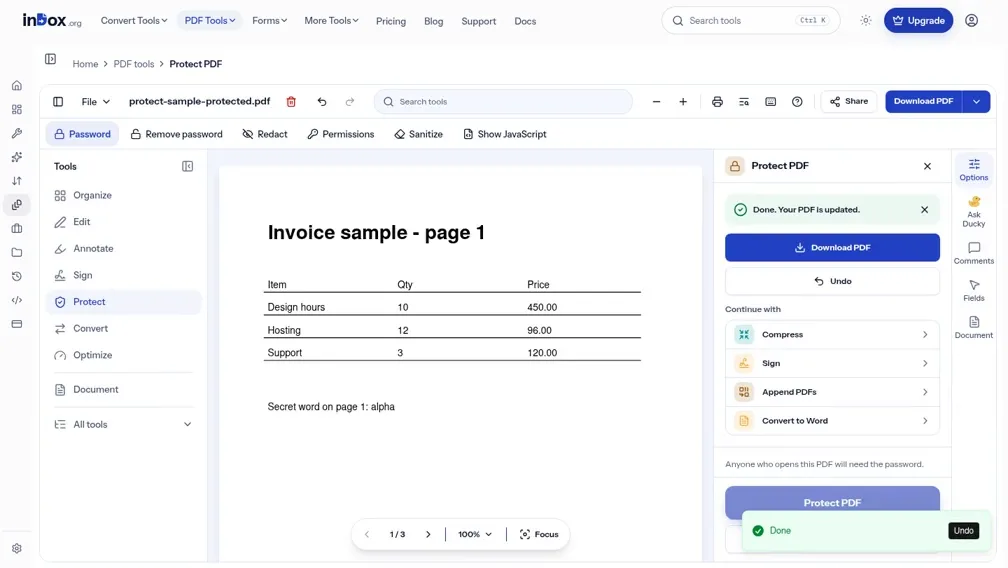
    The button fills with the job's progress and the steps show under it. When it says Done, the editor holds the protected copy: press Download PDF, or Undo to go back. Open the copy once and type the password to check it works. In our test the button went from the click to Done in about 4 seconds.

Screenshot of Protect PDF after a run on an invoice sample, with Done, Download PDF and the note that anyone opening it will need the password

Why protect a PDF with indox?

The panel shows only what the file will do. The password is typed twice, so a typo does not lock you out. The limits have their own switch, their own password and six named boxes, and the panel refuses a setup that limits nothing or reuses the open password as the permissions password. It also says plainly that some readers ignore limits and that the password to open is what keeps the file private. You can protect a file without signing in, within a daily free allowance.

  • Password typed twice, with a strength hint
  • AES-256 on every protected copy
  • Optional limits with a separate permissions password
  • Open password optional when limits are on
  • Undo brings back the unprotected file
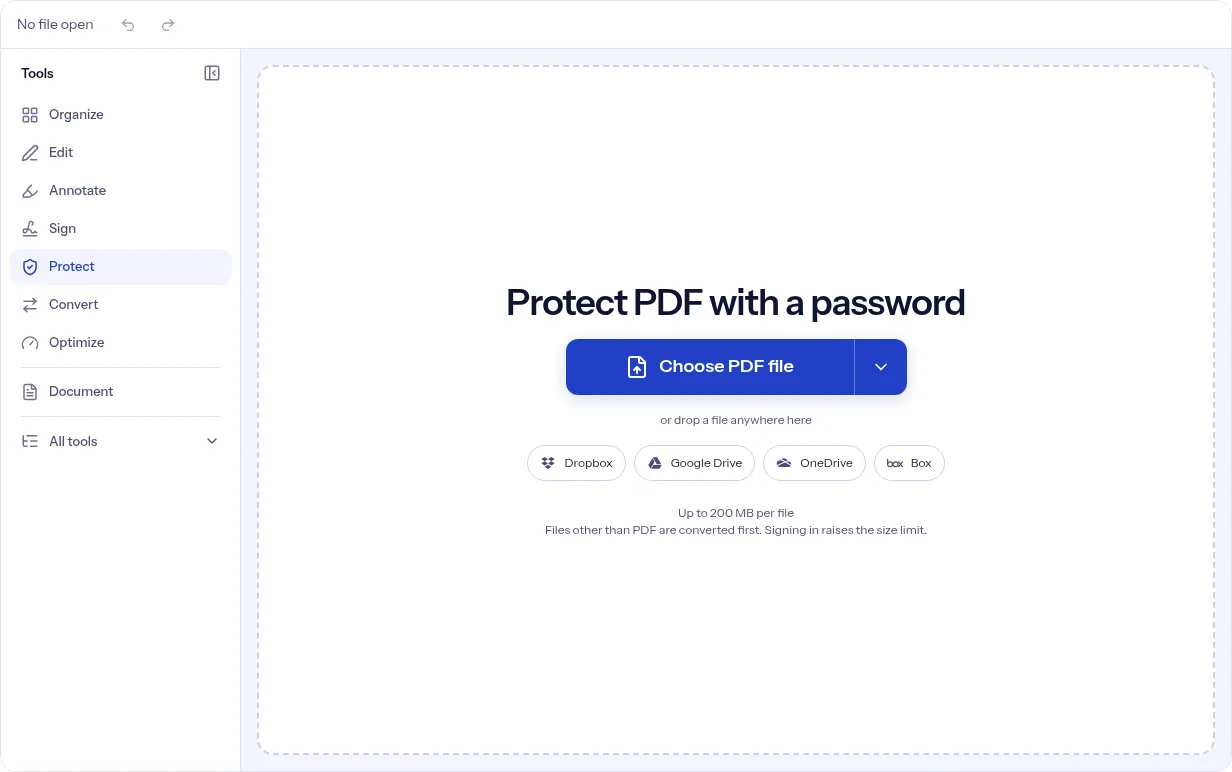
The indox Protect PDF with a password tool on indox.org, ready for your file

What are the limits when you protect a PDF?

File size
A visitor who is not signed in can protect a PDF of up to 200 MB, within a daily free allowance. A signed-in account can upload up to 200 MB per file.
Where it runs
Your PDF and the passwords you set are sent to indox's server, where the copy is encrypted with AES-256 and sent back to the editor. If you are not signed in, the upload and the protected copy are deleted 24 hours after the job finishes. A signed-in account keeps them in its history until you delete them, for at most 180 days, and you can choose 24 hours or 30 days instead. Either way indox keeps a record of the job, such as the file name and its status, not the file.

Limits worth knowing

  • indox has no way to recover a forgotten password. Store it safely, and keep your original until you have tested the copy.
  • Limits are requests that PDF readers honor. Some readers ignore them. Only the password to open keeps the content private.
  • In our test the extraction for accessibility permission stayed allowed even with Copy unticked, and the edit, comment, form and page flags stayed allowed because we left them ticked. Copy off is only a request to the reader.
  • With limits on and no password to open, anyone can open and read the file. The limits are the only thing standing between them and printing, copying or editing.
  • The Permissions password must differ from the Password to open, and at least one thing must be switched off.
  • The strength hint reads length and character mix only: 12 or more characters with at least three kinds (lower case, capitals, digits, symbols) reads Strong, 8 or more with two kinds reads Fair. A password marked Weak is still accepted.
  • Protect last. Compress, watermark or number the pages first, then protect the final copy.
  • A password to open alone gives the same password owner rights. If you want printing or copying switched off, you must switch on the limits.
  • In our test the editor's preview still showed the unprotected original after Done. The downloaded file was the protected copy and asked for the password.

When the protected copy is not what you expected

What you seeWhyWhat to do
Protect PDF stays offThe two passwords differ, or with limits on there is no Permissions password, or nothing is untickedA line under the boxes names a mismatch, a reused password or nothing switched off. If no line shows, type a Permissions password.
The panel says to use a different passwordThe Permissions password is the same as the Password to openChoose a different Permissions password.
Printing or copying still works in some programsSome readers ignore limitsRely on the password to open for real protection.
A reader asks for a password I did not mean to setYou typed one in Password to openTo limit actions on a file anyone can open, leave that box empty and use the limits. See Change permissions.
A later step on the protected copy asks for a passwordThe copy needs its password before a program can read its pagesProtect the file as the last step.
The preview after Done looks unprotectedIn our test the editor kept showing the original in its previewPress Download PDF and open the downloaded file. It should ask for the password.
An upload form says my PDF is password protected, but it opens freelyA copy with only a Permissions password opens without a prompt but is still encrypted, and some upload forms reject any encrypted fileUse Unlock PDF on a copy, or set no limits for files that go to such forms.

What do the free and paid plans add?

Free

  • All converters
  • Daily credit refresh
  • Email support

Basic

  • Access to all features
  • AI Extract
  • Priority conversions
  • Email support
Highest priority

Premium

  • Everything in Basic
  • Highest priority queue
  • Priority support

Pay-As-You-Go

  • No subscription
  • Credits never expire
  • Opt-in auto-refill
  • Access to all features
See prices

Protect PDF, Change permissions or Unlock PDF: which one?

JobWhat it stopsWhat it does not stop
Protect PDF with a password to openA reader cannot open the file without the passwordSomeone who has the password can do everything. In our test all permissions stayed allowed.
Protect PDF with limits and no password to openReaders that honor the flags refuse the actions you untickedAnyone can open and read the file. Per the qpdf manual, the reading software enforces restrictions; the encryption does not.
Change permissionsThe same limits panel, opened with limits already onThe same gaps as above: it limits actions and leaves the content readable.
Unlock PDFRemoves the password from a copy, when you know itIt does not add protection. Use it before you protect again with a new password.

Who protects PDFs?

  • Freelancers and bookkeepers

    You email invoices, tax forms and statements that carry account numbers. A password to open keeps the attachment unreadable if the message lands in the wrong inbox.

  • HR and operations staff

    You send offer letters and payroll summaries to one person at a time. Protect each file and share its password through another channel, such as a phone call.

  • Authors and consultants sharing drafts

    You want a client to read a report on screen. Set a Permissions password and untick Print and Copy text and images, knowing that a reader that ignores limits will still allow them.

When to protect a PDF

  • Before you email a bank statement, tax return or ID scan.
  • When a contract goes to a client and only the signer should open it.
  • When you store a PDF in a shared drive that other people can browse.
  • When reviewers should get a draft with printing and copying switched off.
  • After you finish compressing or watermarking a file and it is ready to send.

Where can I read more?

Do it all with indox

Protect PDF FAQs

What encryption does Protect PDF use?

AES-256. The panel states it, and there is no setting that changes it. In our test the downloaded copy read as version 5, revision 6, key length 256 in qpdf.

What is the difference between the password to open and the permissions password?

The password to open is needed to read the file. The permissions password is only asked for when someone wants to lift the limits you set, such as the ban on printing.

How do I password protect a PDF on a Mac or iPhone?

Open this page in your browser on the Mac, iPhone or Windows computer, add the PDF, type the password twice and press Protect PDF. Nothing has to be installed. The protected copy downloads like any other file; open it once to check that it asks for the password.

Can I limit printing or copying without a password to open?

Yes. Switch on Also limit what people can do, leave Password to open empty and set a Permissions password. Anyone can then open the file, and only that password lifts the limits. Change permissions opens the same panel with limits already on.

Do the limits always stop printing and copying?

No. The panel warns that some PDF readers ignore them. Treat them as requests. In our test with Print and Copy unticked, extraction for accessibility stayed allowed.

What happens if I forget the password?

indox has no way to recover it. Keep your original file or store the password in a password manager.

Does indox check how strong my password is?

It shows a hint once you type: Weak, Fair or Strong. Strong needs 12 or more characters mixing at least three of lower case, capitals, digits and symbols. The hint never blocks you.

Can I protect a PDF that is already signed?

Protecting writes a new encrypted copy, so a certificate signature may not survive. Check it in your PDF reader and keep the original signed file.

Do I need an account to protect a PDF?

No sign-in is needed to get a protected copy. Signed out, each file can be up to 200 MB and counts against a daily free allowance. Signed out, indox deletes the upload and the protected copy 24 hours after the job finishes.

Can I check that the file really is AES-256?

Yes. Run qpdf --show-encryption on the downloaded file. For our test copy it reported R = 6, key length 256 and AESv3 for streams, strings and the file. The qpdf manual explains each line.

Why does a form say my PDF is password protected when it opens freely?

A file with only a permissions password opens without a prompt but is still encrypted, and some upload forms reject encrypted files. Unlock a copy with Unlock PDF or protect it without limits.