Type straight onto the page
Text boxes, checkboxes, radio buttons and dropdowns appear where the form puts them. Tab steps through the fields, and a row in the Fields panel jumps to any one. Each answer is an undoable step.
or drop a file anywhere here
Files other than PDF are converted first. Signing in raises the size limit.
To fill a PDF form here, open it and type your answers into the boxes on the page. Text boxes, checkboxes, radio buttons and dropdowns all work, and Tab steps through them. Press Done, then Download PDF, and you have the filled file. You can fill a PDF without Adobe and without printing it, and you do not need an account. If the PDF is flat, like a scan with no fields in it, you can draw the fields yourself. indox does not file the form for you, so you send it on. In our test on indox.org, a six-field sample form was filled without signing in, and every answer was written into the downloaded file.
Our own one-page form with 6 fields (text, checkbox, radio, dropdown), made for this test
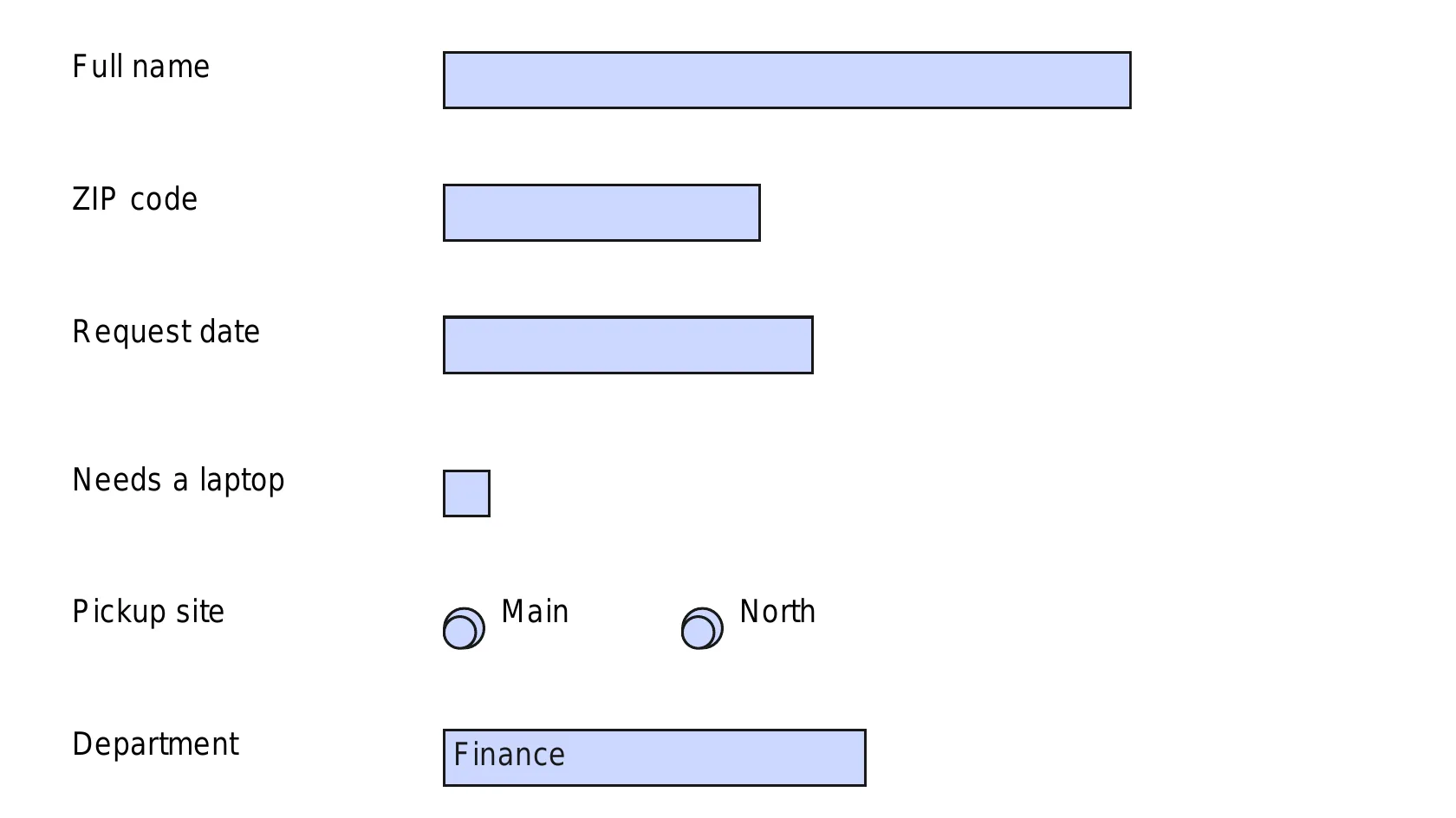
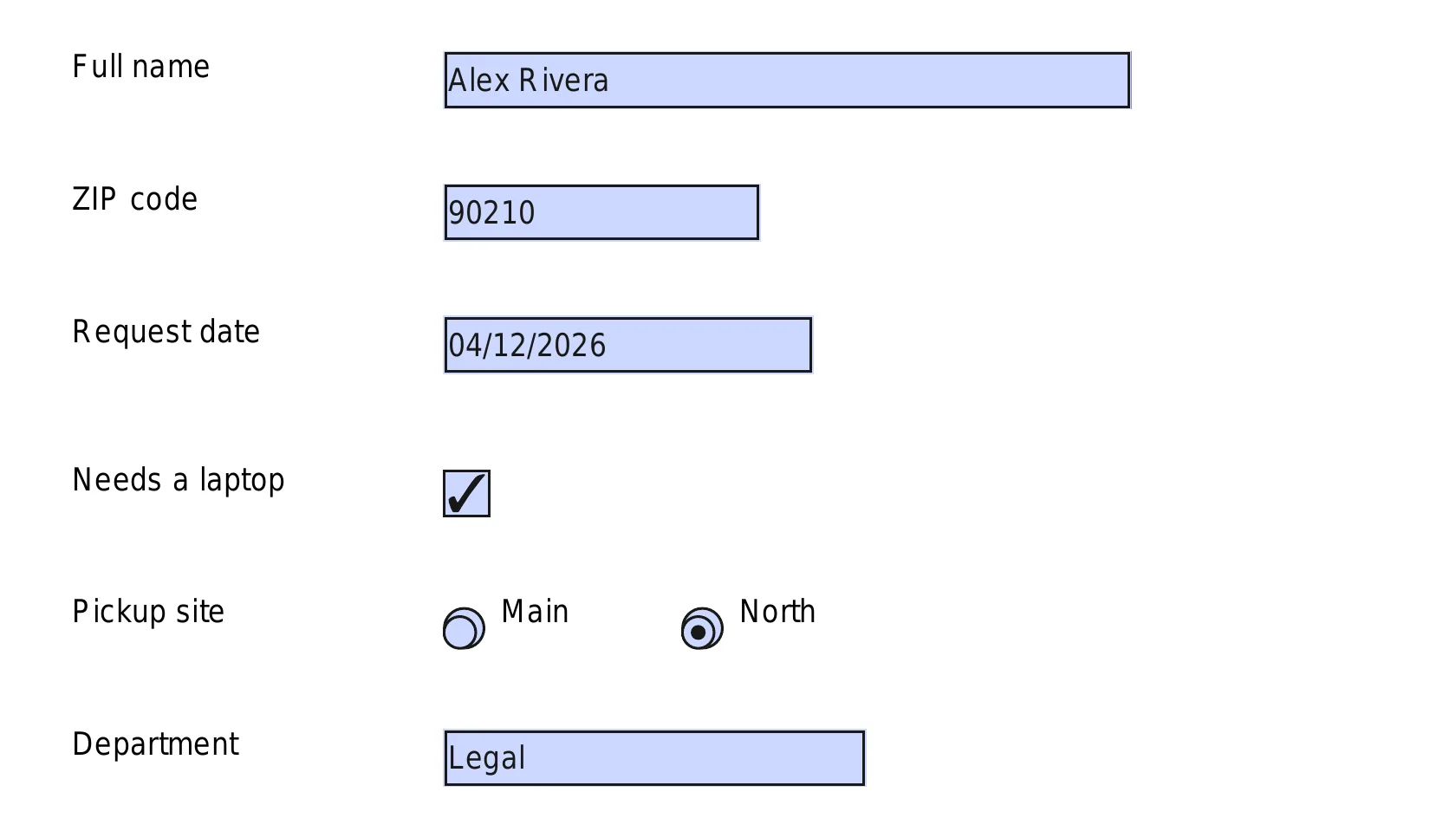
Text boxes, checkboxes, radio buttons and dropdowns appear where the form puts them. Tab steps through the fields, and a row in the Fields panel jumps to any one. Each answer is an undoable step.
Text fields whose label or name mentions ZIP, SSN, EIN or a date are checked when you leave them. ZIP needs 5 digits, SSN and EIN need 9, and a date looks like 04/12/2026. The panel counts how many fields are filled and how many are to check, and shows a Required badge on required ones.
A signature field shows a Sign here button on the page. It opens the signature box, so you can fill and sign a PDF in one pass. The Sign PDF page covers the ways to make a signature.
A PDF with no fields, such as a scan, can still be filled. Open Detect fields (scanned form) in the Sign list and press Find fields on page, then accept the boxes it finds or press Make all fillable to turn them into real form fields. Finding fields needs an account and uses no credits. Or choose Add fields and draw a box for each one: Text, Checkbox, Radio, Dropdown, Signature or Date. Edit many fields changes or removes several at once. In our test on 5 November 2026, adding a new text field and changing a field to Required both worked on a filled sample.
Suggest values reads the form and proposes an answer for each field, with a confidence score and a quote from the document. You accept or dismiss each one, or press Accept all. It needs an account and uses AI credits, and it asks for your consent first. AI never signs for you.
The page runs in your browser, so the steps are the same on an iPhone, an Android phone or a Mac. There is nothing to install. On a phone the layout narrows, and the field-building buttons are left out.
Put your PDF in the upload area by choosing a file, using From URL, pasting from the clipboard or scanning pages with your phone. It can be up to 200 MB when you are not signed in, or 200 MB with a signed-in account. It opens in the editor with the Fill tool ready, and its fields show as boxes on the page.
Click a box on the page or a row in the Fields panel. Type in text boxes, tick checkboxes, choose a radio button or pick from a dropdown. The panel shows progress, such as 3 of 12 filled.
A field that fails a check turns red with a message, for example ZIP needs 5 digits. Press Fix or Next to fix. Done stays off until every flagged field is corrected. In our test, typing 9021 in a ZIP field showed ZIP needs 5 digits in red and kept Done disabled.
Done opens a card with Download PDF, Print and Share a link. Download it, then open the file and read each answer before you send it on. In our test, a one-page form downloaded in about 6.9 seconds with Lock fields off and about 3.9 seconds with it on.
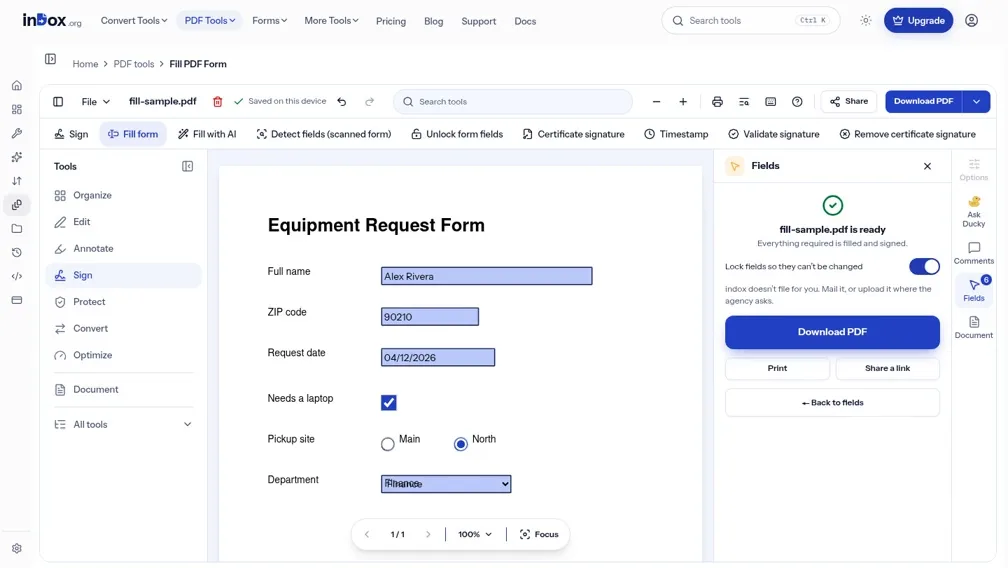
You fill the form where it sits on the page, so you see the real layout while you type. A flat PDF can still be filled, because you can draw its fields. ZIP, SSN, EIN and date entries that look wrong are flagged before you send the form, and you can lock the answers when you are done. Filling and downloading need no sign-up. We ran our own six-field sample through this page without signing in, and the measured sizes and a before and after are shown near the top.
| What you see | Why | What to do |
|---|---|---|
| The Fields panel says This file has no fillable fields. | The PDF is flat, like a scan, with no form fields in it. | Open Detect fields (scanned form) in the Sign list and press Find fields on page, then accept the boxes it finds or press Make all fillable to turn them into real form fields. Or choose Add fields and draw a box for each answer. |
| The page says it could not read this PDF's form fields. | indox could not read the fields, so they cannot be filled. You can still view the file. | Open the file again. If it keeps failing, try another copy of the form. |
| A field turns red with ZIP needs 5 digits, SSN needs 9 digits, EIN needs 9 digits or Use a date like 04/12/2026. | The field's label or name mentions ZIP, SSN, EIN or a date, and the entry does not match. | Correct the entry, or press Fix to jump to it. Done is greyed out until every flagged field is corrected. |
| A field is missing from the Fields panel. | Read-only fields are left out of the list and cannot be filled. | Run Unlock Forms on the file to make locked fields editable, then open it again. |
| Lock fields is switched off and cannot be turned on. | The form carries a digital signature, which already protects it. | A digitally signed form stays unlocked. |
| Suggest values says you are out of AI credits. | Each suggestion run uses AI credits and your balance is too low. | Keep working without AI. Everything else in the editor still works. |
| You want to lock answers on a file you filled earlier. | Lock fields is part of the done card for the file you are filling now. | Run Flatten PDF on the filled file. |
| Your answers look blank, or a radio button looks empty, in another viewer. | With Lock fields off, the file asks the viewer to redraw the fields, and viewers do that differently. | Fill again with Lock fields on, so the answers become page content, then check the file in the viewer your reader will use. |
| You locked the answers and now one must change. | A locked file has no form fields left, so the Fields panel has nothing to fill. | Go back to your unlocked copy, change the answer and download again with Lock fields on. |
| Compared on | Lock fields off | Lock fields on |
|---|---|---|
| Form fields in the file | Kept. In our test, 7 widgets for 6 fields | Removed. In our test, 0 widgets and no AcroForm |
| Where the answers live | As the values of the form fields | Written into the page as regular content, which is what flattening means in the pypdf docs |
| Edit an answer later | Yes, in a viewer that edits forms, or fill the file here again | Not as a form. Fill the unlocked copy again instead |
| Same look in every viewer | Not guaranteed. The file asks viewers to redraw the fields, and another viewer drew our radio button as an empty square | Likely, because the answers are page content. Poppler drew all six in our test |
| Suits | A form that someone will keep filling or a program will read as form data | A final copy you send or print |
A landlord, school, employer or agency sent a PDF form. Type your answers into it and send it back without printing.
The PDF will not take typing. Draw fields where the answers go, then fill them like any other form.
Nothing to install. Open the page, add the file and fill it in the browser.
Facts checked on November 5, 2026
Add your PDF and click a box on the page. Type in text boxes, tick checkboxes, pick radio buttons and dropdown options, then press Done and Download PDF. The tool runs in your browser, so you do not install Adobe or any other PDF editor, and the filled file needs no printer or scanner.
Yes. Filling and downloading are free and need no account; visitors who are not signed in have a daily free allowance. Share a link needs an account, and Suggest values needs an account and AI credits.
Yes. Open this page in your phone's browser, add the PDF and tap the fields. The same steps work on a Mac. On a phone, adding, bulk-editing and deleting fields are hidden, so use a larger screen for those.
The PDF is probably flat, like a scan, with no form fields in it, and the Fields panel says This file has no fillable fields. Open Detect fields (scanned form) in the Sign list and press Find fields on page, then accept the boxes it finds or press Make all fillable to turn them into real form fields. Or choose Add fields and draw a box for each answer. A field marked read-only is left out of the panel. Unlock Forms makes locked fields editable again.
Yes. A signature field shows a Sign here button that opens the signature box. The Sign PDF page covers drawing, typing or uploading a signature, and emailing a form to others to sign.
Suggest values reads the form and proposes an answer for each field, with a quote from the document. You review each one and accept or dismiss it. It asks for consent, needs an account and uses AI credits. AI never signs for you.
By default the filled fields stay editable: in our test the file kept all 7 widgets with the values set. Turn on Lock fields in the done card before you download and the answers are written into the page. In our test that file had no form fields left. A digitally signed form stays unlocked, because the signature already protects it. Flatten PDF does the same for a file you already filled.
With Lock fields off, the file asks the viewer to redraw the form fields, and viewers do that differently. In our test another viewer drew the radio button as an empty square, and some viewers offer to save changes when they open such a file. Turn on Lock fields to write the answers into the page, then check the file in the viewer your reader will use.
In our test on 5 November 2026 they did. A ticked checkbox, the North radio option and the Legal dropdown choice were all in the downloaded file, next to three typed text answers. That was one form, so read the downloaded file before you send it.
The PDF is sent to indox when you open it, so its fields can be read, and your answers are written into the file when you download it. Files are encrypted in transit and processed on indox's server. If you use Suggest values, the pages of the PDF are sent to indox AI. If you are not signed in, the upload and the filled result are deleted 24 hours after the job ends. A signed-in account keeps them in its history instead.