OPUS to MP3 Converter

You get an MP3 file that car stereos, phones, editors and default players open without extra software.

To convert Opus to MP3, add the .opus file, keep MP3 as the output and download the result. Opus is usually a chat voice note, and plenty of players cannot open it, while MP3 plays almost anywhere. Both formats are lossy, so the audio is compressed a second time. In our test a 10-second stereo file came out 19% smaller, a mono voice-style file came out 70% larger, and the title, artist and album tags were not kept.

Transfers use HTTPS, and files converted on the free tier are deleted after 24 hours, so the result is not a long-term archive. Quality depends on the source file, so open the MP3 file once before you share it.

FromOpusLossy

Opus (Opus Interactive Audio Codec)

A lossy audio codec standardised by the IETF in RFC 6716 (2012) that scales from 6 kbit/s speech to 510 kbit/s stereo music. Files are usually Opus streams in an Ogg container and carry the .opus extension, which is how chat apps such as WhatsApp save voice notes. Many older players, car stereos and Apple apps cannot open it without a converter.

ToMP3Lossy

MP3 (MPEG-1 Audio Layer III)

The oldest widely used lossy audio format. Its compression is less efficient than newer codecs, but virtually every car stereo, portable player, operating system and audio program can open an MP3.
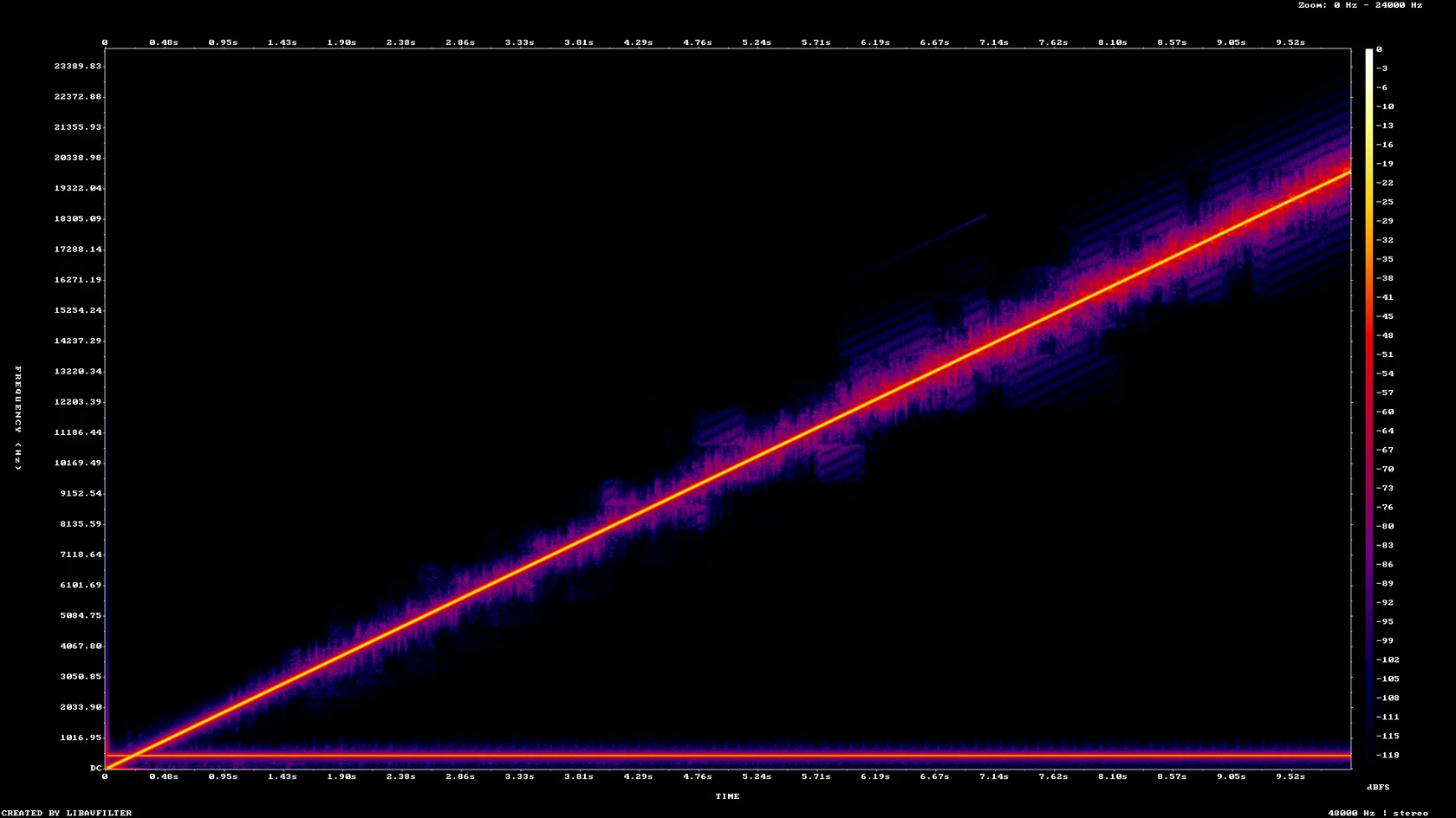
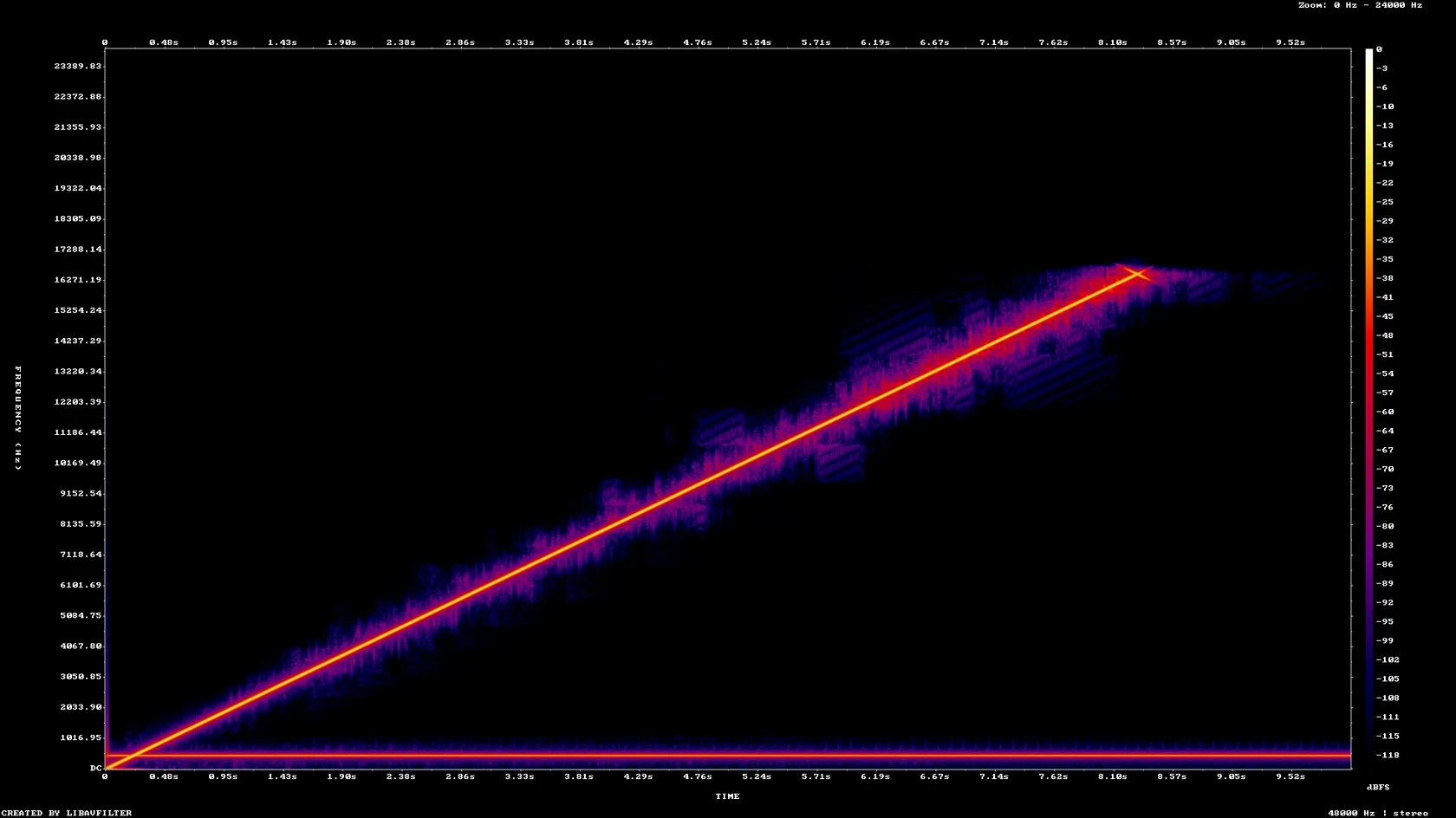
A 10-second stereo Opus test file (96 kbps, tags set) and a 6-second mono one, both made by us

Opus stereothe original, 48 kHz, tags title, artist and album
198,771 bytes
MP3 stereofrom indox, 128 kbps constant, 19% smaller, tags not kept
160,749 bytes
Opus monoa second test, 48 kHz mono, about 38 kbps
28,461 bytes
MP3 monofrom indox, 64 kbps constant, 70% larger
48,429 bytes
Spectrogram of the stereo Opus test file, frequency against time over 10 seconds
Spectrogram of the MP3 made by indox from the same file, on the same scale
Measured on indox.org on 5 November 2026: the Opus files we uploaded and the MP3 files we downloaded. Drag the handle to compare the spectrogram of the stereo Opus with the MP3.

Why use indox to convert OPUS to MP3?

The audio is decoded and written as MP3

Renaming voice.opus to voice.mp3 does not work, because the audio inside is still an Opus stream. The converter decodes it and encodes it again with the LAME MP3 encoder, so the new file is an MP3 inside as well as by name.

Sample rate and channels stay as they are

In our test a 48 kHz stereo Opus file became a 48 kHz stereo MP3, and a 48 kHz mono file stayed mono. Nothing was resampled or mixed down.

A constant bitrate you can predict

With no bitrate option set, our stereo file was written at 128 kbps constant and our mono file at 64 kbps constant. We did not see a bitrate setting on this page during the test.

Checked on two real runs

We converted a stereo sweep tone and a mono voice-style tone with ffprobe readings before and after, so every number on this page comes from a file we uploaded ourselves.

What happens to your audio

Stays

  • The length of the recording and what is said or played
  • Your original Opus file, which is not touched
  • The sample rate and the number of channels, in our test

Changes

  • The codec: Opus is decoded and encoded again as MP3
  • The bitrate: 128 kbps for stereo and 64 kbps for mono in our test
  • The title, artist and album tags, which were not kept
  • The very top of the frequency range, which is thinner
  • A few milliseconds of padding added at the end

How do I convert OPUS to MP3 online?

  1. 1

    Add your Opus file

    Drop the .opus file on the box or choose it from your device. Keep the original, because it is the copy that has been compressed only once.

  2. 2

    Confirm MP3, then start the conversion

    Check that MP3 is the output format and start the conversion. The page may label an .opus file as OGG, which is how it showed ours, and the result is still an MP3. In our test a 10-second file took 3.8 seconds from the click to Completed.

  3. 3

    Download the MP3 and play it

    Save the MP3 and play it on the device you care about. If you need the title or artist, add the tags again in a tag editor, since they are not carried over.

What do I get from indox's OPUS to MP3 converter?

Add an Opus file and get an MP3 back, with nothing to install. The page states what the conversion does to size, tags and high frequencies, using numbers from files we converted ourselves.

  • An MP3 that plays on car stereos, phones and in most editors
  • Nothing to install on Windows, Mac or a phone
  • Sizes, bitrates and tags measured on real runs
  • A plain statement of what is lost, including the tags
The indox Opus to MP3 converter page with the area where you drop or choose a file

What are the limits for OPUS to MP3?

Size

The upload box shows the live size limit before you add a file. Signing in raises it; a paid plan does not change it.

Formats

OPUS in, MP3 out. Pick another output on the converter if you need a different format.

Privacy

Files are encrypted in transit over HTTPS and processed on indox infrastructure.

Deletion

Free-tier files are kept for 24 hours after the job finishes, then deleted automatically.

Limits worth knowing

  • The conversion is lossy to lossy. The MP3 cannot sound better than the Opus file, and a little detail is lost with the second compression.
  • Title, artist and album tags were not kept in our test. If your files depend on tags, plan to retype them after converting.
  • We saw no bitrate option on this page, so the bitrate is chosen for you. In our test that was 128 kbps for stereo and 64 kbps for mono. A very low-bitrate voice note can come out larger than the original.
  • We tested two small files of a few seconds. We did not test Opus files with more than two channels, very long recordings or damaged files, so results there are unknown.

When the result is not what you expected

What you seeWhyWhat to do
The MP3 is bigger than the Opus fileA low-bitrate Opus file, such as a voice note, was written at a higher MP3 bitrateKeep the Opus file if size matters, or accept the larger MP3 for the compatibility
The title and artist are missingThe tags are not carried over by the converterAdd them again in a tag editor
The page calls the file OGGOpus audio is stored in an Ogg container, so the page may show OGG to MP3Carry on. The output is still an MP3
The file has an .ogg extensionSome apps save Opus voice messages as .oggUse OGG to MP3 for that extension
The conversion failsThe recording may be damaged or exported incompletelyRe-export or re-download the recording and try again

What do the free and paid plans add?

Free

  • All converters
  • Daily credit refresh
  • Email support

Basic

  • Access to all features
  • AI Extract
  • Priority conversions
  • Email support
Highest priority

Premium

  • Everything in Basic
  • Highest priority queue
  • Priority support

Pay-As-You-Go

  • No subscription
  • Credits never expire
  • Opt-in auto-refill
  • Access to all features
See prices

Opus vs MP3: what is the difference?

Compared onOpusMP3
StandardIETF RFC 6716, published in 2012A de facto file format, widely adopted for delivering audio to end users
Bitrate range6 to 510 kbit/sUsually fixed choices such as 128 kbps; our test files used 128 and 64 kbps
Typical useChat voice notes and streaming, usually in an Ogg fileMusic libraries, car stereos, portable players and editors
Where it playsNewer players; many older players, car stereos and Apple apps cannot open itVirtually every player, operating system and audio program
TagsStored in the Ogg fileID3 metadata before or after the audio
Converting between themCannot be copied into an MP3 fileNeeds a decode and a new encode from Opus

Who can use a OPUS to MP3 converter?

  • People who received a WhatsApp voice note

    WhatsApp saves voice notes as .opus files, and many default players and some Apple apps will not open them. An MP3 copy opens in a normal player, so you can keep the message or send it on.

  • People moving voice recordings to a car or an old player

    Car USB ports and older portable players are usually built around MP3. Converting an Opus recording gives them a file they can read.

  • Editors and transcribers who need a common format

    Some editing and transcription tools accept MP3 and refuse Opus. A converted copy gets the recording into the project without hunting for a codec.

When to use it

  • Keeping a WhatsApp voice note as a file that opens in any music or audio app.
  • Playing a saved voice message from a USB stick in a car stereo.
  • Sending a recording to someone whose phone or player does not open .opus.
  • Loading a voice recording into an editor or transcription tool that wants MP3.

Where can I read more about converting files?

Do it all with indox

View all 94 tools

OPUS to MP3 FAQs

How do I convert Opus to MP3?

Add the .opus file to the converter in your browser, keep MP3 as the output and download the result. Nothing is installed on your computer. In our test a 10-second file took 3.8 seconds from the click to Completed, though your file may take longer.

Will I lose quality?

A little, yes. Opus and MP3 are both lossy, so the sound is decoded and compressed again. On our sweep test tone the content above 16 kHz fell by 5 dB. For a spoken voice note the difference is usually small, but it is not zero, so keep the Opus file as your master copy.

How do I open or play an .opus file on an iPhone or in an older player?

Some Apple apps and many older players cannot open Opus. Converting to MP3 gives you a file they can play. On a computer, a player such as VLC opens Opus directly, so you may not need to convert at all.

Is Opus better than MP3?

For the same file size, Opus is the more modern codec and is standardised in RFC 6716. MP3 is older but opens almost everywhere. Choose Opus when the player supports it and MP3 when compatibility matters.

Why is the MP3 bigger or smaller than my Opus file?

It depends on the Opus bitrate. Our 159 kbps stereo file became a 128 kbps MP3 and shrank by 19%. Our 38 kbps mono voice-style file became a 64 kbps MP3 and grew by 70%. Low-bitrate voice notes usually grow, and high-bitrate music files shrink.

Can I convert WhatsApp and Telegram voice notes to MP3?

Yes. WhatsApp saves voice notes as .opus. A Telegram voice message saved with an .ogg extension may hold the same Opus audio, and the OGG to MP3 page handles that extension. Use whichever page matches the extension on your file.

Does the converter keep the title and artist tags?

No. In our test the Opus file had title, artist and album tags and the MP3 had none of them. Only an encoder tag remained. Add the tags again in a tag editor if you need them.

Can I just rename .opus to .mp3?

No. The extension is only a label, and the audio inside is still Opus. Many players refuse it or play nothing. The audio has to be decoded and encoded again as MP3.

Can I choose the MP3 bitrate?

We did not see a bitrate setting on this page during our test, so we cannot promise one. With nothing set, our stereo file was written at 128 kbps and our mono file at 64 kbps.

How do I convert Opus to MP3 with ffmpeg?

If ffmpeg is installed on your computer, a command such as ffmpeg -i voice.opus -c:a libmp3lame -b:a 192k voice.mp3 does the same kind of re-encode and lets you pick the bitrate. This page is the shorter route when you have one or two files and do not want to set up software.