WMA to MP3 Converter

You get an MP3 file that phones, Macs, car stereos and nearly every audio app play without a codec pack, with the title and artist tags we tested still attached.

To convert WMA to MP3, add the WMA file, keep MP3 as the output format and download the result. WMA cannot be copied into an MP3 file, so the sound is decoded and compressed again, which makes the MP3 play almost everywhere. In our test a 173,530-byte WMA at 128 kbps became a 160,800-byte MP3 at 128 kbps. Both formats are lossy, so the copy is a second generation, and a DRM-protected WMA may not convert at all.

Transfers use HTTPS, and files converted on the free tier are deleted after 24 hours, so the result is not a long-term archive. Quality depends on the source file, so open the MP3 file once before you share it.

FromWMALossy

WMA (Windows Media Audio)

Microsoft's proprietary audio codec family, normally stored in the ASF (Advanced Systems Format) container. Most .wma files use the lossy standard codec, but the family also has WMA Pro and a lossless variant, so the extension alone does not tell you how a file was compressed. Some older store-bought files also carry DRM protection and may not convert.

ToMP3Lossy

MP3 (MPEG-1 Audio Layer III)

The audio format that almost every phone, car stereo, portable player and audio program can open. It is lossy, which keeps files small, and a plain MP3 needs no special software on Windows, Mac, Android or iPhone.
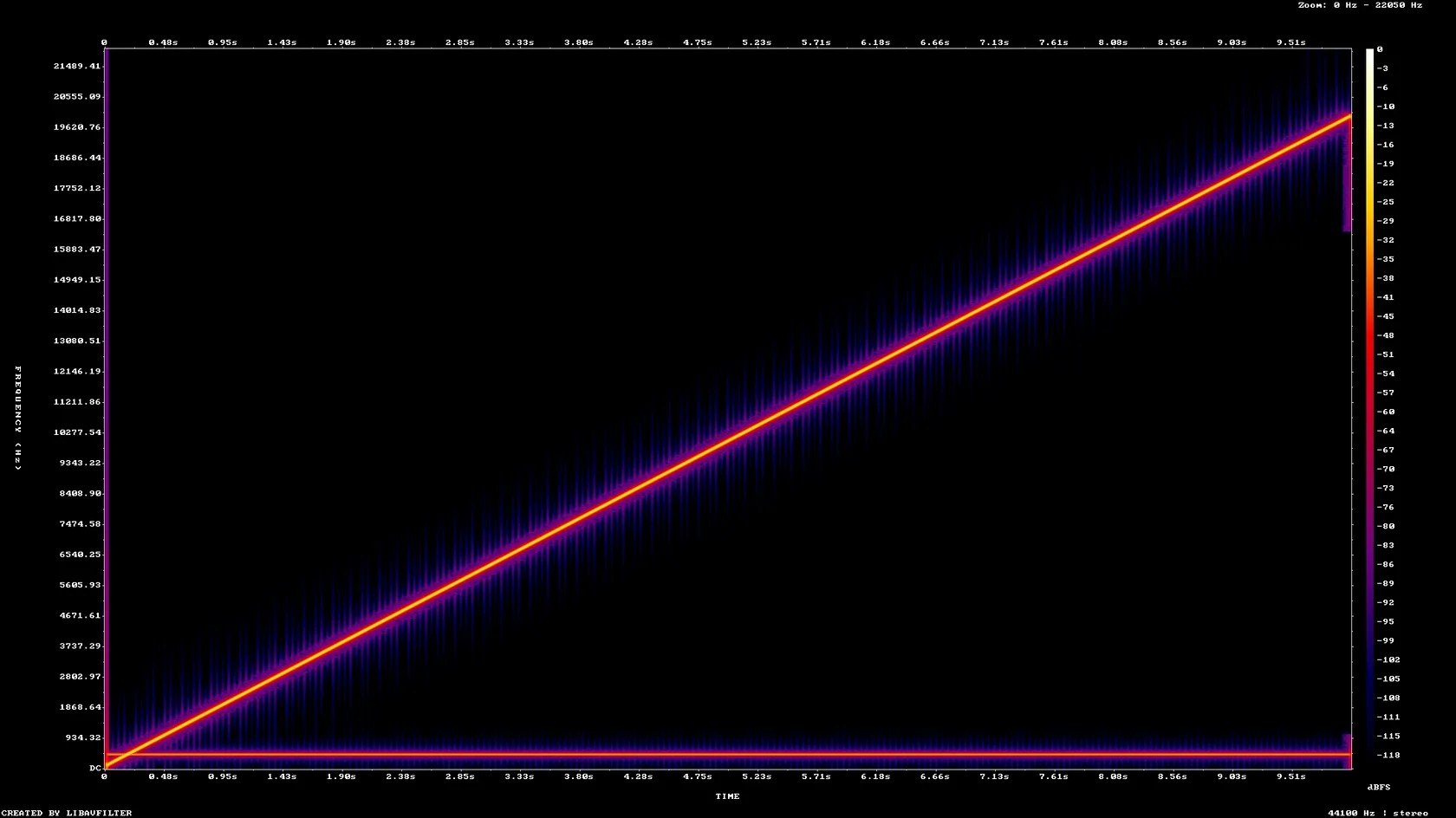
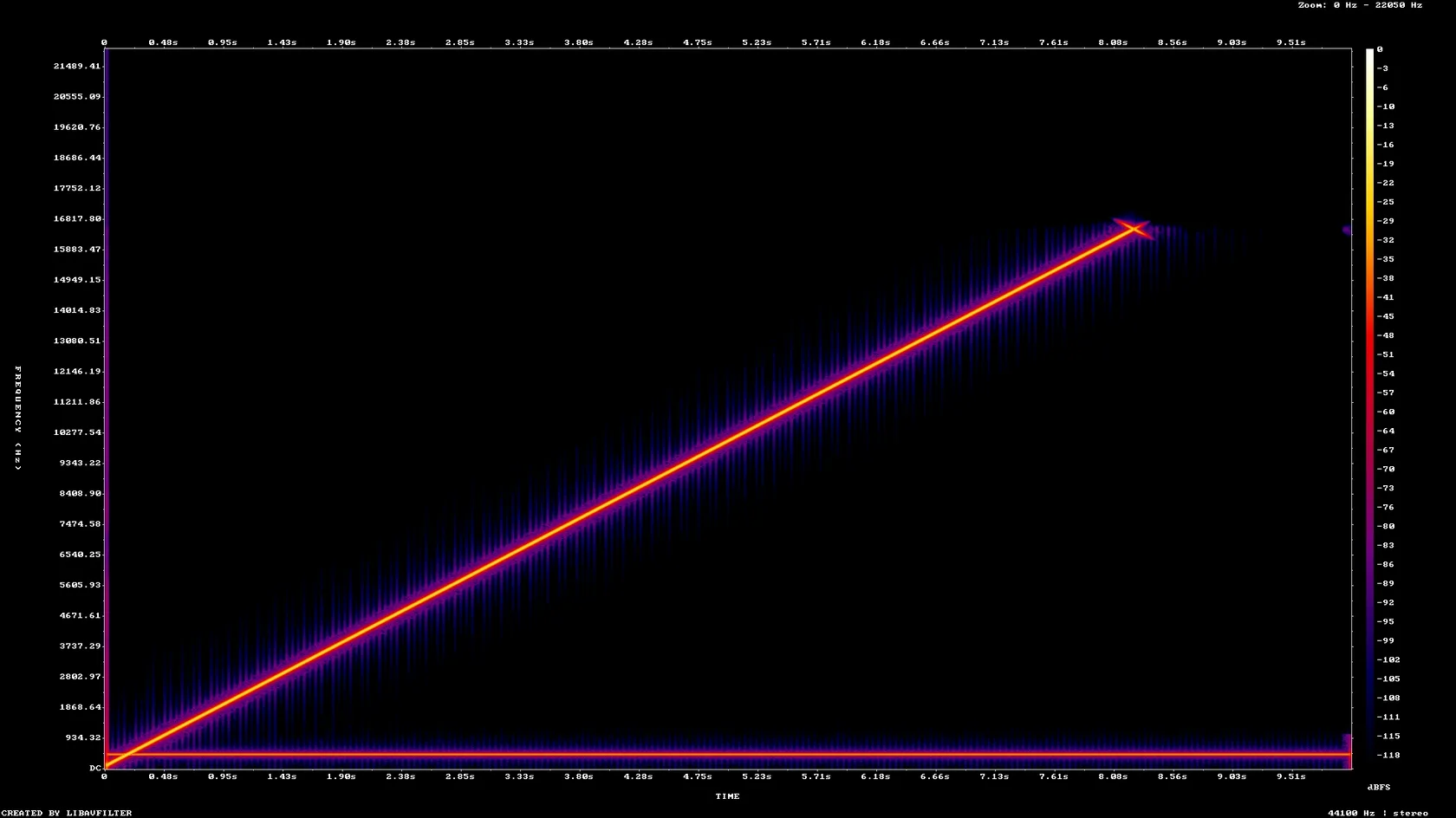
A 10-second stereo WMA test tone (WMA2, 128 kbps, 44.1 kHz) made by us, converted on indox.org

WMAthe original, WMA2 at 128 kbps, 44.1 kHz stereo, 9.999 s
173.5 KB
MP3from indox, 128 kbps, 44.1 kHz stereo, 10.031 s
160.8 KB
Spectrogram of the WMA test tone: a frequency sweep rising to 20 kHz
Spectrogram of the MP3 made by indox: the same sweep cut off near 16.5 kHz
Measured on indox.org on 4 November 2026: the WMA we uploaded and the MP3 we downloaded. Drag the handle to compare their spectrograms; the MP3 stops near 16.5 kHz.

Why use indox to convert WMA to MP3?

The file is an MP3 inside, whatever its name

Changing movie.wma to movie.mp3 in a file manager does not work, because the sound inside is still a Windows Media stream. The converter decodes it and writes an MP3 with the LAME encoder, so the file is an MP3 inside as well as by name.

Title and artist carried over in our test

The WMA we uploaded had a title and an artist tag. The MP3 came back with both as ID3 tags, and we set no option to make that happen. We did not test cover art or album tags, so check those if they matter.

Bitrate follows the source in our test

With no bitrate set, a 44.1 kHz stereo WMA at 128 kbps gave an MP3 at 128 kbps. The result is measured on our own test file, so another source can land elsewhere.

Nothing to install

The conversion runs in your browser tab on indox servers. You do not need Windows Media Player, VLC or a codec pack, so a Mac, an Android phone or a Chromebook can do it.

What happens to your audio

Stays

  • The length of the recording, to within a fraction of a second
  • The song title and artist, in our test
  • Your original WMA, which is not touched

Changes

  • The codec: Windows Media Audio is re-encoded as MP3
  • The top of the frequency range: the MP3 sweep stopped near 16.5 kHz in our test
  • The bitrate may drop when the source is low-rate, as the 32 kbps mono result shows
  • DRM protection, which may stop the conversion altogether

How do I convert WMA to MP3 online?

  1. 1

    Add your WMA file

    Drop the WMA file on the box or choose it from your device. Keep the original, because it is the only copy that has not been compressed twice.

  2. 2

    Confirm MP3, then start the conversion

    Check that MP3 is the output format, then start the conversion and wait for it to finish. In our test a 10-second file took 3.8 seconds from the click to Completed.

  3. 3

    Download the MP3 and listen to it

    Save the MP3 and play it on the device you care about. Check the title and artist, and listen to the end if the recording is a long one.

What do I get from indox's WMA to MP3 converter?

You hand over a WMA file and take away an MP3 that plays on a phone, a Mac or a car stereo. The page says up front that the audio is compressed a second time and that protected WMA files may not convert, so a failed result does not come as a surprise.

  • An MP3 that plays on phones, Macs and car stereos
  • Nothing to install on Windows, Mac or a phone
  • Results measured on a real test file, with a spectrogram of both
  • A plain statement of what is lost and what may fail
The indox WMA to MP3 converter: drop a file or choose one to convert it to MP3

What are the limits for WMA to MP3?

Size

The upload box shows the live size limit before you add a file. Signing in raises it; a paid plan does not change it.

Formats

WMA in, MP3 out. Pick another output on the converter if you need a different format.

Privacy

Files are encrypted in transit over HTTPS and processed on indox infrastructure.

Deletion

Free-tier files are kept for 24 hours after the job finishes, then deleted automatically.

Limits worth knowing

  • The conversion compresses the audio a second time, so the MP3 cannot sound better than the WMA you started with. In our test the energy above 19 kHz fell from -29.80 dB in the WMA to -41.07 dB in the MP3, and the sweep stopped near 16.5 kHz.
  • A DRM-protected WMA may not convert. We did not test a protected file, because we had no licence-clean one to use, so we cannot say how the converter reacts. If the file came from an old music store, expect it to fail.
  • With no bitrate set, a low-rate source gives a low-rate MP3. A mono 22.05 kHz WMA at 64 kbps came out at 32 kbps in our test, half the source bitrate. Only the 44.1 kHz stereo 128 kbps case matched its source.
  • The WMA family has several codecs, including WMA Pro and a lossless one. We tested the standard codec only, so a Pro, lossless or voice file may behave differently.

When the result is not what you expected

What you seeWhyWhat to do
The conversion failsThe WMA may be protected with DRM, or the file is damagedCheck that the file plays in the software that holds its licence, or try another copy
The MP3 sounds thinner or dullerThe audio was compressed a second time and the top frequencies were trimmedKeep the WMA as your master and use the MP3 for playback only
The MP3 is smaller than you expectedA low-rate source gives a low-rate MP3 when no bitrate is setCompare the bitrate of the MP3 with the WMA in your player's file info
The tags are missingWe tested title and artist only; other tags were not checkedRe-tag the MP3 in your music app
You need a lossless copyMP3 is always lossyUse WAV to MP3 only from a WAV master, not from a WMA

What do the free and paid plans add?

Free

  • All converters
  • Daily credit refresh
  • Email support

Basic

  • Access to all features
  • AI Extract
  • Priority conversions
  • Email support
Highest priority

Premium

  • Everything in Basic
  • Highest priority queue
  • Priority support

Pay-As-You-Go

  • No subscription
  • Credits never expire
  • Opt-in auto-refill
  • Access to all features
See prices
Related conversionsAAC to MP3

WMA vs MP3: what is the difference?

Compared onWMAMP3
MakerMicrosoft; stored in the ASF containerOpen standard, from the MPEG family
CompressionLossy for the standard codec; WMA Pro and a lossless variant also existLossy
Where it playsWindows; many Mac, phone and car players need extra softwarePhones, Macs, car stereos, browsers and nearly every audio app
ProtectionSome older store-bought files carry DRMNo DRM in the format
Converting between themCannot be copied into MP3Needs a re-encode from WMA

Who can use a WMA to MP3 converter?

  • People with an old Windows Media Player library

    Music ripped or bought in the 2000s is often a folder of .wma files that a phone, a Mac or a car stereo will not open. MP3 copies play on all of them.

  • Owners of protected store purchases

    Songs bought from old online stores may carry DRM. A protected file may not convert, and no setting on our side changes that.

  • Listeners who care about quality

    Going from one lossy format to another loses some detail. The spectrograms on this page show where, so you can decide whether the MP3 is fine for your ears and keep the WMA as your master.

  • People with voice recordings

    Old dictation and recorder files are often WMA. An MP3 copy is easier to send, play on a phone or hand to a transcription tool. A mono 22.05 kHz test file converted fine, but at a lower bitrate than its source.

When to use it

  • Playing a folder of old .wma songs on an Android phone or an iPhone.
  • Moving a WMA music collection to a Mac, where the system player does not open the format.
  • Burning or copying songs to a USB stick for a car stereo that reads MP3 only.
  • Turning a WMA voice memo into an MP3 that is easy to send by email or chat.

Where can I read more about converting files?

Do it all with indox

View all 94 tools

WMA to MP3 FAQs

How do I convert WMA to MP3 online for free?

Add the WMA file to the converter in your browser, keep MP3 as the output and download the result. Nothing is installed. We saw no sign-up wall, quota or paywall in our test conversions.

How do I convert WMA to MP3 on Android?

Open the converter in the phone's browser, choose the WMA file and download the MP3 when it is ready. The phone does none of the encoding, because the conversion runs on indox servers.

How do I convert WMA to MP3 on a Mac?

Use the converter in Safari or any other browser, and save the MP3 when it finishes. The Mac needs no extra software, and the MP3 opens in Music and QuickTime.

How do I convert WMA to MP3 in Windows Media Player or VLC?

Both can do it on your own computer if you set them up for it, and the result is the same kind of re-encode. This page is the shorter route when you have only a file or two and do not want to configure anything.

Does converting WMA to MP3 lose quality?

Some, yes. Both formats are lossy, so the audio is compressed twice. In our test the MP3 sweep stopped near 16.5 kHz while the WMA reached 20 kHz. Much music has little content up there, so many listeners will not hear a difference at 128 kbps, but it is not lossless.

Can I rename a .wma file to .mp3?

No. The name is only a label. Inside, the file is still a Windows Media stream, and most players will refuse it. The audio has to be decoded and encoded again to become an MP3.

Why will my protected WMA not convert?

Files bought with DRM are locked to a licence, and a converter may not be able to read them. We did not test a protected file. If you own the music, play it in the software that holds the licence.

Will the MP3 be bigger or smaller than the WMA?

It depends on the bitrate. In our test a 128 kbps stereo WMA of 173,530 bytes gave a 128 kbps MP3 of 160,800 bytes. A 64 kbps mono WMA gave a 32 kbps MP3 of 24,489 bytes from 55,030 bytes.

Are the song title and artist kept?

In our test, yes. The title and artist of the WMA came through as ID3 tags with no option set. Cover art and album tags were not tested.