Only the sound is kept
The converter ignores the video track and encodes the audio with an MP3 encoder. The result is a plain audio file with no picture to carry around.
You get an MP3 of the sound in your 3GP clip, a file that phones, cars, players and audio apps open without extra software.
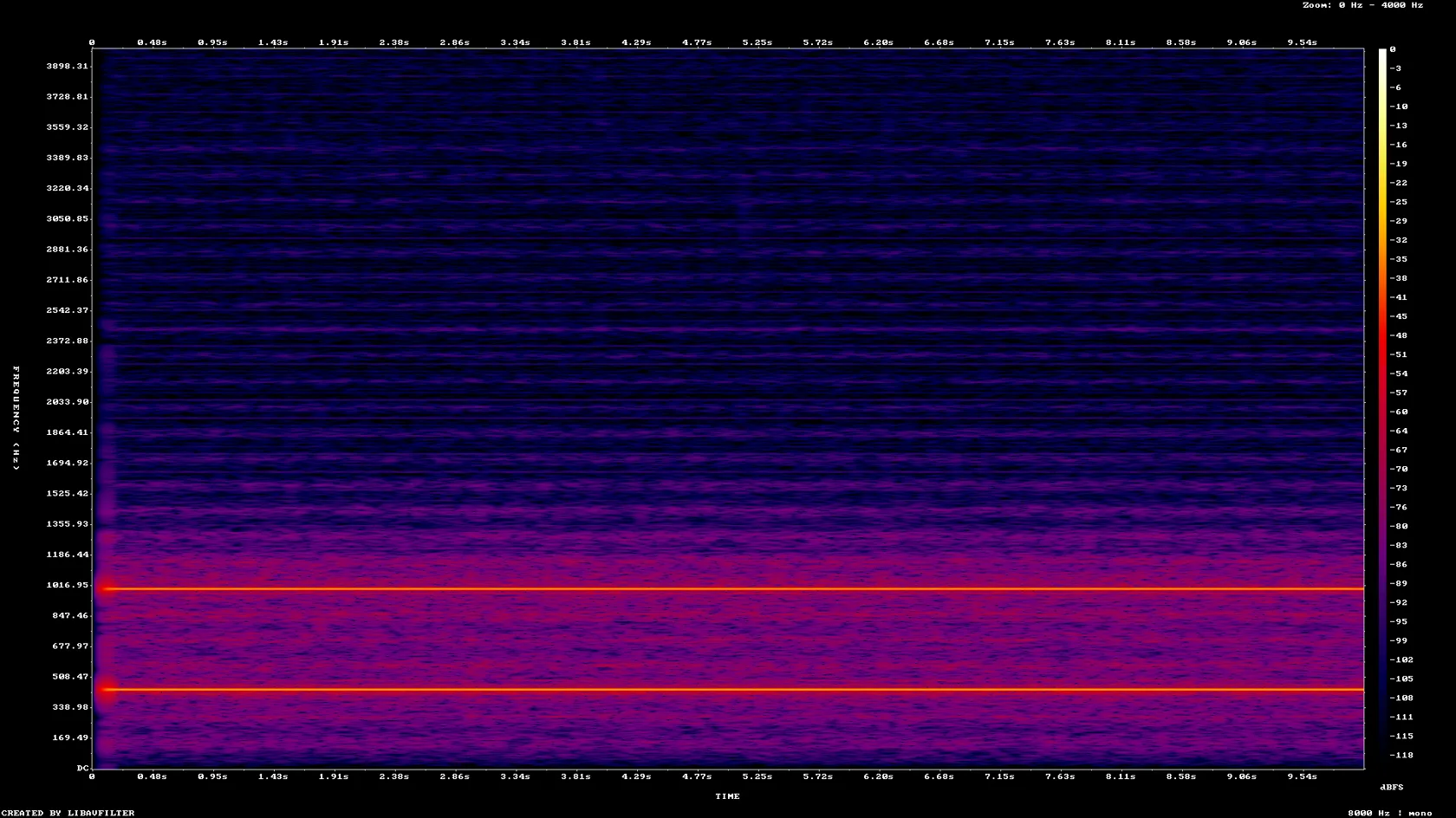
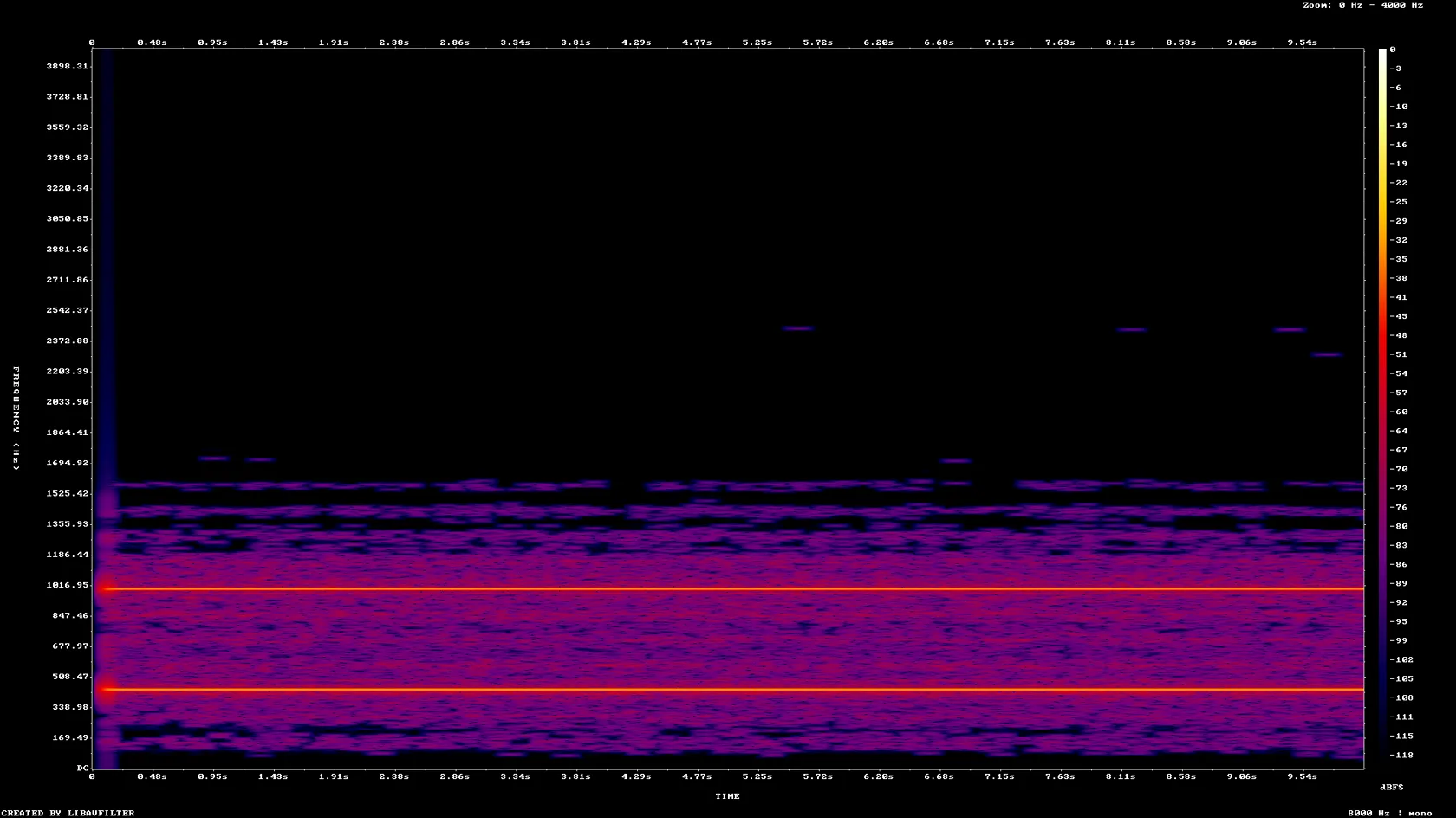
To convert 3gp to mp3, add the 3GP file, keep MP3 as the output format and download the result. The picture is dropped and only the sound is encoded, so the MP3 is much smaller than the video. Phone clips often carry 8 kHz mono AMR speech, and no MP3 setting can make that sound richer than it was recorded. In our test a 48.6 KB AMR clip became a 10.6 KB MP3 with nothing above 4 kHz, the same ceiling as the source.
Transfers use HTTPS, and files converted on the free tier are deleted after 24 hours, so the result is not a long-term archive. Quality depends on the source file, so open the MP3 file once before you share it.
3GP (3GPP file format)
A small video container defined by 3GPP (TS 26.244) for mobile phones and multimedia messages. It is an application of the ISO base media file format and typically holds H.263 or MPEG-4 video with narrowband or wideband AMR speech or AAC audio. Files from older handsets are often low resolution, with 8 kHz mono AMR sound.
MP3 (MPEG-1 Audio Layer III)
The most widely supported lossy audio format. Nearly every car stereo, portable player, phone and audio program opens it, which makes it a safe choice for the sound of a video clip.
A 10-second 3GP test clip (AMR-NB audio, 176 × 144 video) made by us, converted on indox.org
The converter ignores the video track and encodes the audio with an MP3 encoder. The result is a plain audio file with no picture to carry around.
In our test the MP3 kept the 8000 Hz mono layout of the AMR-NB sound in the 3GP. A second clip with 44.1 kHz stereo AAC audio came out as 44.1 kHz stereo.
We converted a 3GP with AMR-NB audio and a 3GP with AAC audio. In our test each took 3.2 seconds from the click to Completed.
A file named .3gpp is the same format as .3gp, and the converter treats it as 3GP.
In our test the 3GP container tags, such as major_brand=3gp6 and compatible_brands, appeared in the MP3 metadata. They are harmless labels that a tag editor will show.
Drop the file on the box or choose it from your device. A .3gpp file works the same way. Keep the original, because it is the only copy that has not been compressed twice.
Check that MP3 is the output format, start the conversion and wait for Completed. In our test both clips took 3.2 seconds from the click to Completed.
Save the MP3 and play it through on the device you will use. A thin or telephone-like sound is already in an 8 kHz mono source, so check the 3GP in a video player if you are unsure.
You add a phone video clip and take away an MP3 of its sound, with nothing to install. Before you start, the page tells you the source audio caps the quality, the MP3 can be larger than the 3GP, and a clip with no sound has nothing to extract.
The upload box shows the live size limit before you add a file. Signing in raises it; a paid plan does not change it.
3GP in, MP3 out. Pick another output on the converter if you need a different format.
Files are encrypted in transit over HTTPS and processed on indox infrastructure.
Free-tier files are kept for 24 hours after the job finishes, then deleted automatically.
| What you see | Why | What to do |
|---|---|---|
| The MP3 sounds thin or like a phone call | The 3GP held 8 kHz mono AMR sound, with nothing above 4 kHz | A converter cannot restore detail that was never recorded. Look for a better source recording |
| The MP3 is bigger than the 3GP | The source audio was AAC at a lower bitrate than the MP3 the converter wrote | Keep the 3GP for storage and use the MP3 only where you need MP3 support |
| The conversion fails | The file may be damaged, or it may have no audio track (we expect that to fail but did not test it) | Play the 3GP in a video player to check it has sound, or try another copy |
| The file shows 3gp6 tags | The 3GP container tags were copied into the MP3 metadata | Edit or clear them in a tag editor |
| Your clip is an MP4, not a 3GP | The formats differ | Use MP4 to MP3 for it |
| Compared on | 3GP | MP3 |
|---|---|---|
| What it holds | Video and audio, sometimes timed text | Audio only |
| Typical codecs | H.263, MPEG-4 or H.264 video with AMR or AAC audio | MPEG-1 Audio Layer III |
| Typical phone sound | Often 8 kHz mono AMR speech on older handsets | Whatever rate and channels the encoder is given |
| Standard | 3GPP TS 26.244, built on the ISO base media file format | Lossy audio coding from the early 1990s |
| Converting between them | The video track is dropped | Needs the audio to be re-encoded |
Facts checked on November 5, 2026
No tool matches that search.
Add the 3GP file to the converter in your browser, keep MP3 as the output format and download the result. Nothing is installed. In our test the conversion took 3.2 seconds for a 10 second clip.
Phone 3GP files usually hold AMR-NB (8 kHz, 4.75 to 12.2 kbit/s), AMR-WB (16 kHz) or AAC audio. It matters because MP3 cannot add detail the recording never had. A video player's file properties, or the ffprobe tool, will show the audio codec and sampling rate.
Narrowband AMR samples at 8 kHz, which leaves nothing above 4 kHz. In our test neither the 3GP sound nor the MP3 had energy above 4 kHz. A converter cannot restore that, so a better original recording is the only fix.
The page showed no bitrate setting in our run, and the converter picked 8 kbps for an 8 kHz mono AMR-NB clip. Raising the bitrate of a source like that only makes a larger file with the same sound. A 44.1 kHz stereo AAC source was written at 128 kbps.
The MP3 bitrate follows the source format. In our test a stereo AAC clip at 96 kbps became a 128 kbps MP3 of 161,270 bytes, which is larger than the 154,122 byte 3GP even with its video. An AMR clip went the other way: 48,622 bytes became 10,588 bytes.
MP3 is among the most widely supported audio formats, and iPhones, Android phones and most car stereos play it. A car with a strict format list is worth checking in its manual.
In our test, run anonymously, there was no sign-up and no limit or quota message. The converter page states how long files are kept, so read that before you upload anything private.
Yes. 3GPP is another spelling of 3GP, and the converter handles a .3gpp file as a 3GP.
Yes, a little. Both are lossy, so the sound is compressed a second time. Because voice clips are often 8 kHz mono, the loss is small next to the limit of the source itself. Keep the 3GP as your master copy.
Yes, both do it on your own computer once installed and set up. The result is the same kind of audio re-encode. This page suits a file or two when you do not want to set anything up.