Works with .aif, .aiff and 24-bit files
The two extensions are the same format. Add either and you get an .mp3 back. Our 24-bit test file converted with no setting to change and no error.
Add an AIFF or AIF file and get an MP3 back, about 16 times smaller in our test. No software to install.
To convert aiff to mp3, add the .aif or .aiff file, keep MP3 as the output format and download the result. In our test a 24-bit stereo AIFF of 2.6 MB became a 161 KB mp3 at 128 kbps, with title, artist and album kept and the cover picture left out.
Transfers use HTTPS, and files converted on the free tier are deleted after 24 hours, so the result is not a long-term archive. Quality depends on the source file, so open the MP3 file once before you share it.
AIFF (Audio Interchange File Format)
Apple's uncompressed audio container, built on Electronic Arts' IFF and specified in version 1.3 in January 1989. It usually holds linear PCM, so the sound is stored as recorded and the files are large. It is common in Mac-based music production, uses .aif or .aiff, and can carry text chunks for name, author, copyright and annotations.
MP3 (MPEG-1 Audio Layer III)
The oldest widely used lossy audio format, dating from the early 1990s. Its compression is less efficient than AAC, but virtually every car stereo, portable player, operating system and audio program made since can open it.
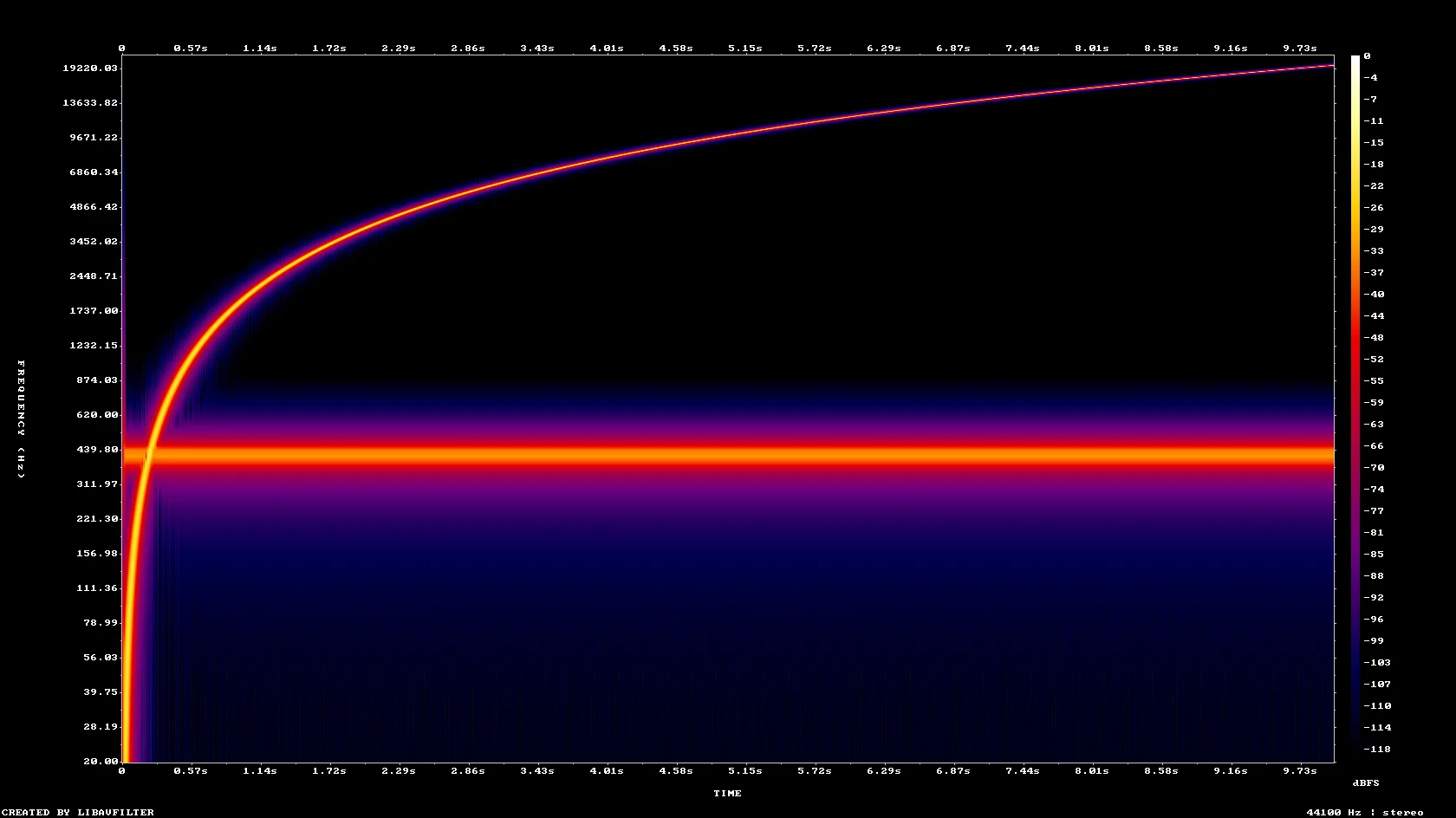
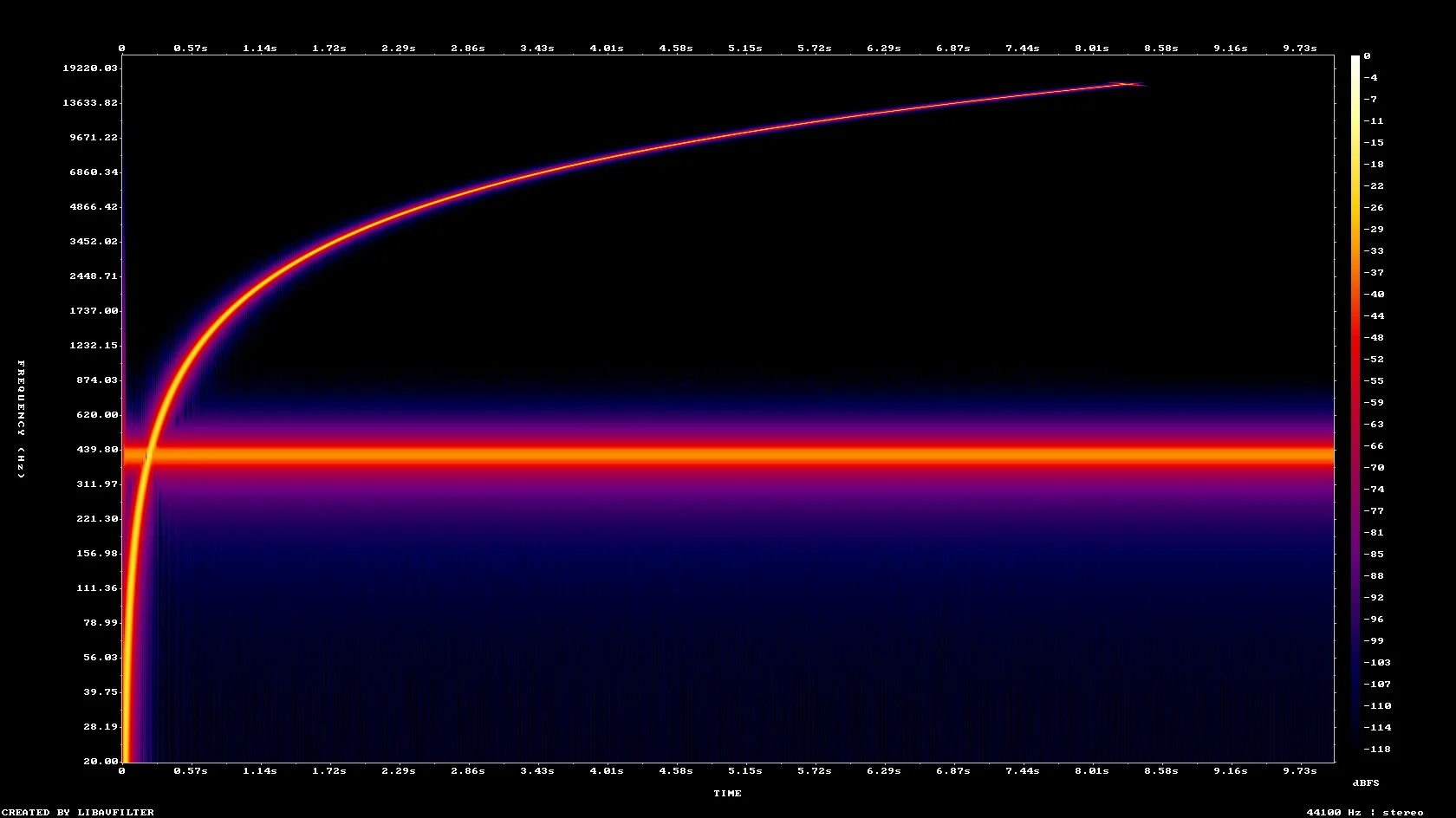
A 10-second 24-bit stereo AIFF test tone with tags and cover art, converted on indox.org
The two extensions are the same format. Add either and you get an .mp3 back. Our 24-bit test file converted with no setting to change and no error.
The conversion runs on indox servers, so it works in the browser on a Mac, a Windows PC, an iPhone or an Android phone. You do not need GarageBand, Logic or a desktop converter.
We converted a tagged AIFF and read the MP3 back. Title, artist and album carried over; the cover art did not. The page also says what happens when you pick no bitrate.
Drop the file on the box or choose it from your device. Keep the original AIFF. It is your uncompressed master, and an MP3 cannot be turned back into it.
Check that MP3 is the output format, then start. We used the default settings. In our test it took 4.2 seconds from the click to Completed for a 2.6 MB file.
Save the MP3 and listen to a few seconds before you send it. If you added cover art to the AIFF, add it again in your music app, because it is not carried over.
You hand over an AIFF or AIF file and take away an MP3 small enough to email, upload or put on a phone. Before you convert, the page says what MP3 cannot keep, so you can judge whether the result fits the job.
The upload box shows the live size limit before you add a file. Signing in raises it; a paid plan does not change it.
AIFF in, MP3 out. Pick another output on the converter if you need a different format.
Files are encrypted in transit over HTTPS and processed on indox infrastructure.
Free-tier files are kept for 24 hours after the job finishes, then deleted automatically.
| What you see | Why | What to do |
|---|---|---|
| The MP3 has no cover picture | An MP3 made here carries no image from the AIFF | Add the artwork again in your music app |
| The audio sounds thinner than the AIFF | MP3 is lossy and a low-rate or mono source gets a low default bitrate | Compare with the AIFF, and keep the AIFF for editing and mastering |
| You need a lossless copy | MP3 cannot be a lossless version of the AIFF | Use AIFF to WAV or AIFF to FLAC if you want to keep every sample |
| A site still rejects the file | Renaming the extension does not change the contents | Upload the converted .mp3, not a renamed AIFF |
| The MP3 is a little longer than the AIFF | The encoder adds a few milliseconds of padding, 31 ms in our test | No action is needed |
| Compared on | AIFF | MP3 |
|---|---|---|
| Compression | Usually uncompressed PCM, so the sound is stored as recorded | Lossy, so hard-to-hear detail is discarded and files are smaller |
| File size | Large. 2.6 MB for 10 seconds of 24-bit stereo in our test | Small. 161 KB for the same clip at 128 kbps |
| Typical use | Music production and archives on Apple systems | Sharing, playback on phones and cars, uploads |
| Tags | Text chunks, and ID3 tags in some files | ID3 tags, with optional cover art |
| Where it opens | Mac apps and most audio editors | Practically every player, phone, car stereo and web page |
Facts checked on November 5, 2026
No tool matches that search.
Open the converter, add your AIFF or AIF file, keep MP3 as the output and download the result. You do not need GarageBand, iTunes or any software on your computer.
Yes, some. AIFF is uncompressed and MP3 discards sound that is hard to hear. In our test the MP3 lost the very highest frequencies, with the sweep stopping near 16.6 kHz instead of 20 kHz. For listening this is often fine, but keep the AIFF as a master.
In our test we picked nothing. A 44.1 kHz stereo file came out at 128 kbps and a 22.05 kHz mono file at 32 kbps. We did not test other settings, so we cannot show a 320 kbps result here.
AIFF stores every sample of the audio without compression, and an MP3 stores a reduced version. Our 2.6 MB AIFF became a 161 KB MP3, about 6% of the size. Real music with more detail than our test tones may come out larger.
Partly. In our test the title, artist and album were readable on the MP3. The 300 × 300 cover picture inside the AIFF was not carried over, so add it again in your music app.
Yes. Our 24-bit, 44.1 kHz test file converted with no setting to change and no error.
Yes. AIF and AIFF are the same format with a shorter and a longer extension. Both are accepted here and the output is an .mp3 file.
Open the converter in Safari or any browser on the device, add the file and download the MP3. Nothing needs to be installed. The Music app on a Mac also has its own import setting for creating MP3 copies, if you prefer to stay in the app.
Yes if you may edit or master the audio again. An MP3 cannot be turned back into the original, so treat it as a listening copy.