Reads the HTML part of the email
The PDF follows the formatted version of the message: the heading, paragraphs and link from our test email were laid out as in the original, and the link stayed blue and underlined.
Add an .eml file and get a PDF of the message back. Headers and body text come across; inline images and attachments do not.
To convert eml to pdf, add the .eml file, keep PDF as the output format and download the result. In our test, a 38,441 byte email became a one-page A4 PDF of 21,210 bytes, but its inline image was not drawn and its attachments were only listed by name.
Transfers use HTTPS, and files converted on the free tier are deleted after 24 hours, so the result is not a long-term archive. Quality depends on the source file, so open the PDF file once before you share it.
Need more PDF options? Open the PDF Converter hub.
EML (email message file)
A single email message saved as a file, with its headers (From, To, Date, Subject), a plain-text or HTML body and any attachments encoded as MIME parts. The syntax follows the Internet Message Format in RFC 5322, and the MIME type is message/rfc822. Each .eml file holds one message.
PDF (Portable Document Format)
A fixed-layout document format published as ISO 32000. Each page records the exact position of every character, image and line, usually with the fonts embedded, so it displays and prints identically in any reader and is awkward to edit.
A small .eml email with HTML, a link, a table, Persian text and two attachments, converted on indox.org
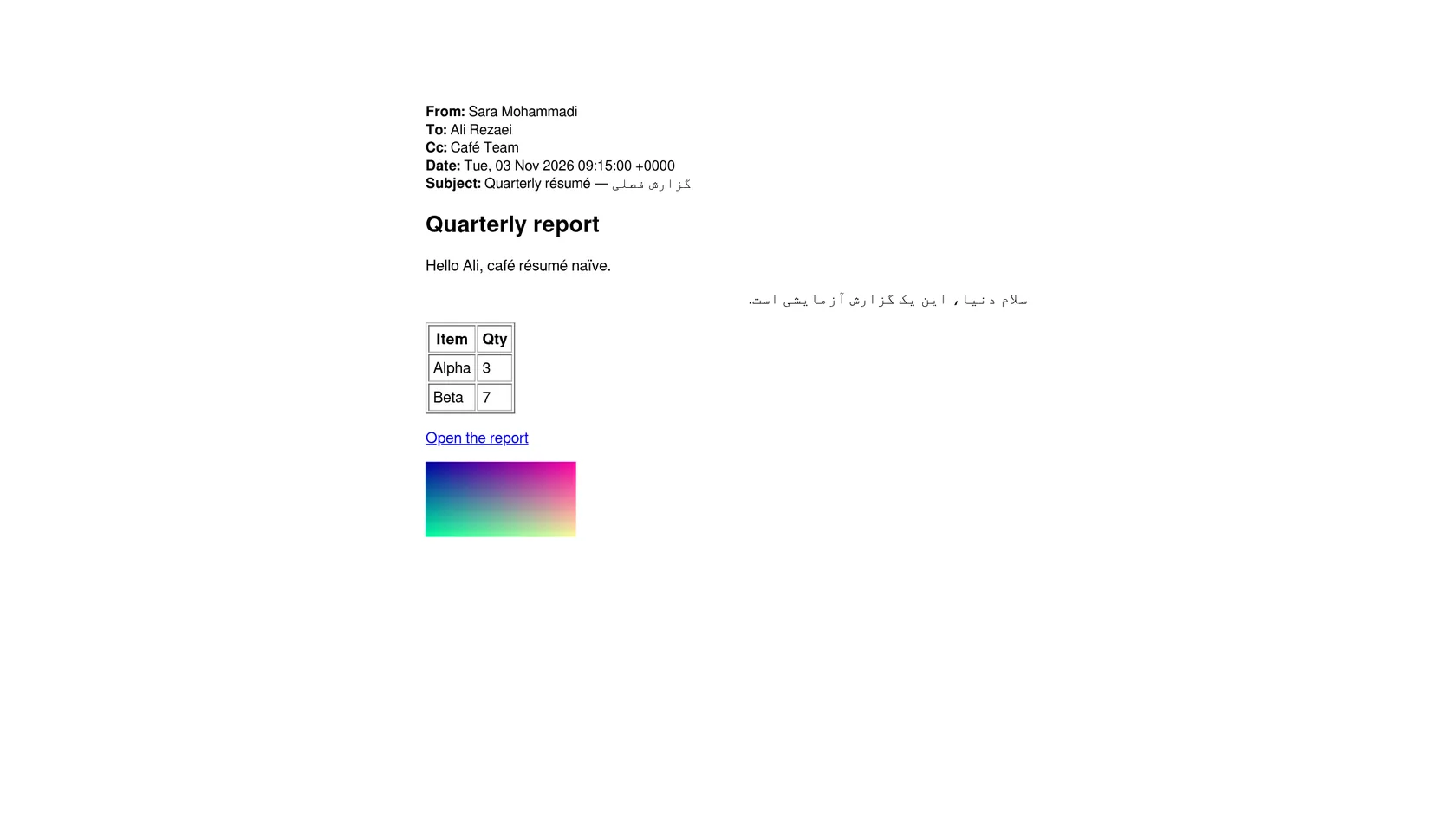
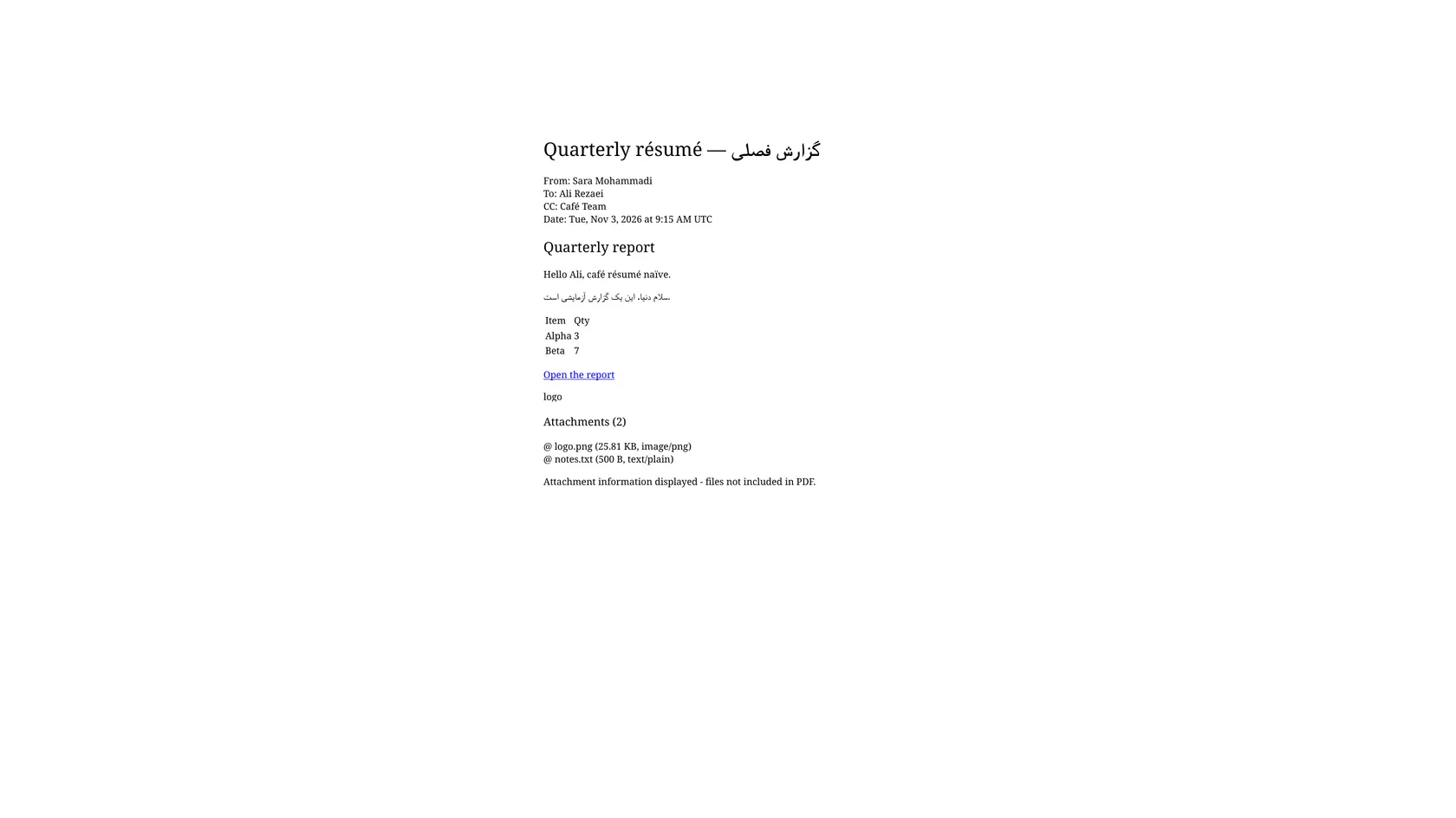
The PDF follows the formatted version of the message: the heading, paragraphs and link from our test email were laid out as in the original, and the link stayed blue and underlined.
Our PDF opened with From, To, CC and Date, and used the subject as the title. Each address was shortened to the display name, so the PDF is not a record of the full addresses.
The Persian title, a right-to-left Persian paragraph and accented Latin letters all came out in the right order, and the PDF embeds its fonts, so it reads the same on another device.
We ran the conversion anonymously in a browser, with no account, limit message or paywall. Nothing needs installing, and no mail client is needed to read the result.
Drop the file on the box or choose it from your device. If you only have the message in a mail app, save or export it as .eml first; most desktop clients and some web mail can do this.
Check that PDF is the output format and start. In our test the first email took 13.6 seconds from the click to Completed, and a second one took 7.5 seconds. Your time will vary.
Open the file before you send or file it. Look for pictures you expected, and check the attachment list at the end if the email carried files.
You hand over a saved email and take away a PDF of its message text, ready to read, print or file. The page tells you what the PDF leaves out before you convert, so you can decide whether it fits.
The upload box shows the live size limit before you add a file. Signing in raises it; a paid plan does not change it.
EML in, PDF out. Pick another output on the converter if you need a different format.
Files are encrypted in transit over HTTPS and processed on indox infrastructure.
Free-tier files are kept for 24 hours after the job finishes, then deleted automatically.
| What you see | Why | What to do |
|---|---|---|
| A picture is replaced by a word | The inline image is not drawn, only its alt text | Screenshot or print the message from your mail app if the picture matters |
| The attachment is missing | The PDF lists attachments but does not embed them | Save the files from your mail app and keep them next to the PDF |
| The sender shows as a name only | Addresses are reduced to display names | Keep the .eml as the record of the exact address |
| A table has no borders | Table borders are not kept | Check the columns still line up; use the original for layout-critical tables |
| The date reads differently | The date is reformatted in the PDF | Read the original header in the .eml if the exact time matters |
| Compared on | EML | |
|---|---|---|
| What it holds | One message with headers, body and attachments as MIME parts | A fixed page layout of the text and images it was made with |
| Editing | Opens in a mail client, text editors can read it | Hard to edit, made to be read or printed as is |
| Attachments | Carried inside the file | Listed here, not included, in our test |
| Where it opens | Mail clients and a few viewers | Any browser, phone or PDF reader |
| Typical use | Saving and moving a message | Reading, printing, filing and sharing |
Facts checked on November 4, 2026
No tool matches that search.
Open the converter, add your .eml file, keep PDF as the output and download the result. You do not need Outlook or any software on your computer.
Converting it to PDF is one way. The PDF shows the sender, recipients, date and body text in any PDF reader, without a mail client.
No. In our test the PDF listed two attachments by name, size and type with a note that the files are not included, and it contained no embedded files. Save attachments from your mail app separately.
Not in our test. A logo embedded in the HTML showed as its alt text, and the PDF held 0 images. This was the same for two different email structures.
In our run the PDF showed From, To, CC and Date, with the subject as the title. Addresses were reduced to display names and the date was reformatted. A Bcc line was not part of our sample.
Headings, paragraphs and links were kept, and the link was blue and underlined. Table borders were lost, so a table became plain columns of text.
Yes in our test. A Persian subject, a right-to-left Persian paragraph and accented Latin letters displayed correctly, and the fonts were embedded in the PDF.
Most desktop mail apps let you drag a message to a folder or use Save As to create an .eml. Web mail often offers a download option on the message menu. The steps vary by app.
In our test the converter page stated that free-tier files are deleted after 24 hours. Check the page for current wording before you convert anything sensitive, and keep the original on your own device.
We tested one file per conversion and saw no batch option, so plan on converting messages one at a time.