MOBI to PDF Converter

Add a DRM-free MOBI ebook and get a PDF with fixed pages back. Protected Kindle purchases cannot be converted.

To convert mobi to pdf, add the .mobi file, keep PDF as the output and download the result. In our test, a 55 KB mobi book with 12 chapters became a 16-page pdf of 112 KB that kept its images, its table and 15 bookmarks. A book protected by DRM cannot be converted.

Transfers use HTTPS, and files converted on the free tier are deleted after 24 hours, so the result is not a long-term archive. Quality depends on the source file, so open the PDF file once before you share it.

Need more PDF options? Open the PDF Converter hub.

FromMOBILossless

MOBI (Mobipocket eBook)

A proprietary ebook format that began with Mobipocket in 2000 and passed to Amazon in 2005. The old MOBI 6 layer (KF7) has little styling, while the KF8 layer added HTML5 and CSS3 in 2011, and one file can carry both. Amazon never published a full specification, and Kindles read it from USB even though Send to Kindle has dropped it.

ToPDFLossless

PDF (Portable Document Format)

A fixed-layout document format published as ISO 32000. Each page records the exact position of every character, image and line, usually with the fonts embedded, so it displays and prints identically in any reader and is awkward to edit.
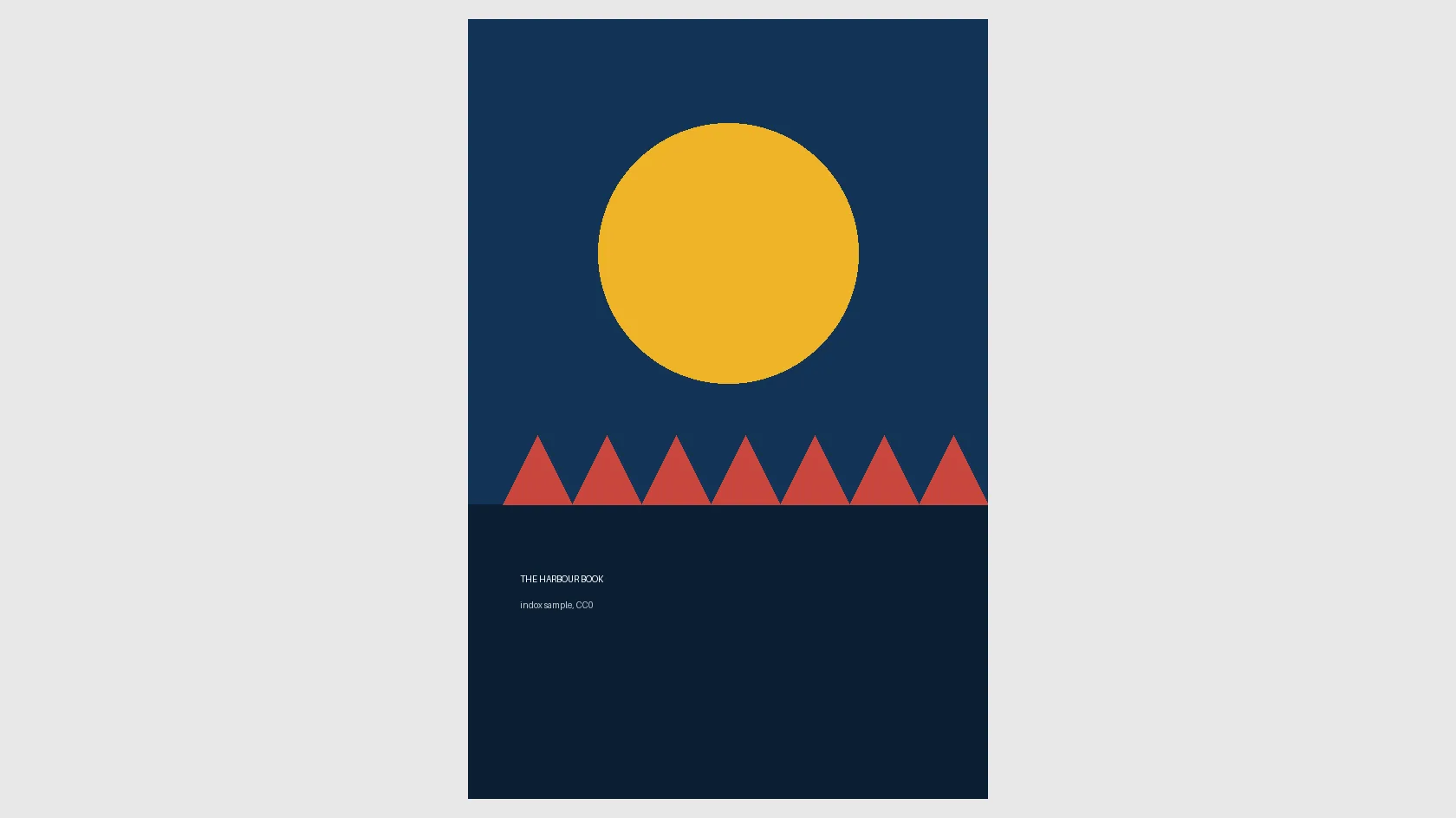
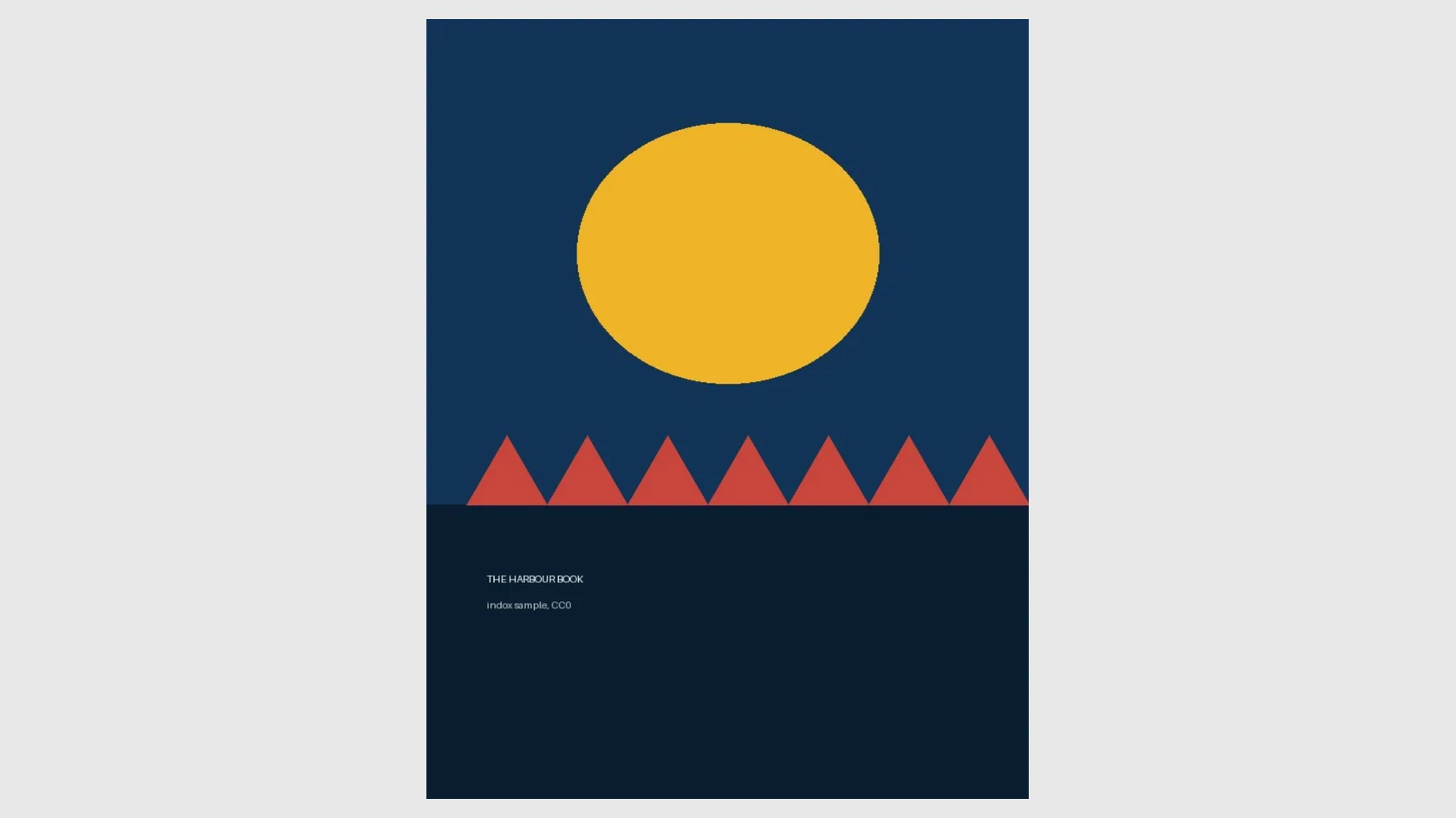
A 55 KB MOBI test book with 12 chapters, a cover, 2 figures and a table, converted on indox.org

MOBIthe original, 12 chapters
55 KB
PDFfrom indox, 16 pages, about 2× larger
112 KB
The cover image of the test book, 600 x 900 pixels, with a round shape, shown at its own proportions
Page one of the PDF made by indox, where the same cover fills a US Letter page and the round shape is stretched into an oval
Measured on indox.org on 5 November 2026: the MOBI we uploaded and the PDF we downloaded. The comparison shows only the cover: the source image on the left and page one of the PDF on the right.

Why use indox to convert MOBI to PDF?

A PDF for printing, annotating and sharing

A PDF looks the same in every reader and prints the same on every printer. That makes it the right copy for a study book you want to mark up, a book to hand to someone without an ebook app, or an archive copy.

Images, tables and chapters come along

In our test the three images, the table and all 12 chapter titles of the sample book were in the PDF, and the chapters were clickable bookmarks. What you get still depends on what the MOBI itself contains.

Nothing to install, any device with a browser

The conversion runs on indox servers, so Windows, Mac, Chromebook, Android and iPhone work the same way. You do not need calibre or a Kindle app on the machine you are using.

Protected books fail

Books bought from the Kindle store usually carry DRM. This converter does not remove it, so those files fail. A DRM-free MOBI that you made, sideloaded or downloaded from a public-domain source is what this page is for.

What happens to your MOBI

Stays

  • Your original MOBI, which is not touched
  • The text of every chapter, selectable in the PDF
  • The images and the table in our test book
  • Chapter titles, now as 15 bookmarks and 31 links

Changes

  • Layout: text no longer reflows and page numbers are new
  • Page size: US Letter, 612 x 792 points in our test
  • Cover: scaled to fill a page, so a circle became an oval
  • Images: stored as JPEG, so a transparent PNG is flattened
  • Contents: a table of contents page is added as the last page
  • File size: 55 KB became 112 KB in our test, about twice as large

How do I convert MOBI to PDF online?

  1. 1

    Add your MOBI file

    Drop the .mobi file on the box or choose it from your device. Keep the original: the MOBI is the version that reflows on a small screen.

  2. 2

    Confirm PDF, then start the conversion

    Check that PDF is the output format and start the conversion. In our test it took 7.9 seconds from the click to Completed for a 55 KB book.

  3. 3

    Download the PDF and check it

    Save the PDF and open it. Look at the cover, one page with a picture and the bookmarks panel before you print or send it.

What do I get from indox's MOBI to PDF converter?

You hand over a DRM-free MOBI and take away a PDF that opens anywhere and prints as shown. The page lists what the conversion changed in a real run, so you can judge before you start whether the PDF fits your job.

  • One PDF for the MOBI you add, in a few clicks
  • Nothing installed on a computer or phone
  • DRM and page size stated up front, with a real measured example
  • Your original MOBI is left as it was
The indox MOBI to PDF converter: drop an ebook or choose one to convert it to PDF

What are the limits for MOBI to PDF?

Size

The upload box shows the live size limit before you add a file. Signing in raises it; a paid plan does not change it.

Formats

MOBI in, PDF out. Pick another output on the converter if you need a different format.

Privacy

Files are encrypted in transit over HTTPS and processed on indox infrastructure.

Deletion

Free-tier files are kept for 24 hours after the job finishes, then deleted automatically.

Limits worth knowing

  • Books with DRM fail. Most books bought from the Kindle store are protected, and indox does not remove protection. In our test a broken file showed only a Failed status after about 2 seconds, with no reason, so check that the book is yours and unprotected.
  • You cannot choose the page size, margins or font. The converter uses fixed defaults and gave US Letter in our test, which can mean extra pages if you print on A4.
  • The PDF will not match your reader's pages. Page numbers, line breaks and font size are decided again, so a note such as "see page 112" will point somewhere else.
  • Images can change. A cover can be stretched to fill the page, and a transparent PNG is flattened. We did not test books with very large images, so check the pages that matter.
  • A table of contents page is added at the end of the PDF, after the last chapter. It is useful for navigation, but it is not at the front.
  • The result depends on the source. A MOBI with no chapter structure gives a PDF without useful bookmarks, and there is no OCR for scanned books.

When the result is not what you expected

What you seeWhyWhat to do
The row shows Failed with no reasonDRM, a damaged file or a file that is not a real MOBIOpen the book in an ebook app. If it is protected, it cannot be converted here
Page numbers differ from my readerThe PDF has fixed pages decided by the converterSearch by chapter title or use the bookmarks panel
The cover looks stretchedThe cover is scaled to the full pagePrint without the first page, or crop it in a PDF editor
The PDF is on US Letter and I print on A4The page size is a fixed defaultUse fit-to-page in your print dialog
A picture lost its transparent backgroundImages are stored as JPEG, which has no transparencyUse the original picture file if you need transparency
Want to keep the book reflowable insteadA PDF cannot reflowUse EPUB to MOBI or MOBI to EPUB for another ebook format

What do the free and paid plans add?

Free

  • All converters
  • Daily credit refresh
  • Email support

Basic

  • Access to all features
  • AI Extract
  • Priority conversions
  • Email support
Highest priority

Premium

  • Everything in Basic
  • Highest priority queue
  • Priority support

Pay-As-You-Go

  • No subscription
  • Credits never expire
  • Opt-in auto-refill
  • Access to all features
See prices

MOBI vs PDF: what is the difference?

Compared onMOBIPDF
LayoutReflowable: text adapts to screen and font sizeFixed: every line stays on its page
Page numbersSet by the reader app and change with font sizeFixed, the same on every device
Where it opensKindles and ebook appsPractically every computer, phone, browser and printer
ContentsChapter list used by the readerBookmarks and links, plus a contents page in our test
Typical useReading a book on a small screenPrinting, annotating, sharing and archiving

Who can use a MOBI to PDF converter?

  • Students who want a study copy

    A PDF can be printed and written on, and its bookmarks make it quick to jump to a chapter. The copy is for books you are allowed to copy, such as a textbook you wrote or a public-domain title.

  • People with an old ebook collection

    Many sideloaded MOBI files sit on old drives and Kindles. A PDF opens on a laptop or tablet without any ebook app, and in a reader that does not support MOBI.

  • Authors checking how a book looks fixed

    If you build a MOBI from your own manuscript, a PDF shows how chapters, tables and pictures look on fixed pages before you print review copies.

  • Kindle owners with a DRM-free file

    Books you bought that arrive protected will not convert here. A MOBI from a public-domain library or a DRM-free publisher will.

When to use it

  • Printing a public-domain novel from a MOBI file for reading away from a screen.
  • Sending a DRM-free ebook to someone whose device has no ebook reader.
  • Annotating a technical manual in a PDF editor.
  • Keeping a fixed-layout archive copy of an ebook you created yourself.

Where can I read more about converting files?

Do it all with indox

View all 94 tools

MOBI to PDF FAQs

How do I convert MOBI to PDF for free?

Open the converter, add your .mobi file, keep PDF as the output and download the result. You do not need calibre or any software on your computer.

Can I convert a Kindle book I bought?

Usually not. Books bought from the Kindle store normally have DRM, and this converter does not remove it, so the conversion fails. Only DRM-free files convert. We did not test a protected book.

Will the PDF have the same page numbers as my reader?

No. A MOBI reflows to the screen and a PDF has fixed pages, so page numbers are set again. Our 12-chapter test book became 16 pages including a table of contents page.

Can I choose A4 or another page size?

No. The converter uses default settings and our test PDF was US Letter, 612 x 792 points. If you print on A4, check the print dialog's fit-to-page option.

Does the PDF keep images and the table of contents?

Yes in our test. The cover and two figures were in the PDF, the table kept its text, and chapters appeared as 15 bookmarks with 31 internal links. A contents page was also added as the last page.

Why did my conversion fail?

The most common cause is DRM. A file that is damaged, or is not really a MOBI, also fails: our 89-byte text file renamed to .mobi showed Failed after about 2 seconds with no reason. Check that the book opens in an ebook app first.

Is the text in the PDF selectable?

Yes. In our test the text was extractable and the fonts were embedded in the file, so you can search and copy from the PDF.

Should I keep the MOBI?

Yes. A MOBI adapts to small screens and a PDF does not, and a PDF cannot be turned back into a clean MOBI. Treat the PDF as a print and share copy.

Do I need an account?

No. Our test ran anonymously on indox.org, and we saw no sign-up, limit or payment prompt.

Is MOBI still supported by Kindle?

Kindles read unprotected MOBI files from USB, but Send to Kindle has dropped the format. Converting to PDF or EPUB is a common way to keep reading old files.