EPUB to MOBI Converter

You get a MOBI file for older Kindles and other MOBI-only readers, with the cover, chapters and contents list carried over from your EPUB.

To convert EPUB to MOBI, add the EPUB file, keep MOBI as the output format and download the result. The output is the old MOBI 6 type, which older Kindles and MOBI-only readers open when you copy the file over a USB cable. A recent Kindle usually does better with the EPUB itself, so check that before you convert. In our test a 20.4 kB EPUB became a 51.5 kB MOBI with its cover and all 5 contents entries, though other books will differ, and a DRM-protected EPUB cannot be converted at all.

Transfers use HTTPS, and files converted on the free tier are deleted after 24 hours, so the result is not a long-term archive. Quality depends on the source file, so open the MOBI file once before you share it.

FromEPUBLossless

EPUB (Electronic Publication)

An open ebook standard maintained by the W3C. An EPUB is a ZIP package of XHTML chapters, stylesheets, images and a navigation file, and its text reflows to fit the screen and the reader's chosen font and size.

ToMOBILossless

MOBI (Mobipocket eBook)

The ebook format Mobipocket started and Amazon took over. This page writes the old MOBI 6 layer, which has little styling and no custom fonts, and it is the type that Kindle 1, 2 and DX class devices and other MOBI-only readers can open.
A 20.4 kB sample EPUB made by us (cover, 3 chapters, 5-entry contents, 2 images), converted on indox.org

EPUBthe original, with a PNG cover, 3 chapters and 2 images
20.4 kB
MOBIfrom indox, about 2.5 times larger, old MOBI 6, cover and 5 of 5 contents entries kept
51.5 kB
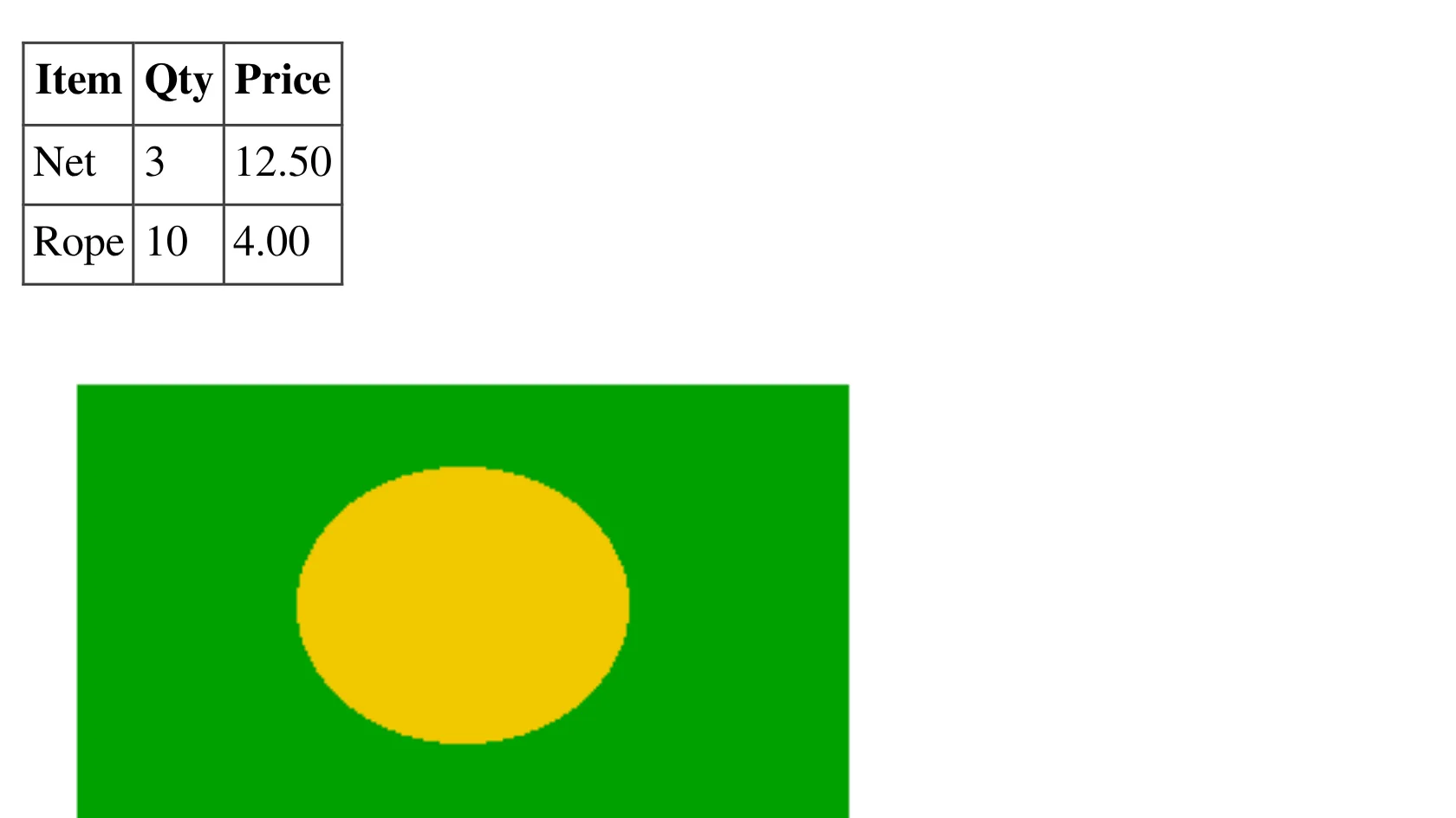
A bordered three-column table and a green image with a yellow oval, from the EPUB, enlarged 3 times
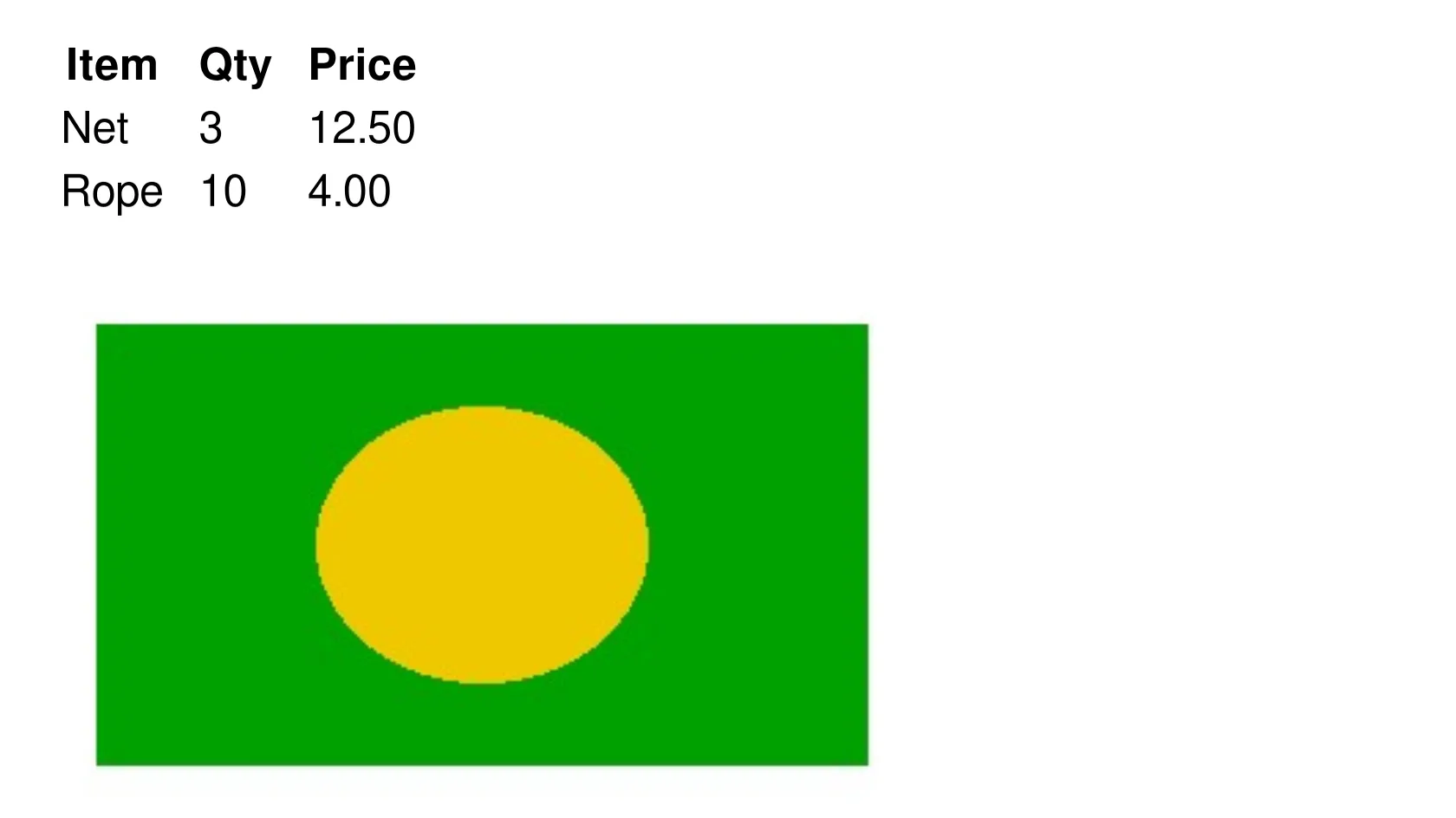
The same region from the MOBI as Calibre re-renders it: the table has lost its borders and the image is a JPEG
Measured on indox.org on 4 November 2026: the sample EPUB we uploaded and the MOBI we downloaded. Drag the handle to compare a table and a GIF image, enlarged 3 times, as Calibre re-renders the MOBI (not a Kindle).

Why use indox to convert EPUB to MOBI?

Cover, title and author carried over

In our test Calibre's metadata reader showed the title, author and language of the MOBI, and the cover was kept as a 21.6 kB JPEG with a thumbnail. A second test book that had no cover came out with a generated one.

Contents list kept, with its nesting

The sample had a 5-entry nested contents list, and all 5 entries were still there, at the same depth, when we converted the MOBI back to EPUB with calibre 6.13.0. A second test book kept 2 of 2.

Every image becomes a JPEG

PNG with transparency, JPEG and GIF images all came out as JPEG in our tests. The MOBI held 4 JPEG records: the cover, its thumbnail and 2 figures.

Calibre's default MOBI, checked in the file

The output file names calibre 6.13.0 as the tool that wrote it. We did not change any settings in our run, so the result is Calibre's default type, the old MOBI 6 format.

What happens to your book

Stays

  • Title, author and language
  • The cover, as a JPEG with a thumbnail
  • Chapters and the contents list, 5 of 5 entries with nesting in our test
  • The text, including Persian text in our second test

Changes

  • The format becomes old MOBI 6, with no KF8 layer
  • PNG and GIF images become JPEG, and transparency is lost
  • Table borders and note-block styling can disappear
  • The file grew about 2.5 times in our test
  • DRM protection blocks the conversion altogether

Which format should you use?

Your readerUseWhy
Kindle 1, 2 or DX class, loaded by USBMOBI from this pageForum posts report these models read only the old MOBI type
A recent KindleThe EPUB, via Send to KindleAmazon reportedly accepts EPUB there; confirm on Amazon's site
A modern Kindle where layout mattersAZW3, made with a desktop toolIt carries the KF8 layer with HTML5 and CSS3
Publishing a book on KDPEPUBKDP ended MOBI for reflowable books on 1 August 2021
Fixed pages for print or screenEPUB to PDFA PDF keeps page positions that MOBI 6 cannot

How do I convert EPUB to MOBI online?

  1. 1

    Add your EPUB

    Drop the EPUB on the box or choose it from your device. Keep the original, because it is the better-quality copy and the one modern readers prefer.

  2. 2

    Confirm MOBI, then start the conversion

    Check that MOBI is the output format, start the conversion and wait for it to finish. In our test a 20.4 kB book took 5.8 seconds from the click to Completed.

  3. 3

    Download the MOBI and copy it to your reader

    Save the file, connect your Kindle or reader by USB and copy it into its documents folder. Then open it and check the contents list and the pictures.

What do I get from indox's EPUB to MOBI converter?

You hand over an EPUB and take back a MOBI for an older Kindle or reader, without installing Calibre. The page states the output type, what it drops and where a different route is better.

  • A MOBI with the cover, chapters and contents list of your book
  • Nothing to install on Windows, Mac, Linux or a phone
  • A conversion we ran and measured on a real sample
  • Stated up front: this is old MOBI 6, not KF8
The indox EPUB to MOBI converter: drop a file or choose one to convert it to MOBI

What are the limits for EPUB to MOBI?

Size

The upload box shows the live size limit before you add a file. Signing in raises it; a paid plan does not change it.

Formats

EPUB in, MOBI out. Pick another output on the converter if you need a different format.

Privacy

Files are encrypted in transit over HTTPS and processed on indox infrastructure.

Deletion

Free-tier files are kept for 24 hours after the job finishes, then deleted automatically.

Limits worth knowing

  • The result is old MOBI 6 only. It is not a KF8 or dual file, so it has no custom fonts and limited styling.
  • DRM-protected EPUBs cannot be converted. Books bought with copy protection will fail, and removing protection is not something this page does.
  • Fixed-layout EPUBs, such as comics and picture books, depend on exact positions that MOBI 6 cannot hold. Expect them to be reflowed or to look wrong.
  • We could not open Amazon's own help pages when we checked on 4 November 2026, so we have not confirmed first-hand what Send to Kindle accepts today. Confirm it on Amazon's site before you choose a route.

When the result is not what you expected

What you seeWhyWhat to do
The Kindle does not list the MOBINewer Kindles and Send to Kindle may no longer take MOBICopy the file by USB into the documents folder, or send the EPUB instead
The conversion failsThe EPUB may be DRM-protected or damagedUse a DRM-free copy you own, or try another copy of the file
Table borders or note styling are goneOld MOBI 6 has little styling supportKeep the EPUB for layout, or use EPUB to PDF for fixed pages
You cannot change the font on a newer KindleForum users report old MOBI 6 files lack custom font supportSend the EPUB or make an AZW3 with a desktop tool

What do the free and paid plans add?

Free

  • All converters
  • Daily credit refresh
  • Email support

Basic

  • Access to all features
  • AI Extract
  • Priority conversions
  • Email support
Highest priority

Premium

  • Everything in Basic
  • Highest priority queue
  • Priority support

Pay-As-You-Go

  • No subscription
  • Credits never expire
  • Opt-in auto-refill
  • Access to all features
See prices
Related conversionsPDF to EPUB

EPUB vs MOBI: what is the difference?

Compared onEPUBMOBI
StandardOpen standard maintained by the W3CProprietary, partly documented; no public specification
ContainerZIP package of XHTML, CSS and imagesBinary PalmDB file; Mobipocket first, then Amazon
StylingFull HTML and CSS support, embedded fontsOld MOBI 6 has little styling; KF8 added HTML5 and CSS3 in 2011
Where it opensMost readers and apps, and Send to KindleOlder Kindles and MOBI-only readers; Kindles still read it over USB
PublishingAccepted by Amazon KDPKDP ended MOBI for reflowable books on 1 August 2021

Who can use a EPUB to MOBI converter?

  • Owners of older Kindles who copy books by USB

    Forum posters report that Kindle 1, 2 and DX class models read only the old MOBI type. If your reader is one of them, an EPUB will not open and a MOBI copied over USB will.

  • Readers whose device or app accepts MOBI but not EPUB

    Some older readers and apps from the Mobipocket era open MOBI and nothing else. A converted copy lets a DRM-free EPUB you own reach them.

  • People who were told to convert everything to MOBI

    Older guides tell you to convert EPUB to MOBI for a Kindle. This page and its guide below help you decide whether that still applies to your device.

  • Authors and formatters handing a file to older tooling

    Amazon KDP stopped taking MOBI for reflowable books on 1 August 2021, but a MOBI proof can still be useful for a legacy reader or an old workflow.

When to use it

  • Putting a DRM-free novel on a Kindle 2 or DX that cannot open EPUB.
  • Loading an EPUB onto an older reader that only lists MOBI files.
  • Making a MOBI copy for a legacy ebook app you still use.
  • Checking how an EPUB's cover, contents list and images survive the old MOBI type.

Where can I read more about converting files?

Do it all with indox

View all 94 tools

EPUB to MOBI FAQs

Do I still need MOBI for my Kindle?

Probably not if your Kindle is recent. Amazon reportedly changed Send to Kindle in late 2023 to accept EPUB and drop MOBI, though we could not verify Amazon's current wording ourselves. MOBI is mainly for older models and MOBI-only readers that you load by USB.

What is the difference between MOBI and AZW3?

MOBI 6 is the old layer with little styling. AZW3 carries the newer KF8 layer with HTML5 and CSS3, so it keeps more of the layout. This page writes MOBI 6 only. For a modern Kindle, use the EPUB itself or make an AZW3 with a desktop tool such as Calibre.

Will my formatting stay the same?

Text, chapters, cover and the contents list did in our test. Table borders, note-block styling and image transparency did not. The result suits plain novels and non-fiction better than books with heavy design.

Why does my converted MOBI not show up on my Kindle?

Newer Kindles and Send to Kindle may refuse MOBI. Copy the file by USB into the documents folder instead, or send the EPUB. A DRM-protected source will have failed to convert in the first place.

Are the cover and contents list kept?

In our test, yes. The cover was a 21.6 kB JPEG, 5 of 5 contents entries survived with their nesting, and a book with no cover got a generated one. Check your own file, because other books can behave differently.

Can I convert a DRM-protected EPUB?

No. A book with copy protection cannot be read by the converter. Use a DRM-free EPUB that you own.

Do I need an account, and how long does it take?

In our anonymous test there was no sign-up and no limit message. A 20.4 kB EPUB took 5.8 seconds from the click to Completed and a 4.5 kB one took 4.8 seconds. Larger books will take longer.

Do images lose quality?

They are re-encoded as JPEG, so PNG transparency and GIF animation are lost and fine lines can soften. In our test 4 images in the output were all JPEG.