Section 1: identity and tax year
Your name, SSN, and the tax form and year the request covers.
15109
Request for Tax Deferment
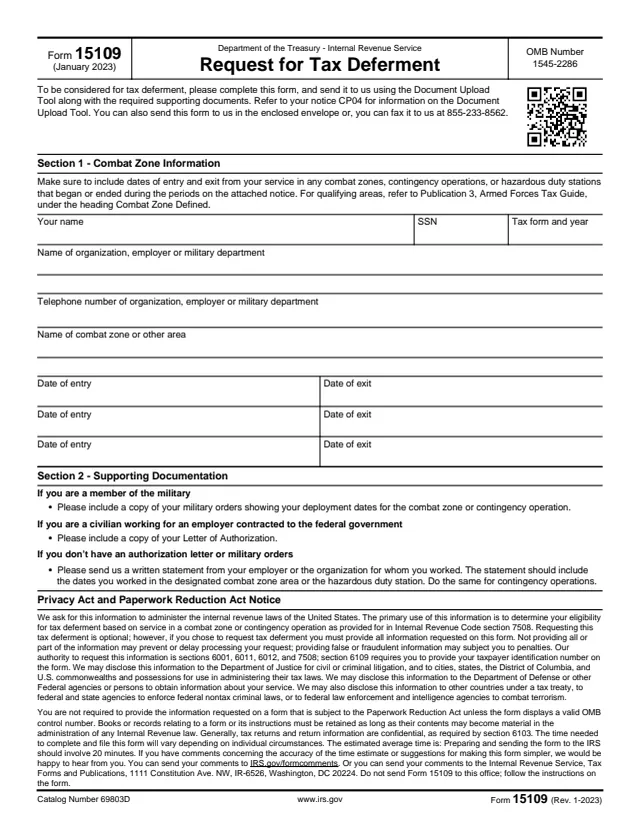
Form 15109 is a one-page request for tax deferment, and it tells the reader to refer to notice CP04 for the Document Upload Tool. The form's Privacy Act notice says the primary use of the information is to determine eligibility for tax deferment based on service in a combat zone or contingency operation, as provided for in Internal Revenue Code section 7508.
The form asks for the person's name, SSN and the tax form and year, the organization, employer or military department they served with, and the dates of entry and exit for each combat zone or other area. A second section lists the supporting documents to include, such as military orders or a Letter of Authorization.
The form says requesting the deferment is optional. It can be sent with the Document Upload Tool, in the enclosed envelope, or by fax. You can fill out Form 15109 free in your browser on this page and download the result without an account.
Your name, SSN, and the tax form and year the request covers.
The name and telephone number of the organization, employer or military department.
The name of the combat zone or other area, and three pairs of date of entry and date of exit lines.
The list of documents to include: military orders, a Letter of Authorization, or a written statement from the employer or organization.
Explains why the IRS asks for the information, cites Internal Revenue Code section 7508, and gives an estimated average time of 20 minutes.
Enter your name and SSN, and the tax form and year the request is for.
Enter the name and telephone number of the organization, employer or military department you served with.
Name the combat zone or other area and enter each date of entry and exit. The form says to include service that began or ended during the periods on the attached notice, and refers to Publication 3, Armed Forces Tax Guide, under Combat Zone Defined.
Add the documents Section 2 lists for your situation: military orders, a Letter of Authorization, or a written statement from the employer or organization with the dates worked.
Upload the form and documents with the Document Upload Tool described in notice CP04, mail it in the enclosed envelope, or fax it.
You get the real form, filled in a browser tab, with nothing standing between you and the finished PDF.
The form says to send it using the Document Upload Tool along with the required supporting documents, and to refer to notice CP04 for information on the tool.
The form says it can also be sent in the enclosed envelope, or faxed to 855-233-8562.
The form asks for military orders, a Letter of Authorization, or a written statement from the employer or organization, depending on the situation.
The Privacy Act notice says not providing all or part of the information may prevent or delay processing the request, and false or fraudulent information may lead to penalties.
The form gives a Washington, DC address for comments on the form and says "Do not send Form 15109 to this office; follow the instructions on the form."
The person asking for the deferment completes the form and sends it to the IRS. The form names three situations for the supporting documents.
No tool matches that search.
The form says its information is used to determine eligibility for tax deferment based on service in a combat zone or contingency operation, as provided for in Internal Revenue Code section 7508.
The form lists three ways: the Document Upload Tool described in notice CP04, the enclosed envelope, or fax to 855-233-8562.
Military orders showing deployment dates, a Letter of Authorization for a civilian working for a federal contractor, or a written statement from the employer or organization with the dates worked.
The form refers to Publication 3, Armed Forces Tax Guide, under the heading Combat Zone Defined.
The form's Privacy Act notice says requesting this tax deferment is optional.
The form estimates 20 minutes for preparing and sending it to the IRS.