JPG to SVG Converter

Add a JPG and get an SVG made of traced vector paths. Flat logos trace well; photos produce very large files.

To convert jpg to svg, add the JPG file, keep SVG as the output format and download the result. In our test, indox traced an 800 × 600 logo into 100 vector paths with no embedded picture, while a photo-like JPG grew about 28 times.

Transfers use HTTPS, and files converted on the free tier are deleted after 24 hours, so the result is not a long-term archive. Quality depends on the source file, so open the SVG file once before you share it.

FromJPGLossy

JPEG (Joint Photographic Experts Group)

A lossy photo format from the early 1990s built on block-based DCT compression. It is limited to 8-bit standard dynamic range with no alpha channel, yet it opens in practically every editor, viewer, email client and content management system.

ToSVGLosslessTransparency

SVG (Scalable Vector Graphics)

An XML-based vector format from the W3C. Shapes, paths and text are stored as drawing instructions, not pixels, so an SVG stays sharp at any size and can be styled with CSS, animated or scripted inside a browser.
An 800 × 600 logo JPG and a photo-like JPG, both made by us at quality 85 and converted on indox.org

Logo JPGthe original, 800 × 600
21.8 KB
Logo SVGfrom indox, 100 paths, 93 fill colours, 1.32× larger
28.7 KB
Photo-like JPGthe original, 800 × 600
117.3 KB
Photo-like SVGfrom indox, 3,572 paths, 28.0× larger
3.29 MB
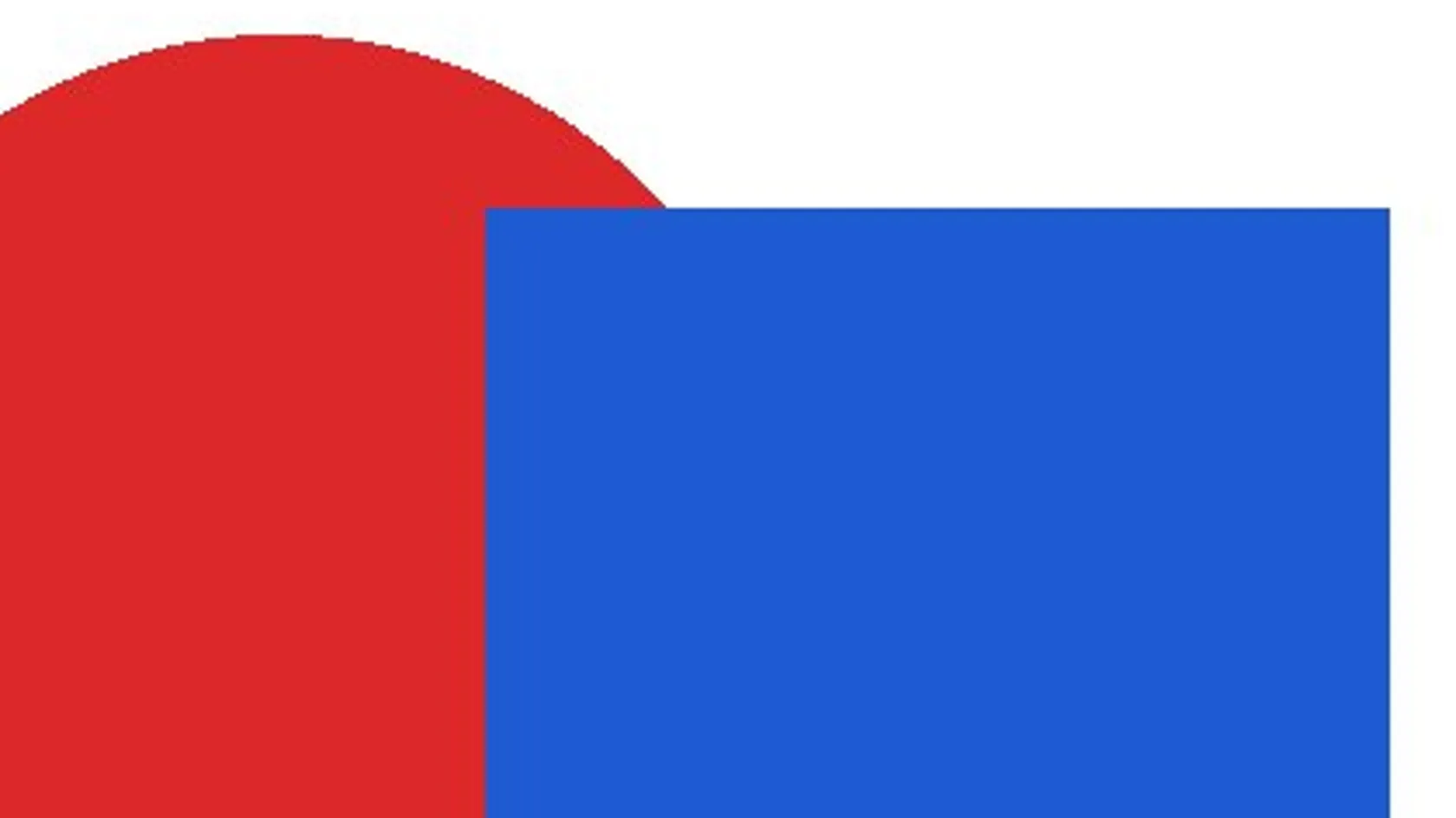
A region of the logo JPG enlarged 4 times, showing pixel stair-steps on the circle and shape edges
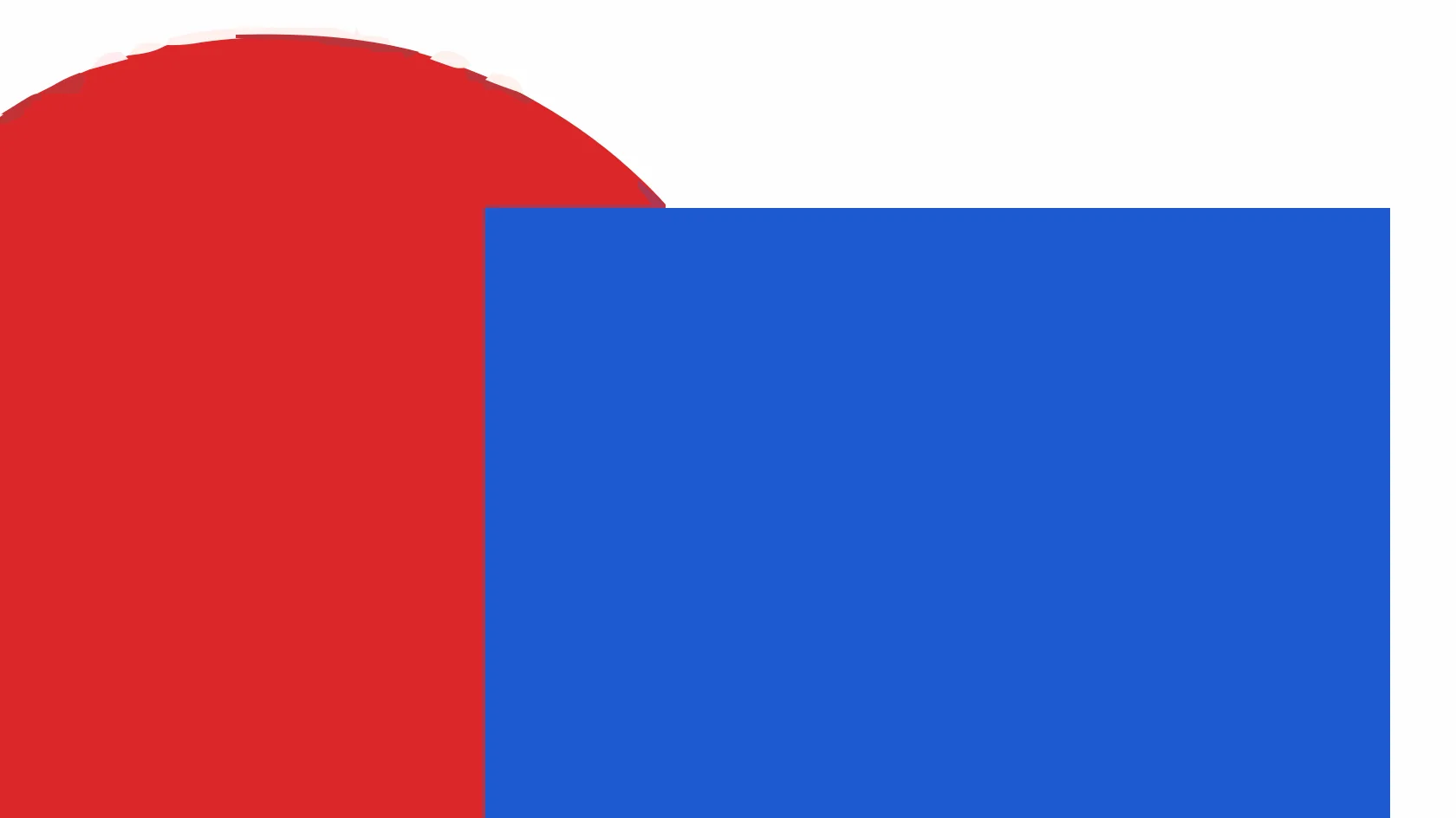
The same region in the SVG made by indox enlarged 4 times, with crisp straight edges and small trace slivers on the circle
Measured on indox.org on 4 November 2026: the logo JPG we uploaded and the SVG we downloaded. Drag the handle to compare the same region enlarged 4×.

Why use indox to convert JPG to SVG?

Real vector paths inside the SVG

Some converters only wrap the JPG in an SVG file as a base64 image, which is still pixels. In our test the downloaded files contained path elements and no image tag and no base64 data, so the shapes can be selected and recoloured in a vector editor.

Works with .jpg and .jpeg, nothing to install

JPG and JPEG are the same format. The conversion runs on indox servers, so it works the same on Windows, Mac, Chromebook, Android and iPhone, and anonymous use needed no sign-in in our test.

What to expect by image type

This page gives measured numbers for a flat logo and for a photo-like image, so you can see before you start whether tracing suits your picture.

What happens to your JPG

Stays

  • Your original JPG, which is not touched
  • The overall look of a flat image at normal size
  • The image width and height, 800 × 600 in our test

Changes

  • Pixels become filled vector paths, 100 for our logo
  • File size: 1.32 times larger for the logo, 28 times for the photo-like image
  • Text in the picture becomes outline paths
  • Faint JPEG fringes can become small extra shapes
  • No viewBox is written, only width and height

How do I convert JPG to SVG online?

  1. 1

    Add your JPG

    Drop the file on the box or choose it from your device. Use the largest, cleanest copy you have, because compression noise in a small JPG becomes extra shapes in the trace.

  2. 2

    Keep SVG as the output and start

    Check that SVG is the output format, then start the conversion. In our test the logo took 3.6 seconds from the click to Completed and the photo-like image took 11.3 seconds.

  3. 3

    Download and check the paths

    Save the SVG and open it in a text editor or a vector tool. Real paths show up as path elements. Add a viewBox if you need the file to scale inside a web page.

What do I get from indox's JPG to SVG converter?

You hand over a JPG and take away an SVG built from traced paths that you can recolour, resize and open in vector software. The sections below show what we measured, including the cases where tracing is the wrong tool.

  • A traced SVG made of paths, with no picture wrapped inside
  • Nothing installed on Windows, Mac or a phone
  • Measured size and path counts for a logo and for a photo
  • Your original JPG is left as it was
The indox JPG to SVG converter: drop a file or choose one to convert it to SVG

What are the limits for JPG to SVG?

Size

The upload box shows the live size limit before you add a file. Signing in raises it; a paid plan does not change it.

Formats

JPG in, SVG out. Pick another output on the converter if you need a different format.

Privacy

Files are encrypted in transit over HTTPS and processed on indox infrastructure.

Deletion

Free-tier files are kept for 24 hours after the job finishes, then deleted automatically.

Limits worth knowing

  • Photos make very large SVG files. Our 117 KB photo-like JPG became a 3.29 MB SVG with 3,572 paths, so the SVG is far heavier than the picture it came from.
  • We saw no option to set the number of colours or the level of detail, so you cannot tune the trace on this page. If the result is too busy, try a cleaner or larger source.
  • The output is an approximation. Even our flat logo showed small slivers along the circle edge when we compared it with the JPG at four times zoom.
  • Text becomes outline paths and is no longer editable text. If you need real text, retype it in a vector editor.
  • The SVG has width and height but no viewBox in our test, so add one before using the file as a fluid image on a web page.
  • Our samples were synthetic images that we generated, not scans or camera photos, so your numbers will differ.

When the result is not what you expected

What you seeWhyWhat to do
The SVG is several megabytesThe source has many colour changes, such as a photo, and each region becomes a pathKeep the JPG for photos, or try a flat, high-contrast version of the picture
Stray specks and slivers around shapesJPEG compression leaves noise that the trace copies as shapesStart from the largest, cleanest original and remove the background noise first
The SVG will not scale in my pageThe file has width and height but no viewBoxAdd a viewBox such as 0 0 800 600 to the svg tag, matching the file's width and height
I cannot edit the wordsText becomes outline pathsDelete those paths and retype the text in a vector editor
I need the picture to stay a photoTracing replaces pixels with shapesUse JPG to PNG or JPG to PDF instead

What do the free and paid plans add?

Free

  • All converters
  • Daily credit refresh
  • Email support

Basic

  • Access to all features
  • AI Extract
  • Priority conversions
  • Email support
Highest priority

Premium

  • Everything in Basic
  • Highest priority queue
  • Priority support

Pay-As-You-Go

  • No subscription
  • Credits never expire
  • Opt-in auto-refill
  • Access to all features
See prices

JPG vs SVG: what is the difference?

Compared onJPGSVG
StoresA grid of coloured pixelsShapes, paths and text as drawing instructions
ScalingBlurs or blocks when enlargedStays sharp at any size
Best forPhotos and shaded imagesLogos, icons and flat illustrations
EditingPixel editorsVector editors, CSS and code
File sizeSmall for photosSmall for flat art, very large for traced photos

Who can use a JPG to SVG converter?

  • Designers who only have a flattened logo

    A client sends a logo as a JPG and you need shapes to recolour or resize. Tracing gives you paths to start from, but check the edges and rebuild any text by hand.

  • Makers with cutters and laser tools

    Cutting machines and CNC software work from outlines. A simple high-contrast picture traces into usable shapes, while a busy picture gives thousands of tiny paths that are hard to cut.

  • Web developers who want scalable icons

    A flat icon saved as JPG can become an SVG that stays sharp at any size once a viewBox is added. For photos, keep the JPG, because the SVG would be much larger.

When to use it

  • Turning a flat logo saved as JPG into paths you can recolour in a vector editor.
  • Preparing a simple high-contrast shape for a cutting machine or a laser job.
  • Making a sharp-at-any-size version of a basic icon or illustration for a web page.
  • Checking quickly how well a picture traces before you spend time cleaning it by hand.

Where can I read more about converting files?

Do it all with indox

View all 94 tools

JPG to SVG FAQs

How do I convert JPG to SVG?

Open the converter, add your JPG or JPEG file, keep SVG as the output and download the result. In our test the logo finished in 3.6 seconds without any sign-in.

Is converting JPG to SVG the same as vectorizing?

Yes, here it is. A JPG has no vector shapes, so the converter has to trace the pixels into paths. In our run the generator comment in the file named VTracer 0.6.4, and the file held no image tag.

Will the SVG contain editable vector shapes?

Yes. In our test the logo SVG held 100 path elements, each with its own fill, so you can select and recolour them in a vector editor. They follow the pixels, so expect extra small shapes where the JPG had noise.

Why does my JPG turn into such a large SVG?

A photo has thousands of colour changes, and each region becomes a path with its own fill. Our photo-like JPG of 117,278 bytes became 3,285,977 bytes with 3,572 paths. A flat logo stayed close to its original size.

Does JPG to SVG lose quality, and will it stay sharp?

The edges stay sharp at any zoom, but the shapes are an approximation of the pixels. On our logo the mean difference from the JPG was 1.42 out of 255, and on the photo-like image it was 7.15.

How can I tell the SVG is a real vector?

Open it in a text editor. Real tracing shows path elements with fill colours. A wrapped picture shows one image tag with a long block of base64 text. Our downloads had no image tags and no base64.

Is a JPG a good source for an SVG?

It works best when the JPG is a large, clean, flat-colour graphic. Heavy JPEG compression adds blocks and fringes that the trace may copy as shapes, so use your biggest original.

Can I use the SVG with a cutting machine or laser cutter?

Possibly, for simple shapes. Many cutters want clean outlines, and a trace of a busy image gives thousands of small paths. Try a high-contrast picture first and check the result in your cutter software.

Does it keep my text as text?

No. The word in our logo sample became outline paths and the SVG had no text elements.