JPG to DXF Converter

Add a JPG and get a DXF of traced black outlines. Logos and line art trace well; photos do not.

To convert jpg to dxf, add the .jpg or .jpeg file, keep DXF as the output format and download the result. The dxf holds traced outlines of the dark shapes, not your picture: in our test a 1200 × 800 px logo gave 12 closed polylines and no embedded image.

Transfers use HTTPS, and files converted on the free tier are deleted after 24 hours, so the result is not a long-term archive. Quality depends on the source file, so open the DXF file once before you share it.

FromJPGLossy

JPEG (Joint Photographic Experts Group)

A lossy photo format from the early 1990s built on block-based DCT compression. It is limited to 8-bit standard dynamic range with no alpha channel, yet it opens in practically every editor, viewer, email client and content management system.

ToDXFLossless

DXF (Drawing Exchange Format)

Autodesk's exchange format for CAD drawings. It stores geometry such as lines, polylines, arcs, circles, splines and text as tagged data, grouped into named layers, and it can be written as plain text or in a binary form. Autodesk publishes a reference for it, which is why CAD, laser and CNC software can read files they did not create.

A 1200 × 800 px logo JPG made for this test, and a noisy gradient JPG, converted on indox.org

Logo JPGthe original, 1200 × 800 px
40,771 B
Logo DXFfrom indox, 12 closed polylines, 3.3 s
17,807 B
Photo-like JPGnoisy gradient, 1200 × 800 px
236,129 B
Photo-like DXF2,245 closed polylines, about 19× the JPG
4,550,111 B
Part of the logo JPG used in our test, showing a circle, a rectangle with a hole and text, enlarged 2×
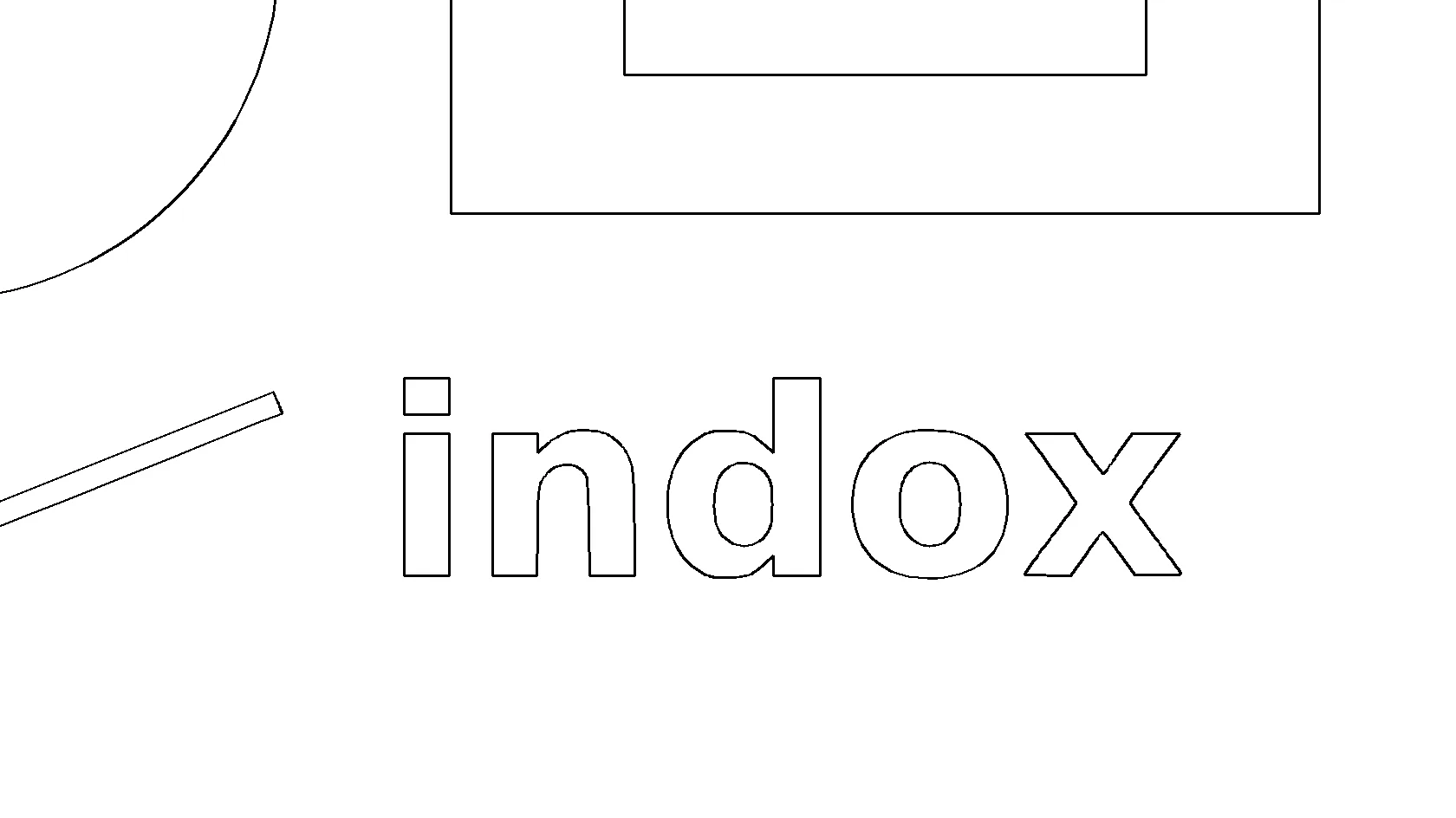
The same part of the logo drawn from the DXF made by indox, with black outlines on white, enlarged 2×
Measured on indox.org on 5 November 2026: our own logo JPG and the DXF we downloaded, and a photo-like noisy gradient as the failure case. Drag the handle to compare the same part of the logo, enlarged 2×, as the JPG and as the DXF outlines.

Why use indox to convert JPG to DXF?

Outlines your CAD or laser software can select

The DXF contains vector polylines, so each shape can be picked, moved and scaled in a CAD program. In our test the file held 12 closed polylines and no image entity, which is why it does not behave like a picture pasted into a drawing.

Works with .jpg and .jpeg, nothing to install

JPG and JPEG are the same format. The conversion runs on indox servers, so it works the same in a browser on Windows, Mac, Linux, Android or iPhone, without a tracing program on your computer.

Curves stay curves

Rounded shapes are written as arc segments instead of thousands of tiny straight lines. In our test 207 of the 282 vertices in the logo DXF carried an arc bulge, so curves are kept as arcs.

Plain facts about scale and size

The DXF is unitless and one drawing unit equals one pixel of your JPG. The page gives the arithmetic to bring the drawing to real size, so you do not discover this at the cutter.

What happens to your JPG

Stays

  • Your original JPG, which is not touched
  • The shape of the dark areas, as outlines
  • Smooth curves, stored as arc segments
  • The width-to-height proportion, 1200 × 800 in our test

Changes

  • Colour: discarded, with grey turned to black or white at mid grey
  • Fills: solid shapes become outlines, holes become their own polylines
  • Detail: shading and soft edges are lost
  • Units: pixels become unitless drawing units
  • Layers: everything goes on one layer, named 0 in our test
  • File size: 40,771 B became 17,807 B for a logo, but a noisy photo grew 19 times

How do I convert JPG to DXF online?

  1. 1

    Prepare a clean, high-contrast JPG

    Crop to the artwork, make it dark on a light background and remove stray marks. A sharp logo or drawing at a large pixel size traces best. Keep the JPG itself: the DXF cannot be turned back into it.

  2. 2

    Add the file and start the conversion

    Drop the JPG on the box or choose it from your device, check that DXF is the output format and start. In our test a logo took 3.3 seconds from the click to Completed.

  3. 3

    Download the DXF and check it before you cut

    Open the file in your CAD or laser program, look at the shapes and set the size (see the scale note below). Make a test cut on scrap material before you use real stock.

What do I get from indox's JPG to DXF converter?

You hand over a JPG of a logo or drawing and take away a DXF of its outlines, ready to open in CAD, laser or CNC software. The page tells you what the file contains and where tracing fails before you spend time on it.

  • A DXF of closed outline polylines from a JPG or JPEG, in a few clicks
  • Nothing installed on Windows, Mac, Linux or a phone
  • What is inside the file stated from a measured run: entity types, layer, units and size
  • The failure case shown, so you know a photo will not give a clean cut path
The indox JPG to DXF converter: drop a file or choose one to convert it to DXF

What are the limits for JPG to DXF?

Size

The upload box shows the live size limit before you add a file. Signing in raises it; a paid plan does not change it.

Formats

JPG in, DXF out. Pick another output on the converter if you need a different format.

Privacy

Files are encrypted in transit over HTTPS and processed on indox infrastructure.

Deletion

Free-tier files are kept for 24 hours after the job finishes, then deleted automatically.

Limits worth knowing

  • The result is a trace of your picture. Curves are approximated and small details can be lost, so expect to tidy the DXF in CAD before cutting.
  • Photos and gradients trace badly. In our test a gradient with noise gave 2,245 closed polylines and a 4.5 MB DXF from a 236 KB JPG, about 19 times larger and a poor cut path.
  • There are no tracing controls on the page we tested: we saw no threshold, smoothing, speck removal or size setting. Fix the picture before you add it.
  • Colour is not kept, and the converter reads dark as shape. We did not test light artwork on a dark background, so invert such an image first.
  • The DXF has no real-world unit. One drawing unit is one pixel, and the file carries no unit setting, so set the size yourself in your CAD or laser program.
  • We did not measure an upload size limit. Very large images may fail or take longer; reduce the pixel size if one does.

When the result is not what you expected

What you seeWhyWhat to do
The DXF is huge and full of small shapesA photo or noisy image has thousands of dark patches after the black-and-white cutUse a clean logo or line art, or simplify the image first; see JPG to SVG for a vector you can edit
The drawing opens tiny, or far too largeOne drawing unit is one pixel and the file sets no unitScale it in your CAD or laser program against a known length
The outline is missing or invertedThe converter reads dark as shapeMake the artwork dark on a light background and convert again
Edges look rough or wobblyJPEG compression adds speckle around edges, and curves are approximatedStart from the least compressed copy, at a larger pixel size
Small gaps or loose specks appearTracing follows every dark patch it findsClean the DXF in CAD before cutting, and test on scrap
You need a PNG, not a DXFThe tracing is only needed for cut pathsUse JPG to PNG to keep the picture itself

What do the free and paid plans add?

Free

  • All converters
  • Daily credit refresh
  • Email support

Basic

  • Access to all features
  • AI Extract
  • Priority conversions
  • Email support
Highest priority

Premium

  • Everything in Basic
  • Highest priority queue
  • Priority support

Pay-As-You-Go

  • No subscription
  • Credits never expire
  • Opt-in auto-refill
  • Access to all features
See prices

JPG vs DXF: what is the difference?

Compared onJPGDXF
What it storesA grid of coloured pixelsGeometry such as lines, polylines, arcs and text
ScalingGets blurry when enlargedScales without losing sharpness
ColourFull colour, 8 bits per channelNot kept by this converter; one layer
Where it opensBrowsers, phones, editors, emailCAD, laser and CNC software
Typical usePhotos, logos on the webCut paths and technical drawings

Who can use a JPG to DXF converter?

  • Laser, CNC and plasma makers tracing a logo

    You have a logo as a JPG and need cut paths. A DXF of its outlines saves redrawing it by hand, though you still check and tidy the paths and test on scrap before a real cut.

  • Sign and vinyl makers

    A customer sends a JPG of a badge or lettering. Traced outlines give your cutter software shapes it can work with, and a high-resolution original gives smoother edges.

  • CAD users digitising a sketch or a plan

    A scanned line drawing can become polylines you can snap to, scale and measure against. Expect a trace of the lines without dimensioned geometry, and scale it against a known length.

  • Makers turning clip art into cut paths

    Bold, one-colour clip art converts cleanly. Detailed or shaded artwork turns into many small shapes, so simplify it in an image editor first.

When to use it

  • Tracing a company logo to cut it from wood, acrylic or sheet metal on a laser or CNC machine.
  • Making a vinyl or stencil cut file from a JPG of lettering or a badge.
  • Turning a scanned line drawing into polylines to scale and trace over in CAD.
  • Preparing a silhouette for a plasma cutter, then testing it on scrap before the real cut.
  • Checking quickly whether a picture is clean enough to trace before you invest in manual redrawing.

Where can I read more about converting files?

Do it all with indox

View all 94 tools

JPG to DXF FAQs

How do I convert a JPG to DXF?

Open the converter, add your JPG or JPEG, keep DXF as the output and download the result. In our test a 1200 × 800 px logo took 3.3 seconds. Check the shapes in your CAD or laser program before you cut.

Does the DXF contain vector shapes or just my picture?

Vector shapes. In our test the file held 12 closed polylines and no IMAGE entity, so the JPG is not embedded. The shapes are outlines of the dark parts of the picture.

Will the DXF look exactly like my JPG?

No. Colour, shading and fine detail are dropped, filled areas become outlines, and curves are approximated. A bold logo comes close in shape; a photo does not.

Why is my photo a huge, messy DXF?

The converter reduces the picture to black and white, and a photo has thousands of tiny dark patches. Our gradient-with-noise test gave 2,245 polylines and a 4.5 MB file from a 236 KB JPG. Trace logos and line art instead.

What units and scale does the DXF use?

The file is unitless and one drawing unit equals one pixel. Our 1200 × 800 px JPG gave a drawing 1200 by 800 units. To cut a 120 mm wide logo, scale the drawing by 0.1 so that 1200 units become 120 mm.

Can I keep the colours of my JPG?

No. Colour is discarded and the shapes go on a single layer. If you need separate parts, split the artwork into separate images, one per colour, and convert each.

Which JPGs trace best, and how do I prepare one?

Dark, sharp, high-contrast artwork on a plain light background, at a large pixel size. Crop tight, remove grey backgrounds and specks, and raise the contrast. JPEG compression adds speckle around edges, so start from the least compressed copy you have.

Is the DXF ready to cut on my laser or CNC machine?

Treat it as a starting point. Open it, check the size, close any gaps, delete stray specks and run a test cut on scrap. Tracing gives outlines; it does not check them for your machine.

Is there a size limit or a free daily limit?

We saw no limit, quota or sign-up wall in our test, and we did not measure a maximum upload size. If a large file fails, reduce its pixel size and try again.