Works for BMP to JPEG as well
JPG and JPEG are the same format with a shorter and a longer extension. Add a .bmp and you get a .jpg back, so there is no separate tool to look for.
Add a .bmp file and get a much smaller .jpg back. If your BMP has transparency, read what happens to it first.
To convert bmp to jpg, add the .bmp file, keep JPG as the output format and download the result. In our test, a 3.8 MB 32-bit bmp became a 37 KB jpg with the same 1200 × 800 pixel size, and its transparent areas turned into the colour stored under them, not black.
Transfers use HTTPS, and files converted on the free tier are deleted after 24 hours, so the result is not a long-term archive. Quality depends on the source file, so open the JPG file once before you share it.
BMP (Windows Bitmap)
A raster format introduced by Microsoft that stores pixels with little or no compression, so files are large. It supports depths from 1 to 32 bits per pixel, and version 5 added optional alpha and embedded colour profiles. A 32-bit file may or may not use its fourth byte for transparency. Files begin with the letters BM.
JPEG (Joint Photographic Experts Group)
A lossy photo format from the early 1990s built on block-based DCT compression. It is limited to 8-bit standard dynamic range with no alpha channel, yet it opens in practically every editor, viewer, email client and content management system.
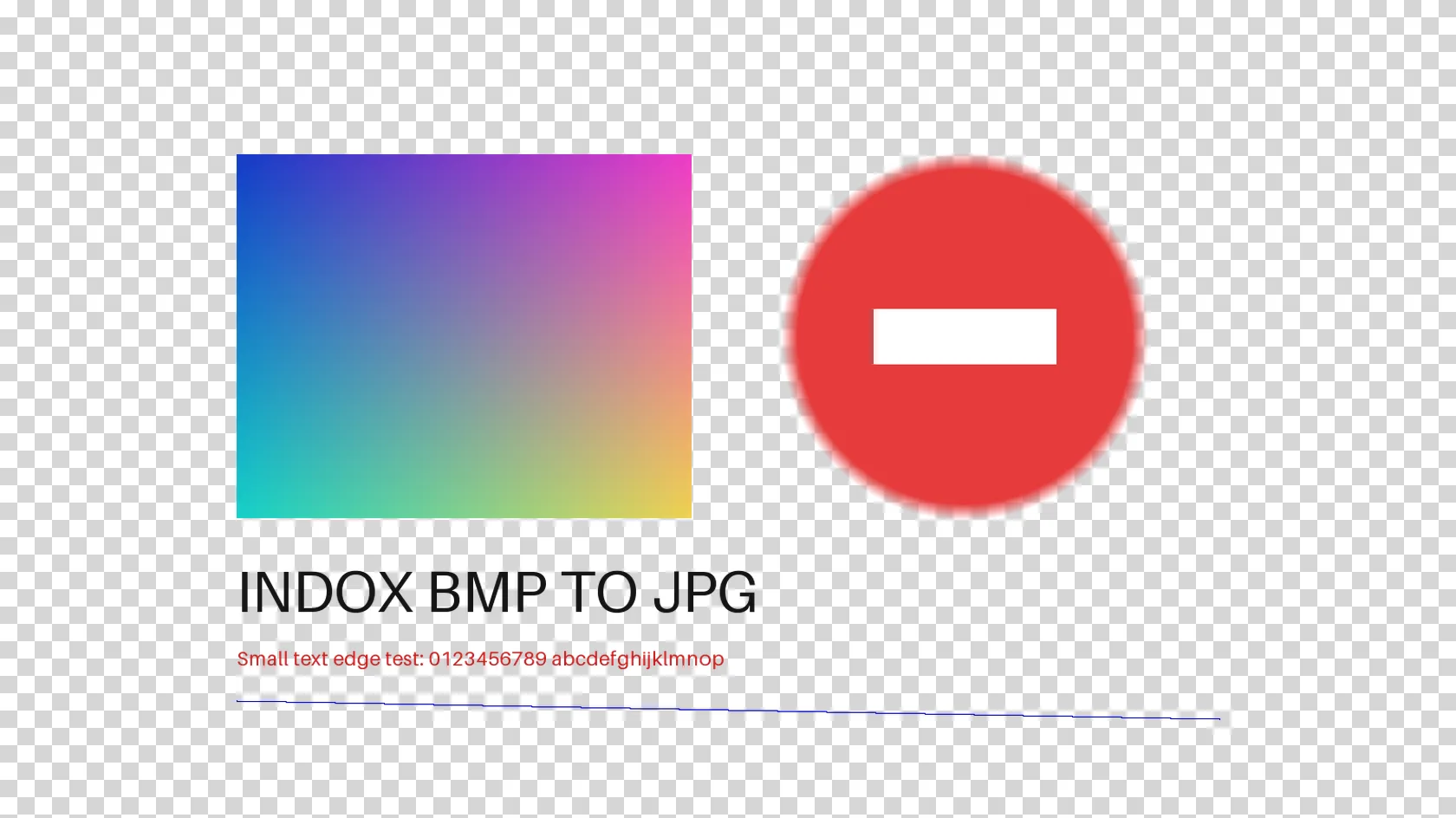
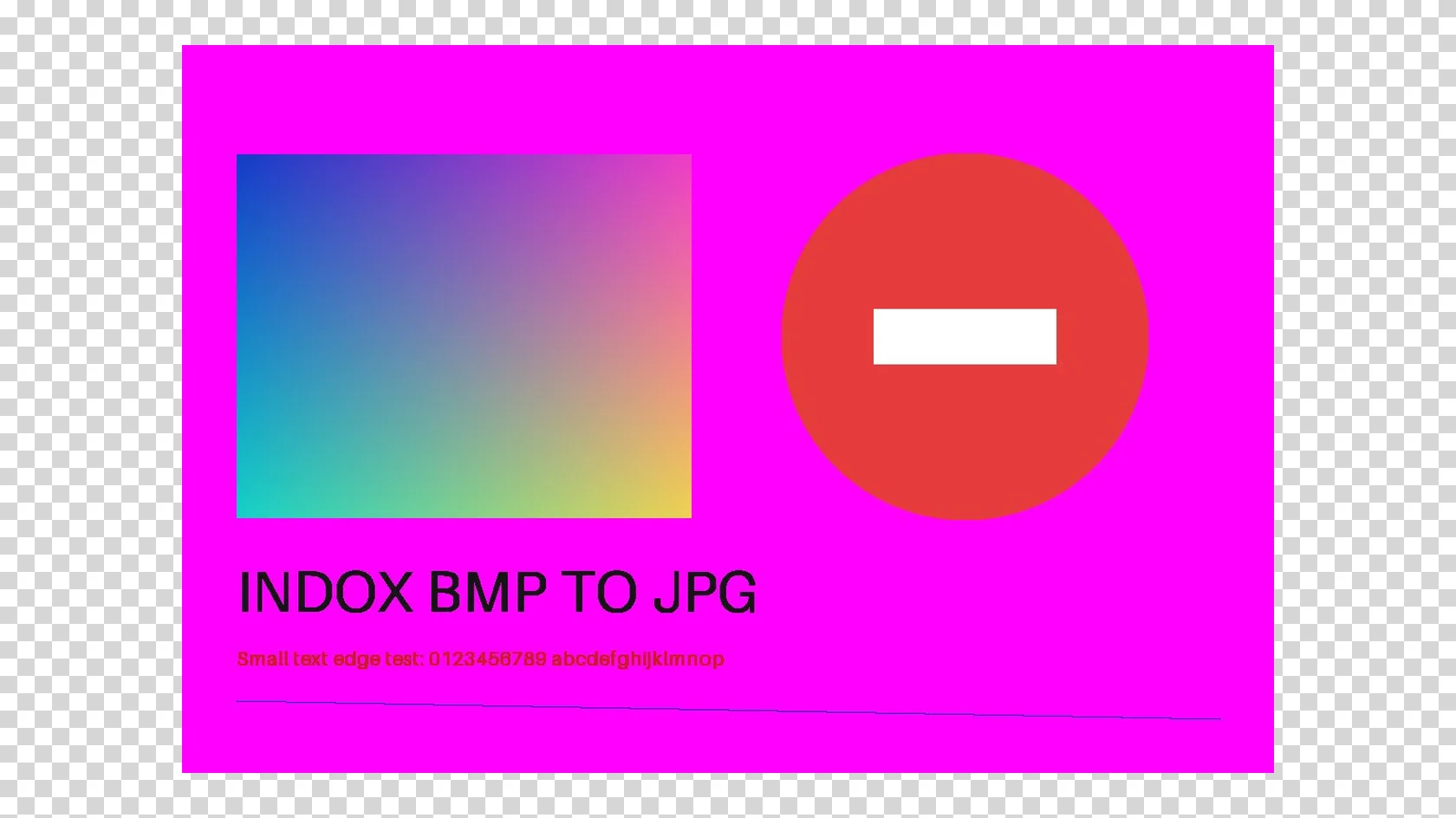
A 1200 × 800 px 32-bit BMP with an alpha channel and an embedded sRGB profile, converted on indox.org
JPG and JPEG are the same format with a shorter and a longer extension. Add a .bmp and you get a .jpg back, so there is no separate tool to look for.
The conversion runs on indox servers, so it works on Windows, Mac, Linux and phones without Paint, Photoshop or a command-line tool.
We ran four conversions as an anonymous visitor and saw no sign-up wall, limit message or paywall text. We have not measured a daily cap.
Below is what our test showed for a 32-bit BMP with an alpha channel, so you can tell before converting whether the result fits.
Drop the .bmp on the box or choose it from your device. Keep the original: a JPG cannot be turned back into the exact BMP.
Check that JPG is the output format, then start the conversion. In our test it took 3.7 seconds from the click to Completed for a 3.8 MB file.
Save the JPG and open it once. If the BMP had transparent areas, look at what colour they became before you use the file.
You hand over a BMP and take away a JPG that is small enough to email, upload or put on a web page. The page also states what happens to transparency and colour profiles.
The upload box shows the live size limit before you add a file. Signing in raises it; a paid plan does not change it.
BMP in, JPG out. Pick another output on the converter if you need a different format.
Files are encrypted in transit over HTTPS and processed on indox infrastructure.
Free-tier files are kept for 24 hours after the job finishes, then deleted automatically.
| What you see | Why | What to do |
|---|---|---|
| A magenta, white or odd coloured area where the BMP was transparent | JPG has no alpha, and the stored colour under transparent pixels shows through | Convert to PNG with BMP to PNG, or fill the background in an editor before converting |
| Blocky detail around text or edges | JPG compression discards fine detail | Keep the BMP master and use the JPG for sharing only |
| Colours look slightly different | No colour profile is written to the JPG | Compare against the original and keep the BMP for colour-critical work |
| The upload fails on a very large BMP | Uncompressed bitmaps are huge and we did not test a size limit | Try a smaller copy, or resize the image in an editor first |
| You need a document, not a picture | A JPG is a single image | Convert the JPG with JPG to PDF |
| Compared on | BMP | JPG |
|---|---|---|
| Compression | None or simple lossless, so files are large | Lossy, so detail is approximated and files are small |
| Transparency | Optional alpha in 32-bit files | No alpha channel |
| Colour profile | Version 5 can embed one | Can carry one, but this converter writes none |
| Where it opens | Windows tools and many editors | Practically every browser, phone, editor and email client |
| Typical use | Legacy Windows images and raw pixel output | Sharing, uploads and web pages |
Facts checked on November 4, 2026
No tool matches that search.
We converted a BMP as an anonymous visitor on 4 November 2026 and saw no sign-up wall, limit message or paywall text in four conversions. We have not tested what happens after many files, so we make no promise about a daily allowance.
A JPG has no alpha channel. In our test the converter ignored the alpha values and kept the colour stored under each transparent pixel. One file with magenta stored there came out magenta, and one with white stored there came out white. It was not black. The result therefore depends on the hidden colour in your file, and you cannot pick the fill here.
In our test a 3,840,726 byte BMP became a 37,072 byte JPG, about 104 times smaller, and a second version of the same art became 46,431 bytes, about 83 times smaller. Your ratio depends on the picture. Photos with fine detail compress less than flat graphics.
Yes, a little, because JPG is lossy. In our test the output matched quality 85 and the opaque areas stayed close to the source, with a peak signal-to-noise ratio of about 33 dB. Sharp edges and text are where blocky detail shows first. We did not test other quality settings.
No. The BMP in our test had an embedded sRGB profile, and the JPG had no profile and no EXIF data. The pixel size stayed 1200 × 800.
Yes. JPG and JPEG are one format with two spellings of the extension, and you get a .jpg file either way.
The converter page states that converted files on the free tier are deleted after 24 hours. Read the page itself for the current wording before you upload anything private.
Uncompressed BMP files are big, and a slow connection or a very large file can fail partway. We did not find a documented size limit and did not test one, so try a smaller copy or resize the image in an editor first.
Use PNG when the picture has transparency, sharp text, screenshots or line art, or when you will edit it again. PNG is lossless, so nothing is approximated. Use JPG when you want the smallest file for sharing a photo.