Header
Inventory management center, period covered, number of paid hours, date prepared and the printed Reports Control Number FS-322.
GSA3291
Monthly Performance Report
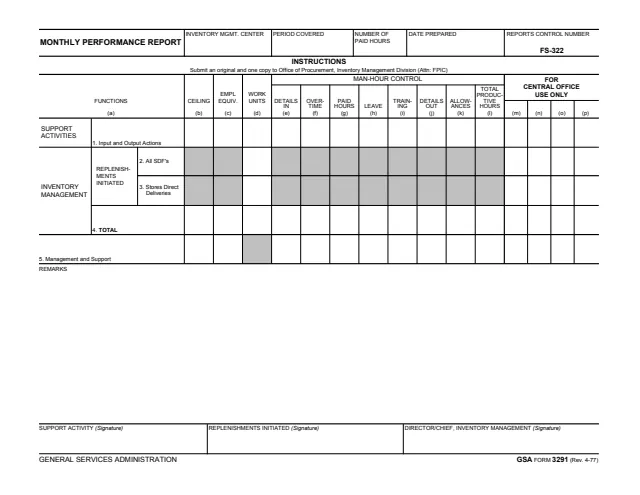
GSA Form 3291, Monthly Performance Report, is a General Services Administration form, Rev. 4-77. The footer prints GENERAL SERVICES ADMINISTRATION, and GSA hosts it in its forms library. The form carries Reports Control Number FS-322.
It is a one-page internal report for an inventory management center. For each function, from support activities to inventory management and management and support, it records the ceiling, employee equivalents, work units and a man-hour control breakdown: details in, overtime, paid hours, leave, training, details out, allowances and total productive hours.
The only instruction printed on the form says to submit an original and one copy to Office of Procurement, Inventory Management Division (Attn: FPIC). Three signature blocks close the report. You can fill it out free in your browser on this page and download the result without an account.
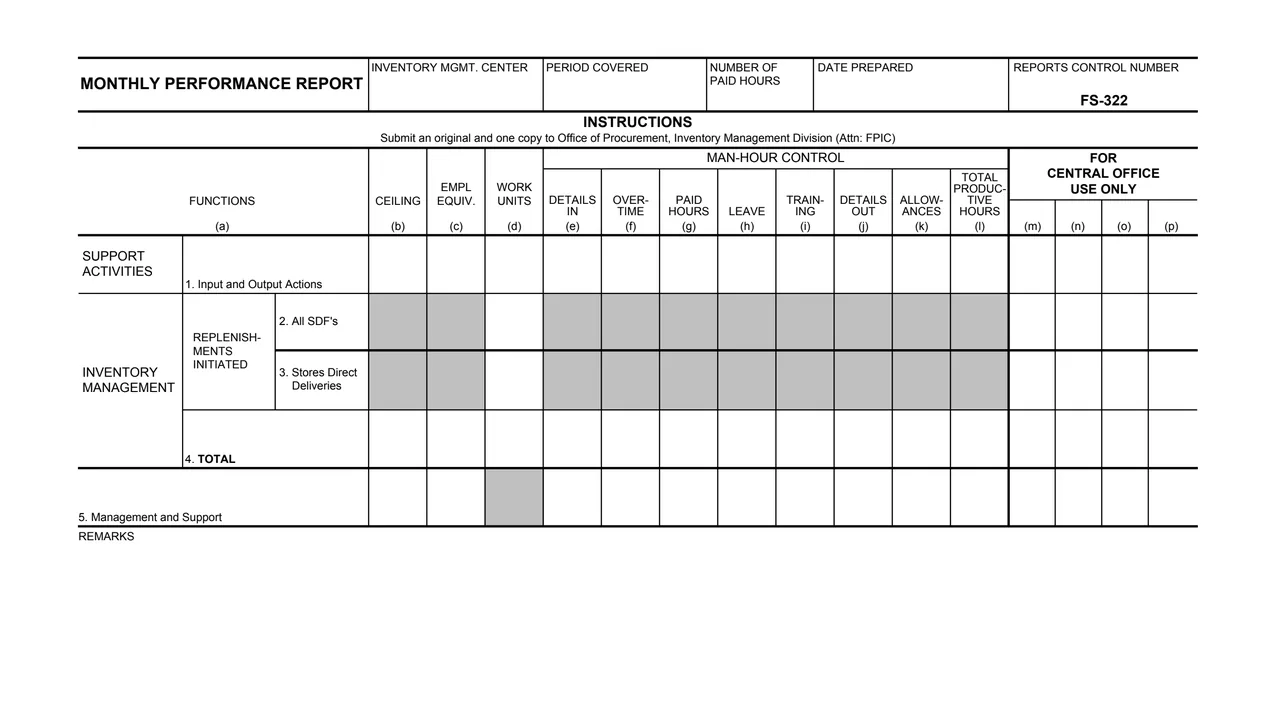
Inventory management center, period covered, number of paid hours, date prepared and the printed Reports Control Number FS-322.
Input and Output Actions, with figures across the staffing, work unit and man-hour columns.
Replenishments initiated for All SDF's and Stores Direct Deliveries, then a TOTAL row. On rows 2 and 3 only the work units cell is open; the others are shaded.
Management and Support, with the work units cell shaded and the staffing and man-hour cells open.
Ceiling, employee equivalents and work units, then Man-Hour Control: details in, overtime, paid hours, leave, training, details out, allowances and total productive hours.
A remarks area, three signature blocks, and columns (m) to (p) marked For Central Office Use Only.
The form is one page: a header, five numbered rows across lettered columns (a) to (p), remarks and signatures.
Enter the inventory management center, the period covered, the number of paid hours and the date prepared.
For each function row, complete columns (b) to (d) where the cells are open.
Enter details in, overtime, paid hours, leave, training, details out, allowances and total productive hours in columns (e) to (l).
Columns (m) to (p) are marked For Central Office Use Only.
Use the remarks area as needed, then collect the three signatures: support activity, replenishments initiated and director or chief, inventory management.
The form says to submit an original and one copy to Office of Procurement, Inventory Management Division (Attn: FPIC).
The form prints one instruction line. These steps follow the blocks it prints.
You get the real form, filled in a browser tab, with nothing standing between you and the finished PDF.
The form says: Submit an original and one copy to Office of Procurement, Inventory Management Division (Attn: FPIC).
The form prints Reports Control Number FS-322 in its header.
The PDF prints no OMB number, privacy notice, burden estimate or further instructions. GSA's page lists Current Revision Date 04/1977 and no authority or regulation.
This is an internal GSA report, not a form the public files. The form names these offices and signers.
No tool matches that search.
The footer prints GENERAL SERVICES ADMINISTRATION and GSA FORM 3291 (Rev. 4-77). GSA hosts a copy in its forms library.
The form says to submit an original and one copy to Office of Procurement, Inventory Management Division (Attn: FPIC).
The form has three signature blocks: SUPPORT ACTIVITY, REPLENISHMENTS INITIATED and DIRECTOR/CHIEF, INVENTORY MANAGEMENT.
On the PDF, rows 2 and 3 (All SDF's and Stores Direct Deliveries) are shaded except for the work units column, and row 5 has its work units cell shaded. Only the open cells take entries.
The form marks them For Central Office Use Only.