Items 1 to 3: month, region and hours
Reporting month and year, reporting region, and total available people hours, next to reports control symbol PB-126.
GSA3163
Operations Activity Report
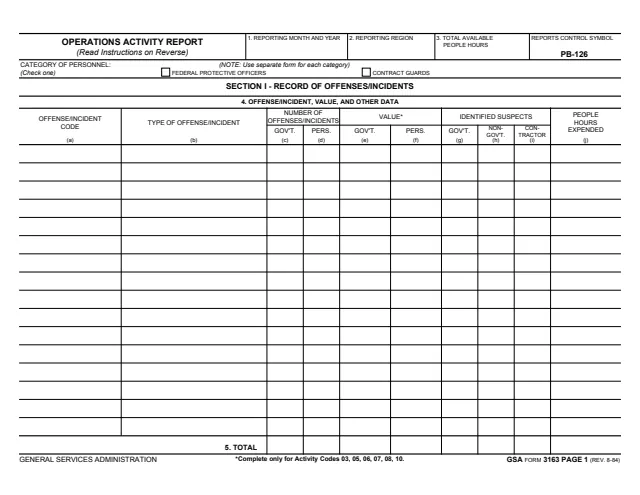
GSA Form 3163, Operations Activity Report, is a General Services Administration form, GSA FORM 3163 PAGE 1 (REV. 8-84) in its footer, with reports control symbol PB-126. GSA hosts it in its forms library.
The report covers one month and one reporting region. A check box picks the category of personnel, Federal Protective Officers or Contract Guards, and the form says to use a separate form for each category. Section I, Record of Offenses/Incidents, lists each offense or incident code reported during the month with the number of offenses and incidents, dollar values, identified suspects and people hours expended.
The instructions for Section I are printed on the back of page 1. The downloaded PDF holds page 1 and its back only. You can fill it out free in your browser on this page and download the result without an account.
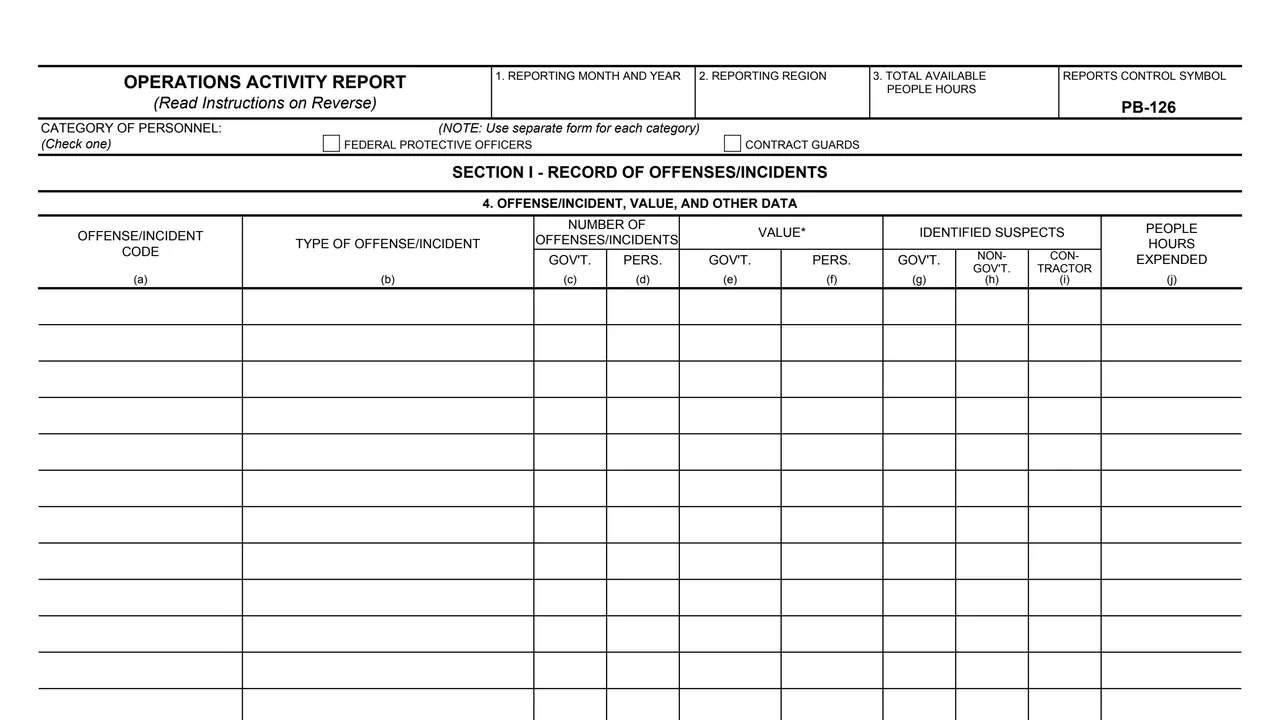
Reporting month and year, reporting region, and total available people hours, next to reports control symbol PB-126.
Check one: Federal Protective Officers or Contract Guards. The note says to use a separate form for each category.
The offense or incident code number and the type of offense or incident that matches the code.
The number of offenses and incidents for government and for personal property, and the dollar value for government and for personal property.
Identified suspects who were government, non-government or contractor at the time of the offense, and the people hours expended.
A totals row under the table for columns (c) thru (j).
Page 1 holds the report and its back holds the instructions for Section I.
Check the box for Federal Protective Officers or Contract Guards, as appropriate, and use separate forms to record information for each category.
Enter the numeric month and year of the report, e.g., 01/80 for January 1980, the region number or "NCR", and the uniformed people hours available during the month.
Enter code numbers for offenses and incidents reported during the month, in ascending order, with the matching type in column (b).
Columns (c) and (d) take the number of offenses and incidents for government property and for individuals and personal property. The value columns are completed only for Activity Codes 03, 05, 06, 07, 08, 10, rounded off to the nearest dollar.
Enter identified suspects by whether, at the time of the offense, they were employed by the Federal government, neither employed by it nor under contract to it, or working under contract to it, then the people hours expended.
The form says it is only necessary to enter totals for columns (c) thru (j) after the last code numbers for FPO's and again after the last code numbers for contract guards.
The back of page 1 gives these instructions.
You get the real form, filled in a browser tab, with nothing standing between you and the finished PDF.
The downloaded PDF prints no address, recipient or due date.
The form prints REPORTS CONTROL SYMBOL PB-126 in its top right corner.
Column (e) is the dollar value of robbery, burglary, theft, arson and vandalism of government property, and column (f) the dollar value of personal property for the same crimes.
The PDF holds GSA FORM 3163 PAGE 1 and PAGE 1 BACK. No later pages are included.
The form does not name a preparer and prints no signature block. It reports by region and by category of personnel.
No tool matches that search.
The footer prints GENERAL SERVICES ADMINISTRATION and GSA FORM 3163 PAGE 1 (REV. 8-84), with reports control symbol PB-126. GSA hosts it in its forms library.
The form says to check the box for Federal Protective Officers or Contract Guards, as appropriate, and to use separate forms to record information for each category.
The note on page 1 says to complete the value columns only for Activity Codes 03, 05, 06, 07, 08, 10. The instructions name robbery, burglary, theft, arson and vandalism and say to round off to the nearest dollar.
The instructions say to enter the numeric month and year of the report, e.g., 01/80 for January 1980.
Column (g) counts suspects employed by the Federal government, column (h) those neither employed by it nor working under contract to it, and column (i) those working under contract to it, each at the time of the offense.
The downloaded pages print no list of codes. Column (a) takes the code numbers for offenses and incidents reported during the month, in ascending order.