Your details
Your name (print or type), your Social Security number, your preparer tax ID number and your mailing address.
15115
Request for Missing Information on the Application for Enrollment or Renewal of Enrollment to Practice before the IRS
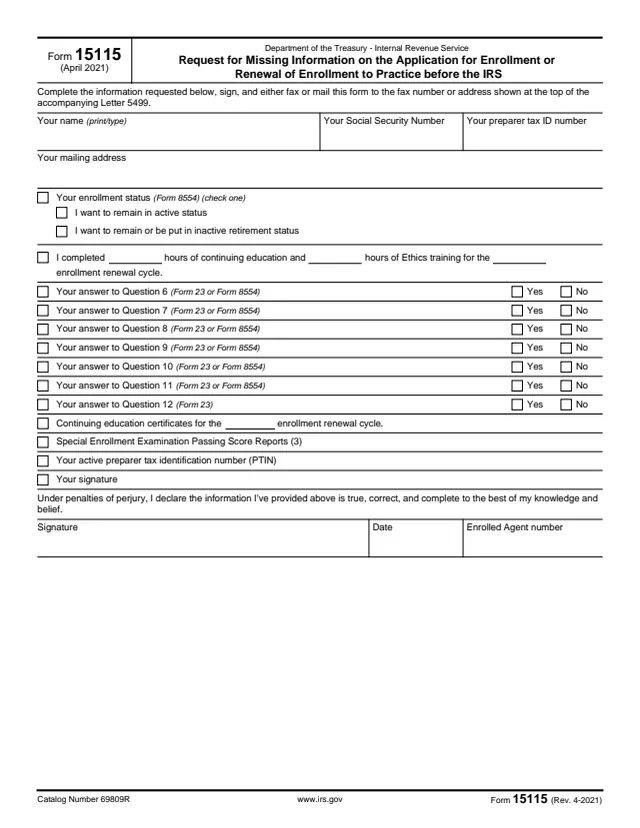
Form 15115, Request for Missing Information on the Application for Enrollment or Renewal of Enrollment to Practice before the IRS, is a one-page reply form. It comes with Letter 5499 and collects details that were missing from an application on Form 23 or Form 8554.
The form asks for the applicant's name, Social Security number, preparer tax ID number and mailing address, the enrollment status choice, continuing education and Ethics hours, and Yes or No answers to Questions 6 through 12 of those applications. The applicant signs under penalties of perjury and adds the Enrolled Agent number.
The form says to complete it, sign it, and fax or mail it to the fax number or address shown at the top of the accompanying Letter 5499. You can fill out Form 15115 free in your browser on this page and download it without an account.
Your name (print or type), your Social Security number, your preparer tax ID number and your mailing address.
Check one: I want to remain in active status, or I want to remain or be put in inactive retirement status.
Blanks for the hours of continuing education and the hours of Ethics training completed for the enrollment renewal cycle.
Yes or No boxes for your answers to Questions 6 through 11 (Form 23 or Form 8554) and Question 12 (Form 23).
Continuing education certificates for the enrollment renewal cycle, Special Enrollment Examination Passing Score Reports (3), and your active preparer tax identification number (PTIN).
A declaration under penalties of perjury that the information is true, correct and complete, with the signature, date and Enrolled Agent number.
The form says to send it to the fax number or address shown at the top of the accompanying Letter 5499. Have the letter ready before you start.
Print or type your name, then enter your Social Security number, your preparer tax ID number and your mailing address.
Check one enrollment status box, then enter the hours of continuing education and of Ethics training for the enrollment renewal cycle.
Mark Yes or No for each question number. The numbers match Questions 6 through 12 on Form 23 or Form 8554.
Fill in the lines for continuing education certificates, the Special Enrollment Examination Passing Score Reports and your active PTIN.
Sign under the penalties of perjury statement, enter the date and add your Enrolled Agent number.
You get the real form, filled in a browser tab, with nothing standing between you and the finished PDF.
The form says to fax or mail it to the fax number or address shown at the top of the accompanying Letter 5499. Form 15115 prints no fax number or address of its own.
Form 15115 prints no due date. The form itself points only to Letter 5499 for where the reply goes.
The applicant signs and dates the form under penalties of perjury, declaring the information true, correct and complete to the best of their knowledge and belief.
Form 15115 has no separate instructions. Its only directions are the lines at the top of the form.
The applicant to practice before the IRS completes and signs the form after receiving Letter 5499. It goes back to the IRS at the fax number or address on that letter.
No tool matches that search.
It is the IRS form titled Request for Missing Information on the Application for Enrollment or Renewal of Enrollment to Practice before the IRS. It collects details that were missing from that application.
The form says to fax or mail it to the fax number or address shown at the top of the accompanying Letter 5499.
Your answers to Questions 6 through 11 on Form 23 or Form 8554, and Question 12 on Form 23, each marked Yes or No.
Yes. The form has a signature and date line under a penalties of perjury statement, along with the Enrolled Agent number.
Yes. You can fill it out in your browser on this page and download it without an account, then fax or mail it as Letter 5499 shows.