Contact information
Social Security number, taxpayer name, any change of address, and primary and secondary phone numbers with the best time to call.
15103
Form 1040 Return Delinquency
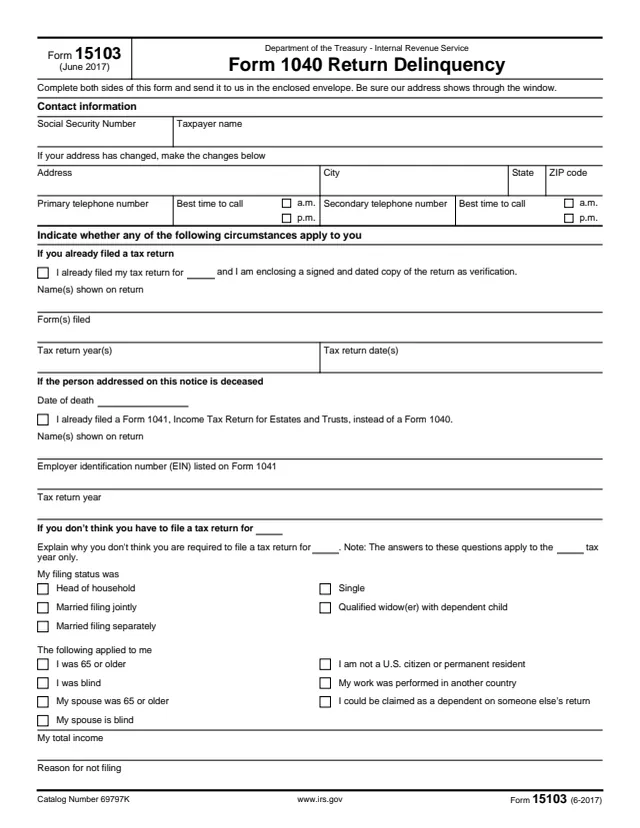
Form 15103, Form 1040 Return Delinquency, is a reply form that comes with an IRS notice. It lets the person the notice is addressed to tell the IRS why a Form 1040 is shown as not filed for a year.
The form lists several circumstances: a return was already filed, the person addressed on the notice has died, the person does not think a return is required for that year, or there is a refund or estimated tax payment from a prior year to apply. Each has its own lines to complete.
The form says to complete both sides and send it back in the enclosed envelope, with the IRS address showing through the window. It ends with a signature under penalties of perjury. You can fill out the PDF free in your browser on this page and download it without an account.
Social Security number, taxpayer name, any change of address, and primary and secondary phone numbers with the best time to call.
The year, the name or names shown on the return, the forms filed, the tax return years and the tax return dates.
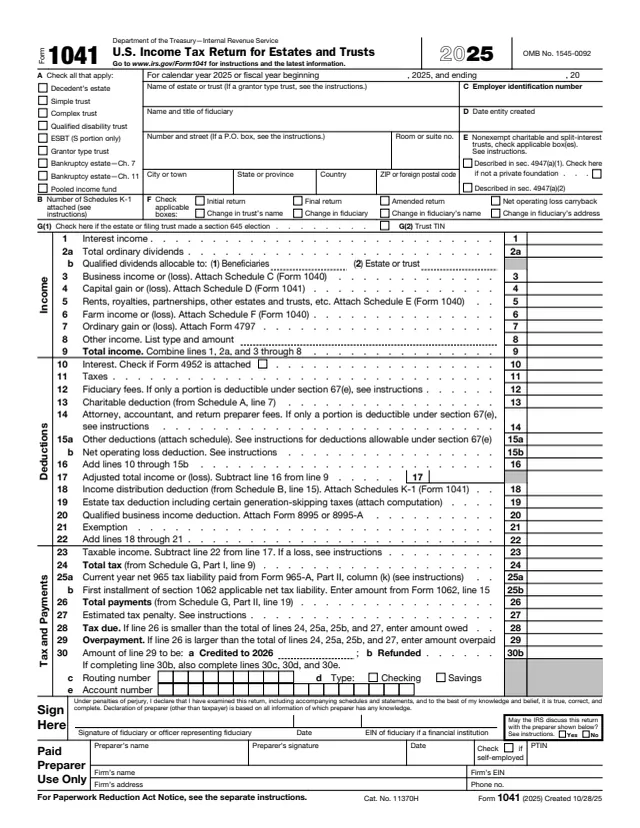
Date of death, and a box for a Form 1041 filed instead of a Form 1040, with the names on that return, its EIN and the tax year.
Filing status boxes, circumstances such as age, blindness, citizenship, work in another country or being claimable as a dependent, total income and the reason for not filing.
On page 2, the choice to apply a prior year credit to another return or get a refund check, then the penalties of perjury statement, signature and date.
Enter the Social Security number and name, any new address, and phone numbers with the best time to call, marking a.m. or p.m.
The form says to indicate whether any of the listed circumstances apply. Complete only the sections that fit, and fill in the tax year in the blanks they show.
Check the box, enter the year, and list the names, forms, years and dates of the return. The box says a signed and dated copy of the return is enclosed.
Explain why, check the filing status and the circumstances that applied, and enter total income. The form notes the answers apply to that tax year only.
Choose to apply the credit to another return, giving the tax form number, period ending and SSN, or to receive it as a refund check. The form notes a return is filed in either case.
Sign and date under penalties of perjury, then send both sides back in the enclosed envelope with the IRS address showing through the window.
You get the real form, filled in a browser tab, with nothing standing between you and the finished PDF.
The form says to send it in the enclosed envelope, making sure the IRS address shows through the window. The form itself prints no address.
The form says to complete both sides of the form before sending it.
If a return was already filed, the form says a signed and dated copy of that return is enclosed as verification.
The form notes that a tax return is filed to be eligible for a refund, even where a return may not be required, and that a return for the year is filed to apply a prior year credit.
The signature covers the information on the form and on any attached income tax return, schedules and statements, under penalties of perjury.
The form is a reply to an IRS notice. It is completed by or for the person the notice is addressed to and returned to the IRS.
No tool matches that search.
It comes with an IRS notice about a Form 1040 return for a year. The form lets the person addressed on the notice say the return was filed, explain why no return is required, or report other circumstances.
The form says to send it in the enclosed envelope with the IRS address showing through the window. The address is not printed on the form.
Check the already filed box, fill in the return details and enclose a signed and dated copy of the return as verification, as the form describes.
The form has a section for the date of death and for a Form 1041 filed instead of a Form 1040, with its EIN and tax year.
The form notes that a tax return is filed to be eligible for a refund, even when a return may not be required.