Markup symbols are removed
Headings became plain lines, and the marks for bold, italic and inline code disappeared. In our notes file the count of # fell from 13 to 0, of * from 6 to 0 and of backticks from 8 to 0.
You get a plain text file with the Markdown symbols removed, ready to paste into an email, a form or a word processor.
To convert md to txt, add the Markdown file, keep TXT as the output format and download the result. The # and * marks, backticks and table pipes are removed, and the words stay. Not everything is cleaned: in our test link addresses were dropped and ~~ strikethrough marks were kept. Other files will differ, and the sections below list what happens to each element.
Transfers use HTTPS, and files converted on the free tier are deleted after 24 hours, so the result is not a long-term archive. Quality depends on the source file, so open the TXT file once before you share it.
MD (Markdown)
A plain-text file where headings, lists, links, tables and code are marked with ordinary punctuation such as # and *. It has no page size, fonts or page breaks, so a reader or converter decides how it looks. Markdown is a family of dialects rather than one standard: CommonMark and GitHub Flavored Markdown are the best known.
TXT (Plain Text)
A file of plain characters with no fonts, bold or links. In our test the TXT from indox was valid UTF-8 with no byte order mark and LF line endings, and its lines were never longer than 72 characters.
Two Markdown test files we wrote (939 and 453 bytes), converted anonymously on indox.org
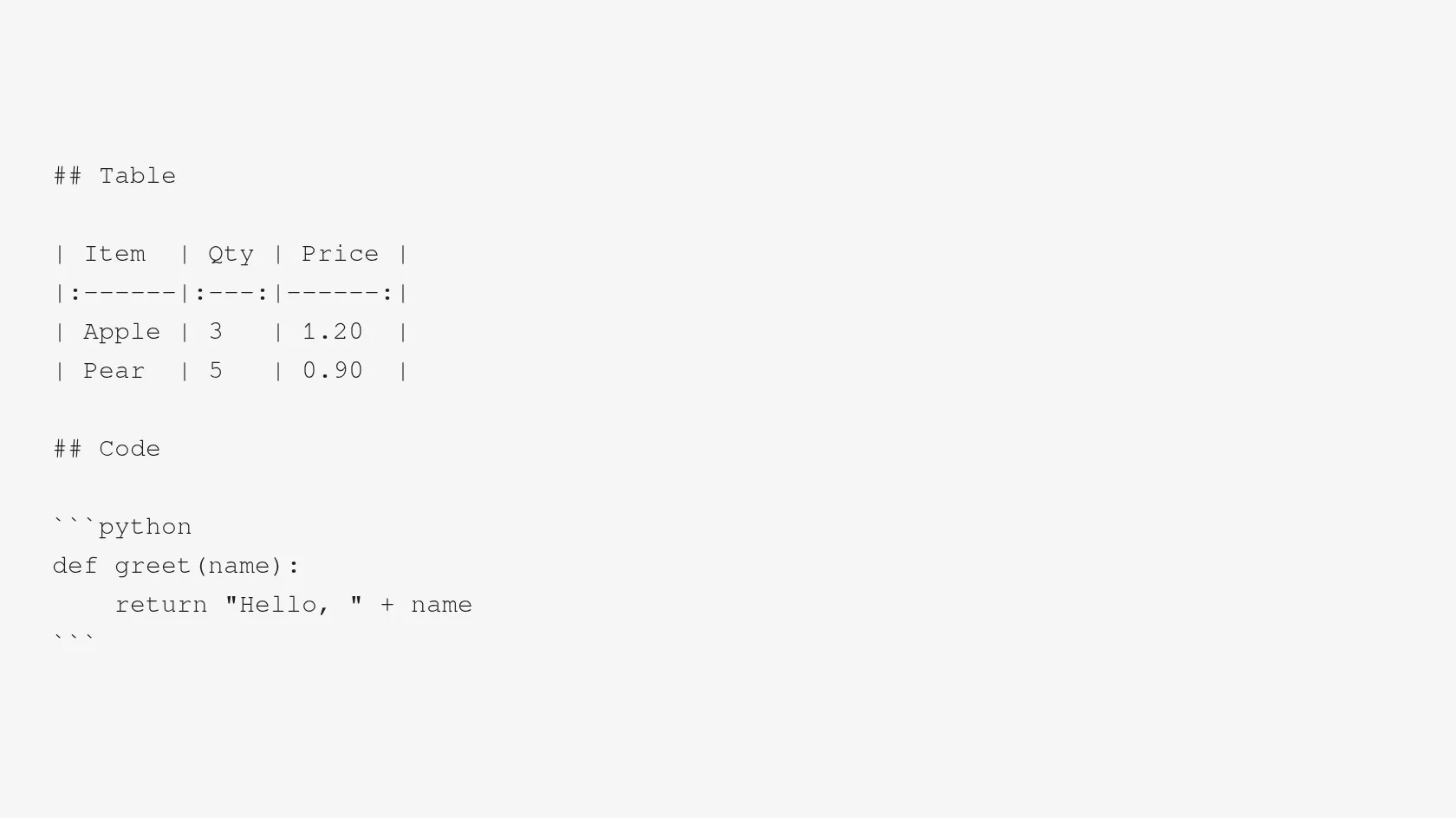
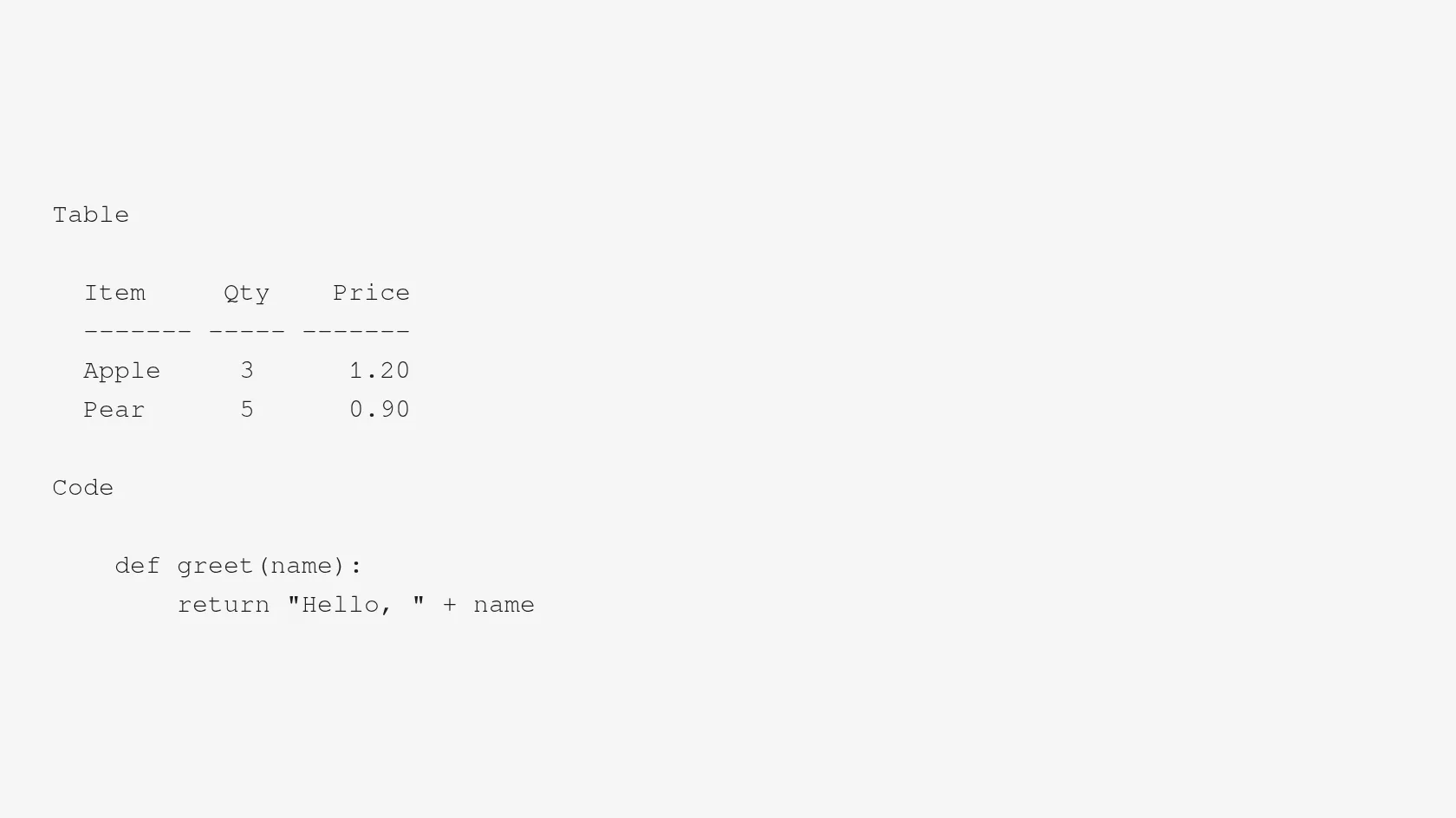
Headings became plain lines, and the marks for bold, italic and inline code disappeared. In our notes file the count of # fell from 13 to 0, of * from 6 to 0 and of backticks from 8 to 0.
A link written as [link to indox](https://indox.org/en-US) came out as the words link to indox. The web address was dropped. A bare address written in the text stayed as it was.
Pipe tables turned into columns lined up with spaces and a dashed rule under the header row. A 6-column, 5-row table stayed aligned, with no line longer than 66 characters.
In our test the Persian, Japanese and accented Latin lines came out character for character the same. The 2 extra non-ASCII characters in the output were the task-list box symbols.
Code fences and the language name were removed and the code was indented by 4 spaces. A block quote lost its > mark and was indented by 2 spaces.
Drop the .md file on the box or choose it from your device. The original is not changed, so you can run it again with edits.
Check that TXT is the output format, then start the conversion and wait for Completed. In our test a 939-byte file took 3.3 seconds from the click to Completed.
Open the file in a text editor and look at links, tables and any HTML you wrote. If a web address matters, copy it from the Markdown first, because it will not be in the TXT.
You hand over a Markdown file and take away plain text, with nothing installed on your computer. The page tells you up front what is removed, what is kept and what is left half-cleaned, and every number on it comes from a file we converted ourselves.
The upload box shows the live size limit before you add a file. Signing in raises it; a paid plan does not change it.
MD in, TXT out. Pick another output on the converter if you need a different format.
Files are encrypted in transit over HTTPS and processed on indox infrastructure.
Free-tier files are kept for 24 hours after the job finishes, then deleted automatically.
| What you see | Why | What to do |
|---|---|---|
| The link addresses are missing | Only the link text is kept | Copy the addresses from the Markdown first, or write them as bare URLs in the text |
| Tildes ~~ are still in the text | Strikethrough marks are not removed | Find and replace ~~ in a text editor |
| Tags like </div> or <b> are left over | Raw HTML is only partly removed | Delete the HTML from the source, or clean the TXT by hand |
| Lines have run together into one paragraph | Consecutive lines are merged into one paragraph | Put a blank line between the lines you want kept apart |
| You need fonts, bold or a page layout | A TXT cannot hold them | Use MD to PDF or MD to DOCX instead |
| Compared on | MD | TXT |
|---|---|---|
| What it is | Plain text with punctuation that marks headings, lists, links and code | Plain characters only |
| Headings and emphasis | Written as # and * marks that a viewer turns into styling | No styling, so the marks are removed and the words remain |
| Links and images | Hold a web address next to the label or alt text | Keep the label or alt text, and in our test no address |
| Tables | Pipe-separated rows | Columns aligned with spaces |
| Registered type | text/markdown, defined in RFC 7763 | text/plain |
Facts checked on November 4, 2026
No tool matches that search.
Add the .md file to the converter in your browser, keep TXT as the output format and download the result. Nothing is installed. Open the TXT in a text editor to check links and tables.
The symbols disappear. In our notes file the # count fell from 13 to 0, * from 6 to 0, backticks from 8 to 0 and table pipes from 16 to 0. The exceptions are ~~ strikethrough marks, which stayed, and raw HTML, which is only partly removed.
You can, and it opens in a text editor, but the file still contains every symbol. The # and * marks, the backticks and the pipes remain, because renaming changes the name and leaves the content alone.
The link text stays and the web address is dropped. [link to indox](https://indox.org/en-US) became the words link to indox. A bare address typed in the text stayed. If you need the addresses, copy them before converting.
A pipe table becomes columns aligned with spaces and a dashed rule under the header, with no pipes. In our test a 6-column, 5-row table stayed aligned. It is plain text, not CSV, so a spreadsheet will not split the cells for you.
An image is replaced by its alt text. The picture and its address are not in the TXT, since a text file cannot hold an image.
In our test it did. We converted lines in Persian, Japanese and accented Latin, and they came out character for character the same, in a UTF-8 file with no byte order mark. We did not test every script, so open the result and check yours.
Not as typed. A single line break inside a paragraph is merged, and paragraphs are re-wrapped at 72 characters. A blank line between two paragraphs is kept, and list items stay on their own lines. We saw no option to change this.
In our test of two small files no limit, quota or paywall message appeared, but we did not try large files. The converter page states how long uploaded files are kept, so read it before you upload anything private.
Yes. Pandoc can write plain text, and some editors can copy Markdown as plain text. Its options differ from what this page runs, so the output may differ. This page is the quicker route for a file or two.