Tags, scripts and styles are left out
In our test, marker words placed inside a script block and a style block did not appear in the TXT. The page title tag was not written as a separate line, so the heading text showed up once.
You get a plain TXT file with the words of your HTML page: no tags, no styling, nothing a text editor cannot show.
To convert html to txt, add the HTML file, keep TXT as the output format and download the result. People often call this html to text. The tags are removed, the readable words stay, and text inside script and style blocks is left out. Link addresses are not kept. In our test a 993-byte HTML file became a 517-byte TXT file, though your file will differ, and a page that builds its content with JavaScript can give an almost empty result.
Transfers use HTTPS, and files converted on the free tier are deleted after 24 hours, so the result is not a long-term archive. Quality depends on the source file, so open the TXT file once before you share it.
HTML (HyperText Markup Language)
The markup language of web pages. An HTML file is plain text describing structure, and it usually points to separate stylesheets, images, fonts and scripts. It has no page size, so a browser lays the content out to fit whatever window displays it.
TXT (Plain Text)
A file that holds only characters. It has no fonts, bold or italic, images, tables or page layout, so every program shows the same words in its own default style. The characters can be stored in different encodings, which is why accented or non-Latin text sometimes appears garbled when a file is opened with the wrong one.
A 993-byte HTML page with a table, a link, an image and script and style blocks, made by us
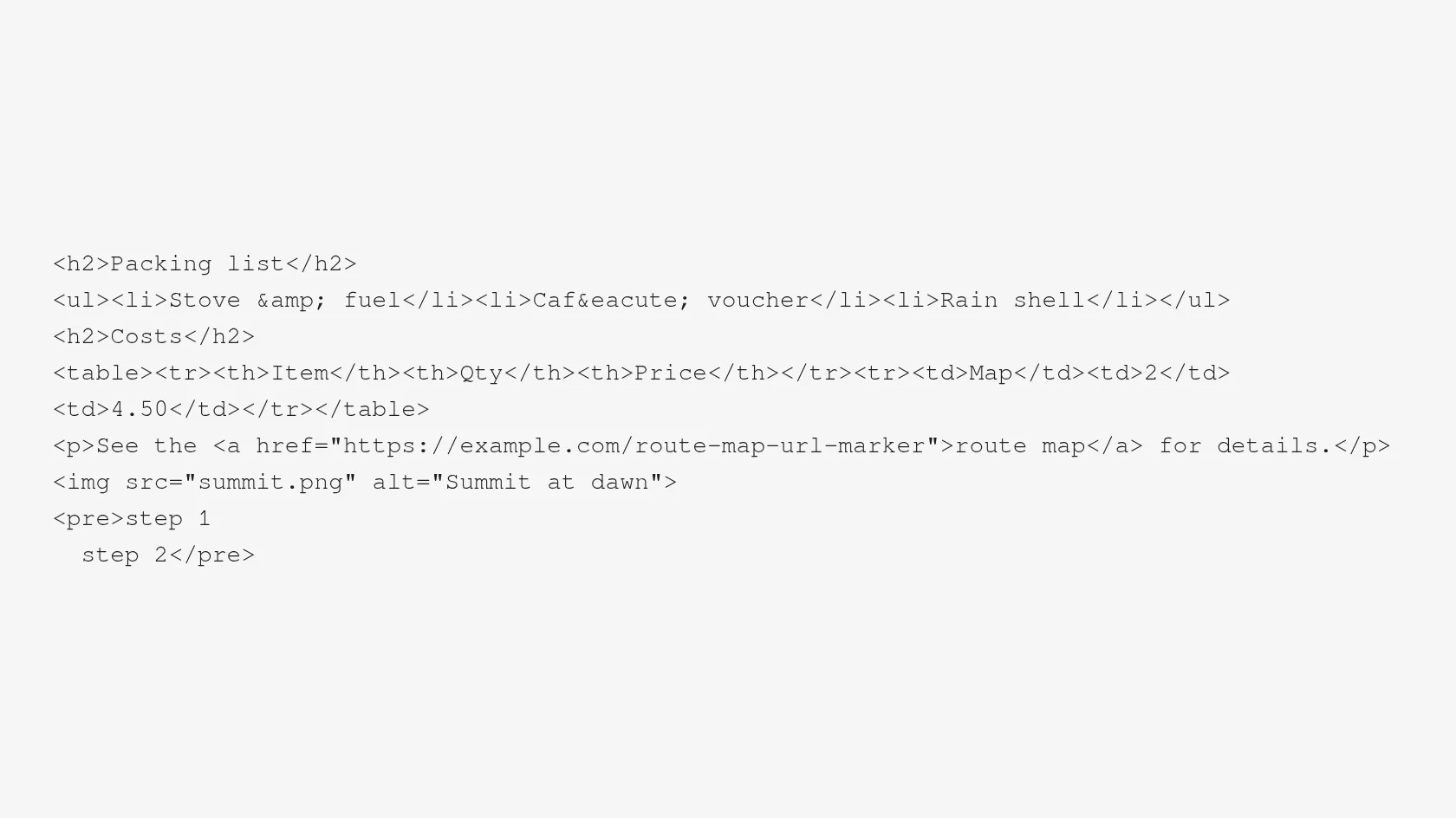
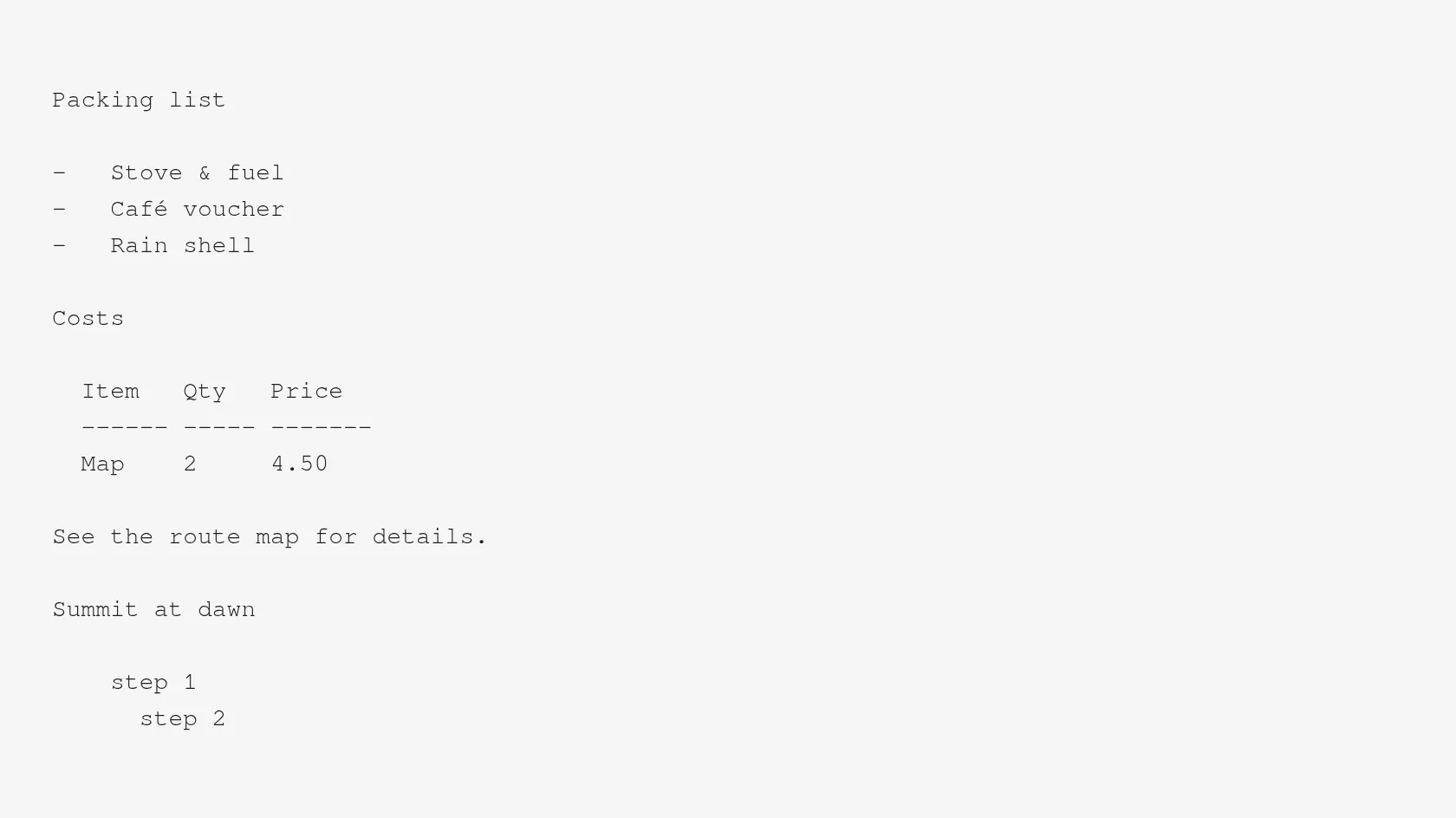
In our test, marker words placed inside a script block and a style block did not appear in the TXT. The page title tag was not written as a separate line, so the heading text showed up once.
List items stay on their own lines, a table becomes a grid of aligned columns with a dashed rule under the header row, and a preformatted block is indented by four spaces.
In our test & came out as &, é as é, and the Persian, Japanese and accented text we included arrived unchanged.
A paragraph that sat on one 190-character line in the HTML came out as three lines, and no line in our TXT was longer than 69 characters.
The TXT we downloaded had no byte order mark, used LF line endings and ended with a newline, so it opens cleanly in any editor.
Drop the .html file on the box or choose it from your device. Keep the original, because a TXT cannot be turned back into a styled page.
Check that TXT is the output format, then start the conversion. In our test a 993-byte file took 3.2 seconds from the click to Completed, and we did not have to sign in.
Open the file and check that the headings, lists and any table are where you expect them. If characters look wrong, see the encoding row under troubleshooting.
You hand over an HTML file and take away a plain TXT of its readable words. Nothing is installed on your computer, and the page says up front what is dropped, including link addresses and anything a script would add later.
The upload box shows the live size limit before you add a file. Signing in raises it; a paid plan does not change it.
HTML in, TXT out. Pick another output on the converter if you need a different format.
Files are encrypted in transit over HTTPS and processed on indox infrastructure.
Free-tier files are kept for 24 hours after the job finishes, then deleted automatically.
| What you see | Why | What to do |
|---|---|---|
| The TXT is empty or very short | The page builds its text with JavaScript, which the converter does not run | Save the page after it has fully loaded, or copy the text from the browser |
| Quotes and accents look like ’ or é | The HTML was saved in one encoding and read as another | Save the file as UTF-8 and add a meta charset tag near the top |
| Link addresses are missing | Only the visible link text is written to a TXT | Copy the addresses from the HTML before converting |
| Lines break in odd places | Lines are wrapped at about 72 columns | Join the lines in a text editor that can reflow paragraphs |
| A table looks misaligned | A wide table does not fit the 72-column wrap | Read the TXT in a monospace font, or shorten the cell text in the HTML |
| Compared on | HTML | TXT |
|---|---|---|
| Content | Markup that describes structure, with references to images, styles and scripts | Plain characters only |
| Styling | Set by CSS and applied by the browser | None |
| Images and media | Referenced by address, not stored in the file | Not included |
| Encoding | UTF-8 is recommended and is the HTML5 default | Plain characters; our downloaded file was UTF-8 |
| Opens in | A browser lays it out for the window | Any text editor, with no layout |
| Converting between them | Markup is removed and links lose their addresses | Cannot be turned back into the original page |
Facts checked on November 5, 2026
No tool matches that search.
Add the HTML file to the converter in your browser, keep TXT as the output and download the result. Nothing is installed. Many people search for this as html to text, and it is the same conversion.
Paragraphs and list items stay on their own lines. Long lines are wrapped at about 72 columns, so a paragraph that was a single line in the HTML can become several in the TXT. In our test a 190-character paragraph became three lines.
Links keep their text and lose their address. An image is replaced by its alt text, if it has any. A table is redrawn as a grid of spaces and dashes. All three held in our test file.
Yes. In our test, marker text placed inside a script block and a style block was not in the TXT. The converter does not run scripts or apply CSS, so it also cannot see text that JavaScript would add later.
That pattern appears when UTF-8 bytes are read as Windows-1252 or Latin-1. Browsers pick an encoding from a byte order mark first, then from a meta charset in the first 1024 bytes, then a default. Save your HTML as UTF-8 and put a meta charset tag near the top of the file.
No. The converter takes an uploaded file. Save the page from your browser as an HTML file, then upload that.
In our test we converted four files without signing in and saw no limit or payment message. Limits can change, so check the page when you upload. A very large file may be refused.
Tools such as lynx, w3m and pandoc do the same job on your own machine and let you set options like wrap width. This page is the shorter route for a file or two when you do not want to install anything.
The words are similar, but copying from a browser takes what is rendered and follows the page's layout. Converting the file reads the HTML itself, so hidden menus and script-built text behave differently.