Section 1: type of request
Add User, or Revise Current User (i.e., name change, office change, additional user roles). The form says to select only one.
GSA3718
Go.gov Access Request
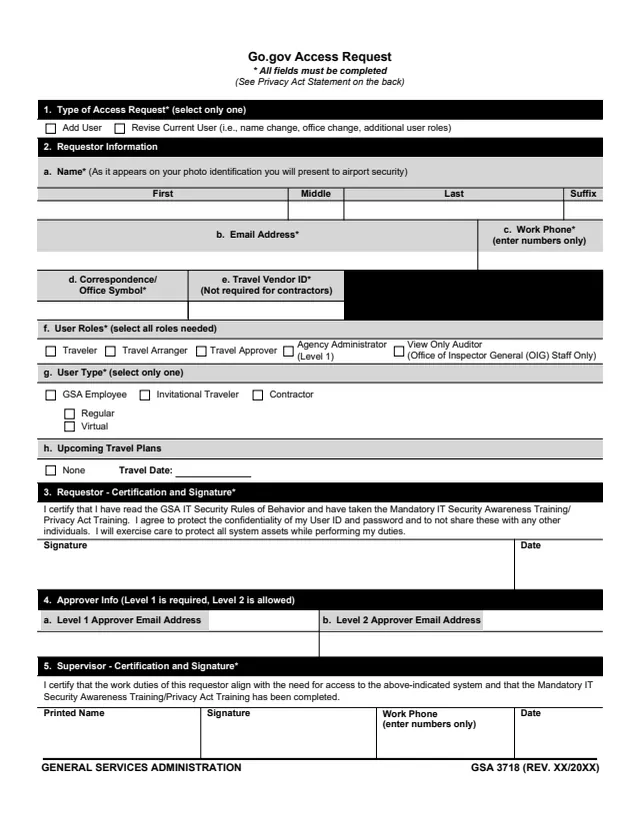
GSA Form 3718, Go.gov Access Request, is a two-page General Services Administration form. GSA's forms page gives a current revision date of 01/2026 and the authority or regulation OAS 5700.1A, and GSA hosts it in its forms library.
The instructions say to use it to establish a user profile in the e-gov travel system, or to add or make a change to user roles in an existing profile. The form says all fields must be completed. It asks for the type of request, the requestor's details, user roles and user type, upcoming travel plans, the requestor's certification and signature, the approvers' e-mail addresses and the supervisor's certification and signature.
The instructions say that after the form is completed and signed, it is e-mailed to the local Agency Administrator (Level 1). You can fill it out free in your browser on this page and download the result without an account.
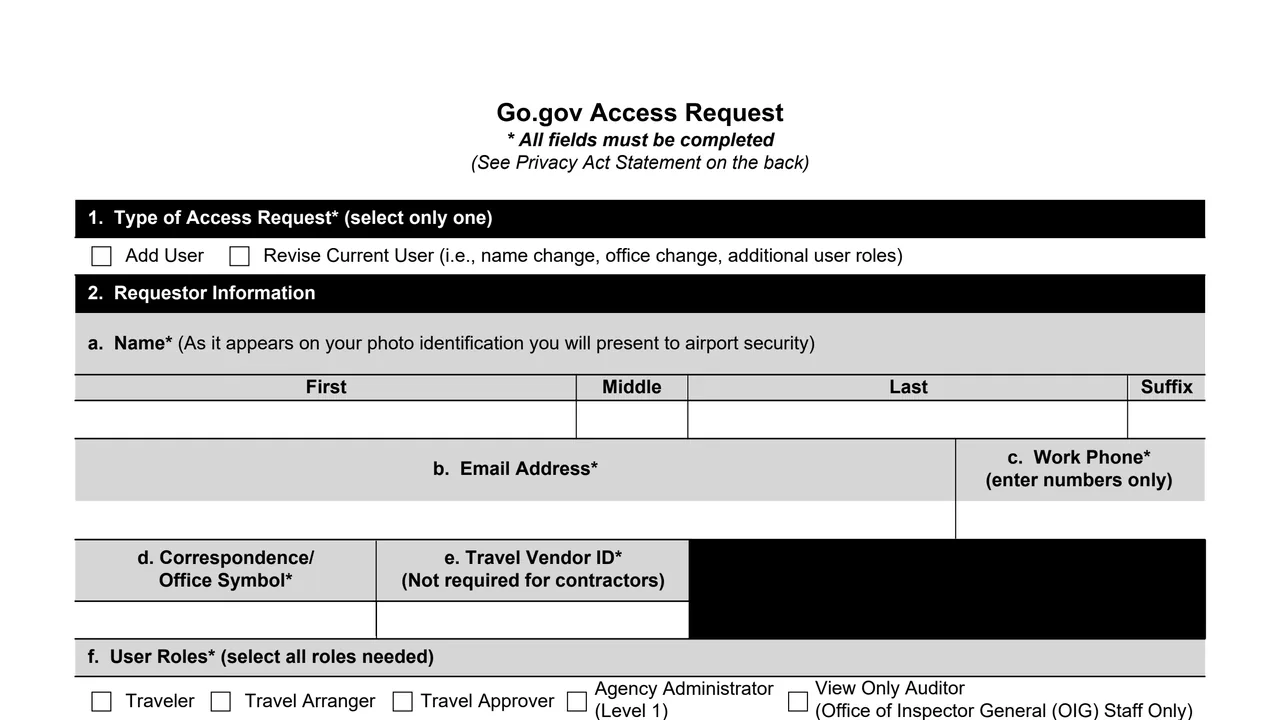
Add User, or Revise Current User (i.e., name change, office change, additional user roles). The form says to select only one.
Name as it appears on the photo identification presented to airport security, e-mail address, work phone in numbers only, correspondence/office symbol and travel vendor ID.
User roles: Traveler, Travel Arranger, Travel Approver, Agency Administrator (Level 1) and View Only Auditor (Office of Inspector General (OIG) Staff Only). Then the user type and upcoming travel plans, None or a travel date.
The requestor certifies reading the GSA IT Security Rules of Behavior and taking the Mandatory IT Security Awareness Training/Privacy Act Training, agrees to protect the User ID and password, then signs and dates.
Level 1 and Level 2 approver e-mail addresses. The form says Level 1 is required and Level 2 is allowed.
The supervisor's printed name, signature, work phone in numbers only and date.
In Section 1, check Add User or Revise Current User. The form says to select only one and that all fields must be completed.
Enter the name as it appears on the photo identification presented to airport security, then the e-mail address, work phone in numbers only and correspondence/office symbol.
The instructions say an ID is required for those requesting a Traveler role and all others leave it blank. It begins with "E" and is followed by an eight or nine-digit number.
Check every role needed in item 2f, one user type in item 2g, and either None or a travel date in item 2h.
The instructions describe signing Sections 3 and 5 by inserting a GSA ID card in the card reader, clicking the Signature line, clicking Sign and entering the GSA ID PIN when prompted.
The instructions say that after the form is completed and signed, it is e-mailed to the local Agency Administrator (Level 1), who is also the contact for help with the form.
You get the real form, filled in a browser tab, with nothing standing between you and the finished PDF.
The instructions say: After the form is completed and signed, email it to your local Agency Administrator (Level 1).
The instructions say to contact the local Agency Administrator (Level 1) for help completing the form.
The Privacy Act statement says use of the system is voluntary, but individuals who choose not to disclose information will be unable to be reimbursed by the federal government in connection with their travel. Routine uses are in System of Records Notice GSA/GOVT-4, Contracted Travel Services Program.
The privacy statement cites 5 USC 5701-5739, and 31 U.S.C. §§ 3511, 3512, and 3523, and the Federal Travel Regulation. GSA's forms page lists OAS 5700.1A.
The footer prints GSA 3718 (REV. XX/20XX) with no date filled in. The revision shown here is the current revision date on GSA's forms page, 01/2026.
Item 2g lists three user types, and the form has signature blocks for the requestor and the supervisor.
No tool matches that search.
The footer reads GENERAL SERVICES ADMINISTRATION, GSA 3718. GSA hosts it in its forms library and lists the authority or regulation OAS 5700.1A.
The instructions say to use it to establish a user profile in the e-gov travel system, or to add or make a change to user roles in an existing profile.
The instructions say the only role permitted for an Invitational Traveler is Traveler and the only role permitted for a Contractor is Travel Arranger.
The instructions say it is required for those requesting a Traveler role and others leave it blank. It begins with "E" and is followed by an eight or nine-digit number. Item 2e says it is not required for contractors.
That the requestor's work duties align with the need for access to the system and that the Mandatory IT Security Awareness Training/Privacy Act Training has been completed.
The instructions say to e-mail it, completed and signed, to the local Agency Administrator (Level 1).
The Privacy Act statement says use of the system is voluntary, but individuals who choose not to disclose information will be unable to be reimbursed by the federal government in connection with their travel.