Blocks 1 to 3: CSC, agency and contact
The CSC the report goes to, the agency name and address, and the person to contact with signature, title, telephone number and date.
GSA3580
Customer Supply Center Discrepancy Report
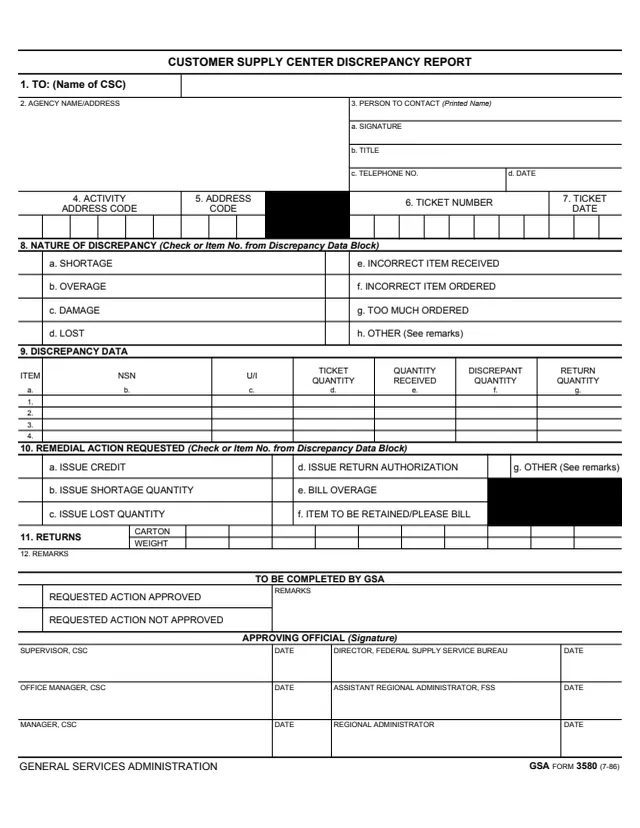
GSA Form 3580, Customer Supply Center Discrepancy Report, has the footer GENERAL SERVICES ADMINISTRATION and GSA FORM 3580 (7-86), and GSA hosts it in its forms library. GSA's forms page lists a current revision date of 07/1986.
The instructions on page 2 say the form is to be initiated in an original and two copies by the Customer Supply Center (CSC) customer to report discrepancies in CSC shipments and to request authorization to return merchandise. They say shipment discrepancies include but are not limited to shortages, overages, and lost and damaged shipments. Customers complete the top half of the form (blocks 1 thru 12) and GSA completes the bottom half.
You can fill it out free in your browser on this page and download the result without an account.
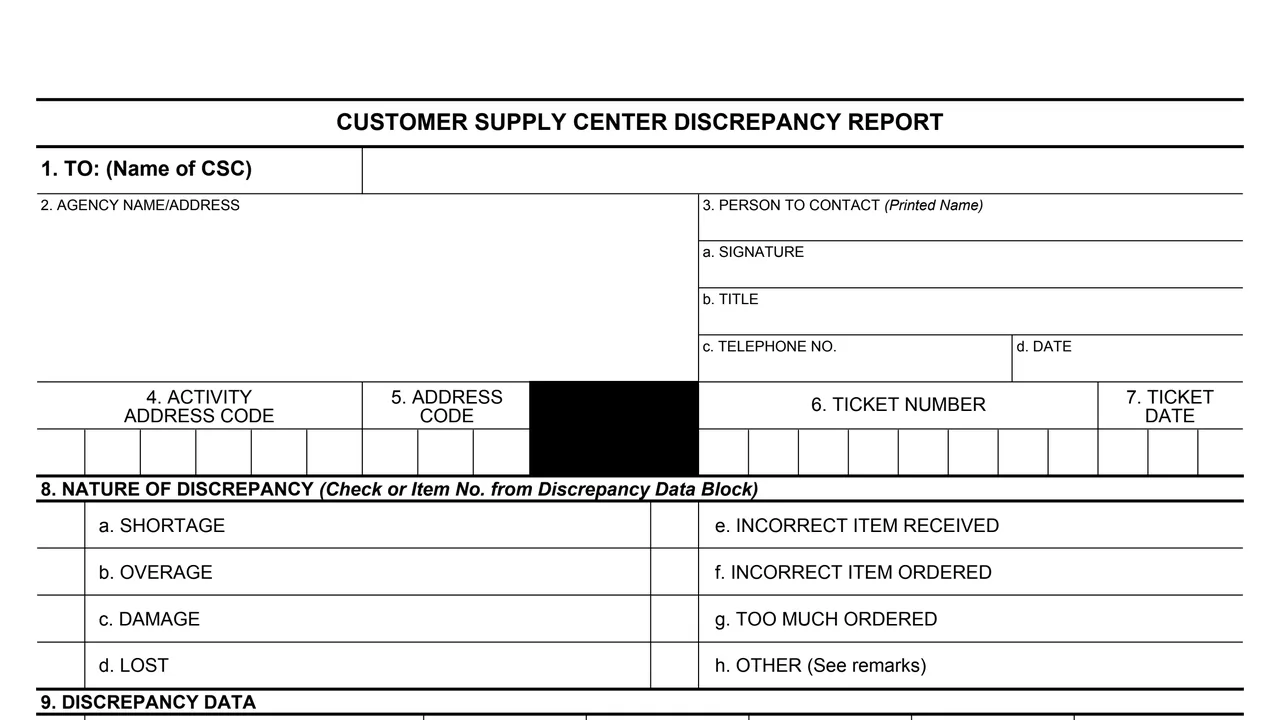
The CSC the report goes to, the agency name and address, and the person to contact with signature, title, telephone number and date.
Activity address code, address code, ticket number and ticket date. The instructions describe block 5 as the Access Code, the three-digit code required to place orders.
Shortage, overage, damage, lost, incorrect item received, incorrect item ordered, too much ordered, or other.
Four rows with item, NSN, U/I, ticket quantity, quantity received, discrepant quantity and return quantity.
Remedial action requested (issue credit, issue shortage quantity, issue lost quantity, issue return authorization, bill overage, item to be retained/please bill, or other), carton and weight for returns, and remarks.
Requested action approved or not approved, remarks, and dated signatures for the Supervisor, Office Manager and Manager of the CSC, the Director, Federal Supply Service Bureau, the Assistant Regional Administrator, FSS, and the Regional Administrator.
The instructions say all entries are to be typed or printed in ink, and that customers complete blocks 1 thru 12.
Enter the six-digit activity address code on the ticket (packing slip), the eight-digit ticket number from its upper right and the ticket date from its top center. The access code is restricted and does not appear on the ticket.
Check the type being reported in block 8. The instructions define each one, for example a shortage is a received quantity less than the ticket quantity.
Enter each NSN with its unit of issue and quantities. The discrepant quantity is the ticket quantity subtracted from the quantity received; a negative quantity indicates a shortage and a positive number an overage.
Check the remedial action in block 10. For returns, enter the number of cartons and the weight per carton; the instructions say unit weights come from the picking ticket.
Use block 12 for comments, including the date that system and financial records are updated. The original and copy 1 go to the CSC, and copy 2 is kept as a suspense copy.
You get the real form, filled in a browser tab, with nothing standing between you and the finished PDF.
To the CSC named in block 1, the CSC that issued the discrepant order. The form prints no address.
The instructions say the original is retained by the CSC. Copy 1 is sent to the CSC with the original, then retained by the customer after it is returned by the CSC with approving signatures.
Retained by the customer as a suspense copy, then destroyed upon receiving the approval copy.
The instructions say picking ticket weights may be confirmed by telephoning the CSC.
The footer reads GSA FORM 3580 (7-86). The form prints no OMB number or privacy statement, and GSA's page lists no authority or regulation.
The instructions split the form between the customer and GSA.
No tool matches that search.
The instructions say the CSC customer initiates it and completes the top half, blocks 1 thru 12. GSA completes the bottom half.
An original and two copies. The original and copy 1 go to the CSC; copy 1 comes back with approving signatures, and copy 2 is kept as a suspense copy until then.
The instructions say to subtract the ticket quantity from the quantity received. A negative quantity indicates a shortage and a positive number indicates an overage.
The instructions say the access code is the three-digit code required to place orders and, because it is a restricted code, it does not appear on the ticket.
Block 10 lists issue credit, issue shortage quantity, issue lost quantity, issue return authorization, bill overage, item to be retained/please bill, and other.
GSA marks the requested action approved or not approved in the bottom half, with signature lines for CSC and Federal Supply Service officials and the Regional Administrator.