1. Your situation
Three statements, each with its own next steps. You mark the one that best describes your situation.
15119
Response to Notice CP54
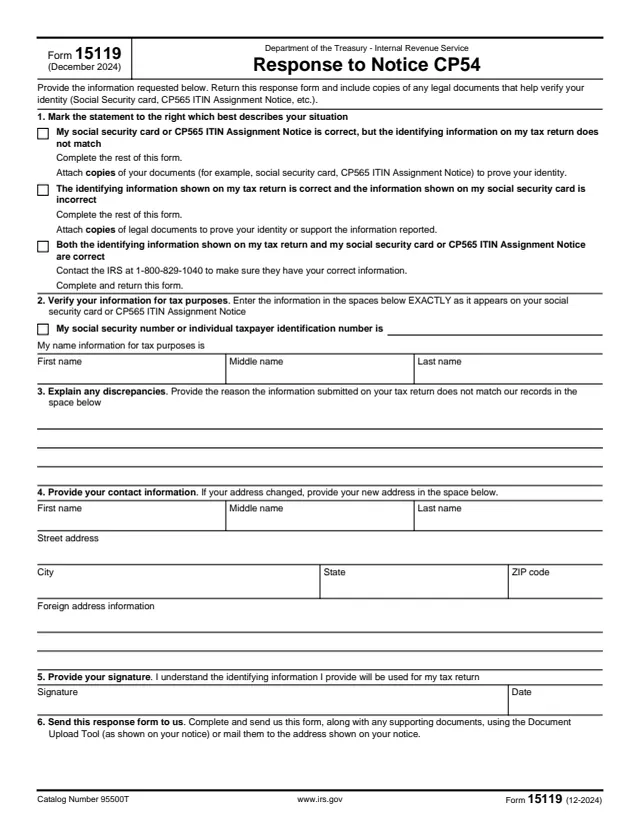
Form 15119, Response to Notice CP54, is the reply form for Notice CP54. In it, the taxpayer explains why the identifying information on their tax return does not match IRS records and confirms their number and name exactly as they appear on their social security card or CP565 ITIN Assignment Notice.
The form has six numbered sections: the statement that best describes the situation, the verified number and name, an explanation of the discrepancy, current contact information, a signature, and how to send it. The form asks for copies of legal documents that help verify identity, such as a Social Security card or CP565 ITIN Assignment Notice.
The form says to send it, with any supporting documents, through the Document Upload Tool as shown on the notice or by mail to the address shown on the notice. You can fill out Form 15119 free in your browser on this page and download it without an account.
Three statements, each with its own next steps. You mark the one that best describes your situation.
Your social security number or ITIN, then your first, middle and last name, exactly as they appear on your social security card or CP565 ITIN Assignment Notice.
A space for the reason the information on your tax return does not match IRS records.
Your name, street address, city, state and ZIP code, plus foreign address information. If your address changed, the new address goes here.
Your signature and date under the statement that the identifying information you provide will be used for your tax return.
Directions to send the form and supporting documents using the Document Upload Tool shown on your notice, or by mail to the address on your notice.
In section 1, mark the statement that best describes your situation and follow the next steps printed under it.
In section 2, enter your social security number or ITIN and your name EXACTLY as they appear on your social security card or CP565 ITIN Assignment Notice, as the form says.
In section 3, give the reason the information submitted on your tax return does not match IRS records.
In section 4, enter your name and address. If your address changed, enter the new one. Use the foreign address lines if they apply.
In section 5, sign and date the form.
Include copies of documents that help verify your identity, such as a Social Security card or CP565 ITIN Assignment Notice, and send everything as section 6 describes.
You get the real form, filled in a browser tab, with nothing standing between you and the finished PDF.
The form says to send it, along with any supporting documents, using the Document Upload Tool as shown on your notice, or by mail to the address shown on your notice.
Copies of legal documents that help verify your identity, such as a Social Security card or CP565 ITIN Assignment Notice. The form asks for copies.
For the third statement, where both records are correct, the form says to contact the IRS at 1-800-829-1040 to make sure the IRS has your correct information.
Form 15119 prints no due date and no mailing address of its own. It points to the notice for the address and the upload tool.
The taxpayer who received Notice CP54 completes and signs the form and returns it to the IRS.
No tool matches that search.
It is the response form for Notice CP54. It records why the identifying information on a tax return does not match IRS records and confirms the correct number and name.
The form asks for copies of legal documents that help verify identity, such as a Social Security card or a CP565 ITIN Assignment Notice.
The form says to use the Document Upload Tool as shown on your notice, or to mail it to the address shown on your notice.
The form says to contact the IRS at 1-800-829-1040 to make sure the IRS has your correct information, and to complete and return the form.
EXACTLY as it appears on your social security card or CP565 ITIN Assignment Notice, the form says, with first, middle and last name in separate fields.