SF59

Request for Approval of Noncompetitive Action

Agency
GSA
Revision
Revised January 1979
Fillable fields
64
Pages
2
Official source
GSA form page
Checked
October 20, 2026
Fill SF59 online
Page 1 of form SF59

Standard Form 59 (SF 59): Request for Approval of Noncompetitive Action

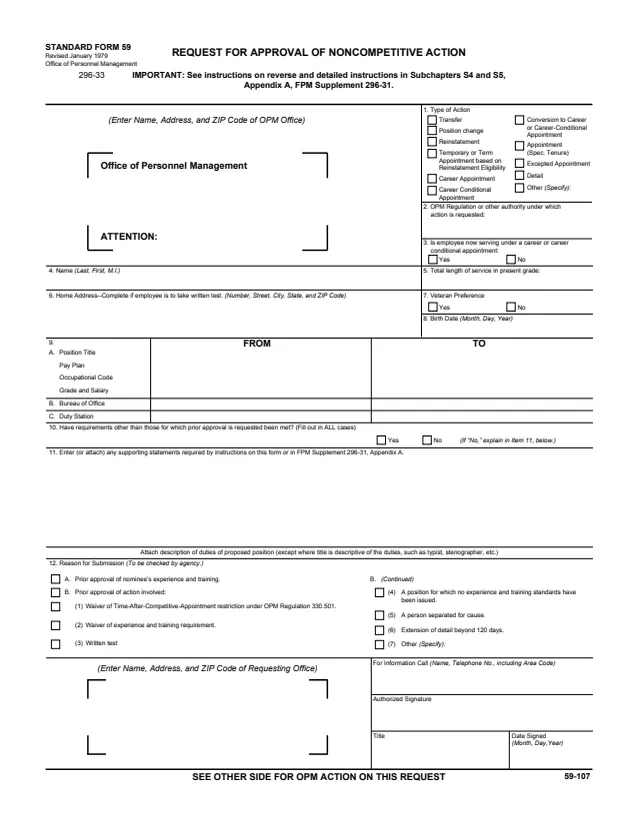
Standard Form 59 (SF 59), Request for Approval of Noncompetitive Action, is a U.S. Office of Personnel Management (OPM) form. Its header reads STANDARD FORM 59, Revised January 1979, Office of Personnel Management. GSA hosts a copy in its forms library.

The requesting agency completes the front: the OPM office the request goes to, the type of action (such as transfer, position change, reinstatement, detail or a career or career-conditional appointment), the authority, the employee's details, the position moving from and to, supporting statements and the reason for submission. The reverse prints instructions and an OPM ACTION block where OPM marks the action approved or disapproved.

The form points to detailed instructions in Subchapters S4 and S5, Appendix A, FPM Supplement 296-31. You can fill it out free in your browser on this page and download the result without an account.

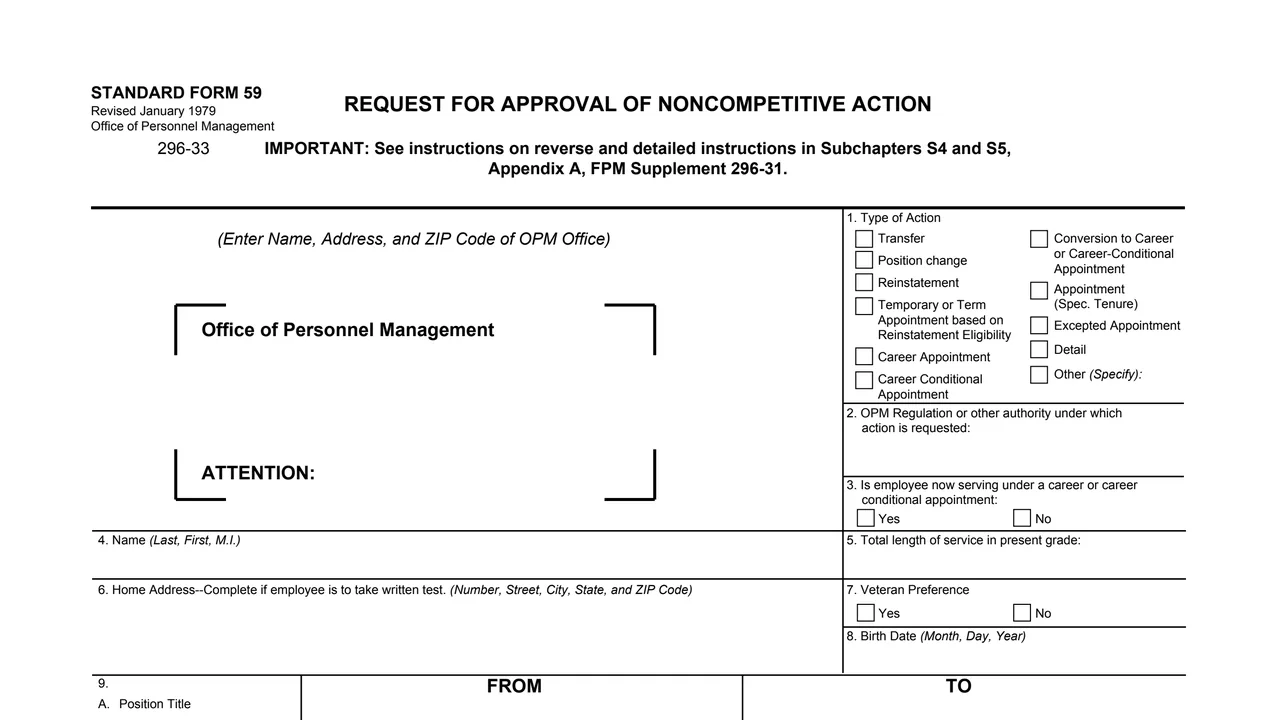
Top of page 1 of Standard Form 59 (SF 59): Request for Approval of Noncompetitive Action, as printed by GSA

What's on SF 59

Item 1: OPM office and type of action

The name, address and ZIP code of the OPM office, and boxes for transfer, position change, reinstatement, temporary or term appointment, career or career-conditional appointment, conversion, excepted appointment, detail or other.
Items 2 and 3: authority and appointment

The OPM regulation or other authority under which the action is requested, and whether the employee now serves under a career or career-conditional appointment.

Items 4 to 8: the employee

Name (Last, First, M.I.), total length of service in present grade, home address (complete if employee is to take written test), veteran preference and birth date.

Item 9: from and to

Position title, pay plan, occupational code, grade and salary, bureau or office, and duty station, for the current and proposed positions.

Items 10 to 12: requirements and reason

Whether other requirements have been met, supporting statements, a description of duties, and the reason for submission, such as prior approval of experience and training, a written test or extension of detail beyond 120 days.

Reverse: instructions and OPM action

Number of copies, the office to submit to, supporting documents, requests involving separation for cause, and OPM's decision with the requirements it reviewed.

The front has items 1 to 12 and the requesting office block. The reverse has the instructions and OPM's action.

How to complete SF 59

  1. 1

    Address the right OPM office

    The instructions say to submit the request to the office which has recruiting jurisdiction over the position, except when the applicable instructions require submission to OPM's central office.

  2. 2

    Choose the action and authority

    Check the type of action in item 1 and enter the OPM regulation or other authority in item 2.

  3. 3

    Describe the employee and positions

    Complete items 3 to 9 with the employee's appointment, name, service, veteran preference, birth date and the from and to positions.

  4. 4

    Answer item 10 and add statements

    Item 10 is filled out in ALL cases, and a No is explained in item 11. The form asks to attach a description of duties of the proposed position, except where the title is descriptive of the duties.

  5. 5

    Attach supporting documents

    The instructions say to attach a completed copy of Standard Form 171 (or 173), Personal Qualifications Statement, except that Standard Form 172 may be used with requests which involve qualification requirements only.

  6. 6

    Sign and submit in duplicate

    Check the reason in item 12, then an authorized official signs with title and date. The instructions say to submit this form in duplicate.

These steps follow the instructions printed on the reverse of the form.

Why fill Form SF59 on indox

You get the real form, filled in a browser tab, with nothing standing between you and the finished PDF.

  • Fill the form right in your browser, no software to install
  • Free to fill and free to download, with no account
  • The official blank straight from the GSA, not a copy someone retyped
  • Works on a phone, tablet or computer

Where it goes and what the form says

Where it goes

To the OPM office which has recruiting jurisdiction over the position. The form gives one central office example: Staffing Systems and Services Group, Office of Personnel Management, Washington, D.C. 20415, for career appointment requests based on service in the legislative or judicial branch under section 2(b) or (c) of the Ramspeck Act.

Copies

The instructions say to submit this form in duplicate.

Separation for cause

For a request involving separation for cause, the form asks the agency to state whether the nominee's Official Personnel Folder is in the agency's possession, or has been requested by it.

OPM's decision

OPM marks the action Approved or Disapproved and checks what it reviewed: qualifications requirements only, suitability, reinstatement eligibility determination or other. A note says the agency determines whether the individual meets all other requirements.

Who completes SF 59?

  • The requesting agency office

    The agency enters its name, address and ZIP code as the requesting office, a contact under For Information Call, and an authorized signature, title and date signed.

  • The agency marks the reason

    Item 12, Reason for Submission, is labeled To be checked by agency.

  • The employee or nominee

    Items 3 to 9 describe the person: current appointment, name, length of service in present grade, home address if a written test is involved, veteran preference, birth date and the position from and to.

  • The OPM office

    The OPM office with recruiting jurisdiction over the position receives the request. The OPM ACTION block on the reverse has an authorized signature and date for OPM.

SF 59 is a request from an agency to OPM. The employee or nominee is the subject of the request, not the filer.

Official sources and the blank

Do it all with indox

View all 94 tools

Questions about Form SF59

Who issues SF 59?

The header reads STANDARD FORM 59, Revised January 1979, Office of Personnel Management. GSA hosts a copy in its forms library.

Who fills out SF 59?

The requesting agency. It enters its office details and an authorized signature, and item 12 is labeled To be checked by agency. The employee or nominee is described in items 3 to 9.

Where is SF 59 sent?

The instructions say to submit it to the office which has recruiting jurisdiction over the position, except when the applicable instructions in FPM Supplement 296-31 require submission to OPM's central office.

How many copies of SF 59 are submitted?

The instructions say to submit this form in duplicate.

What documents go with SF 59?

The instructions say to attach a completed copy of Standard Form 171 (or 173), Personal Qualifications Statement, or in some cases Standard Form 172, plus any statements required by FPM Supplement 296-31, Appendix A.

What does OPM fill in?

The OPM ACTION block on the reverse: approved or disapproved, the requirements reviewed, remarks, and an authorized signature and date.