Blocks 1 to 3: document identification
1, Doc. Iden. (1-3); 2, Routing Iden. (4-6); and 3, M & S (7).
SF344
Multiuse Standard Requisitioning/Issue System Document
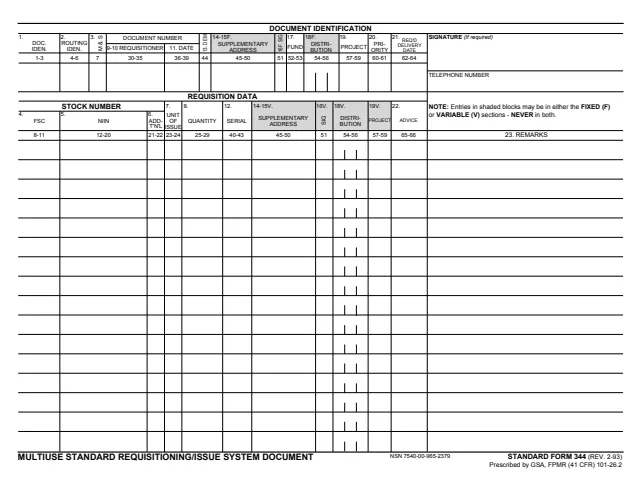
Standard Form 344 (SF 344), Multiuse Standard Requisitioning/Issue System Document, is a one-page form with a Document Identification row across the top and Requisition Data lines below it. Its footer prints STANDARD FORM 344 (REV. 2-93), Prescribed by GSA, FPMR (41 CFR) 101-26.2, with NSN 7540-00-965-2379, and GSA hosts a copy in its forms library.
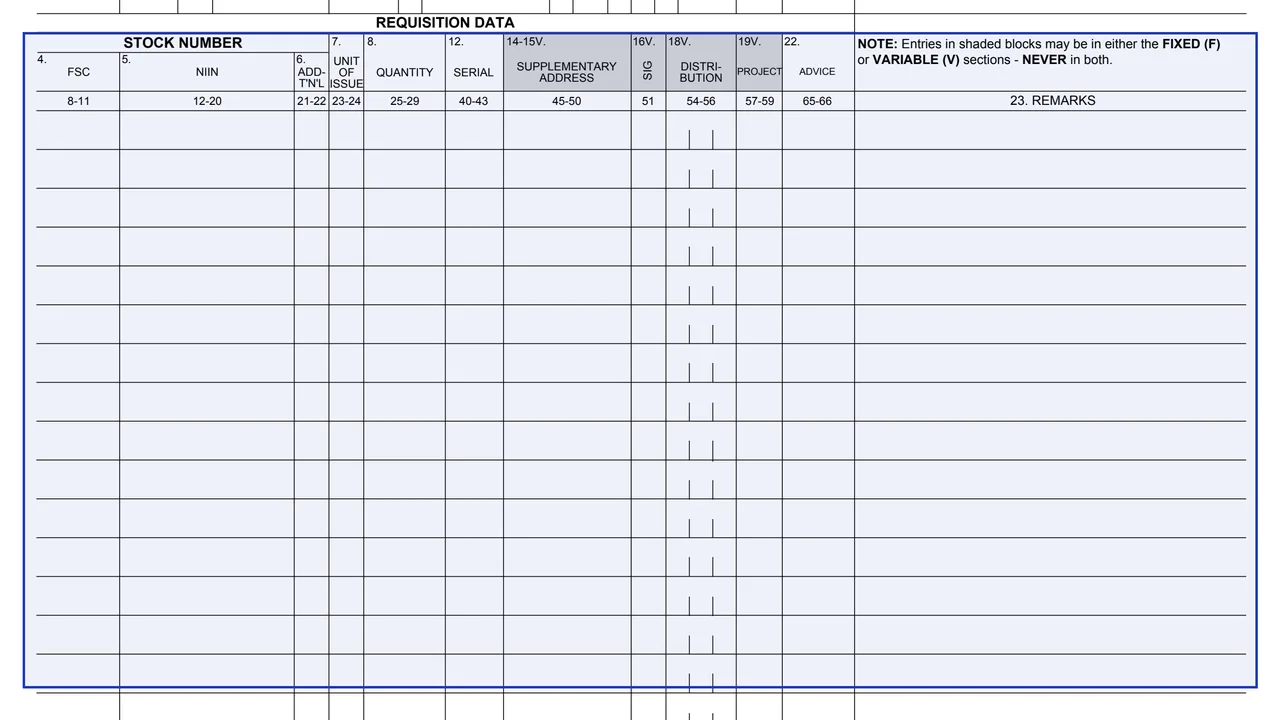
The form prints no written instructions. Each block has a number and a heading, such as FSC, NIIN, Unit of Issue, Quantity and Priority, with a number range printed under it. A note says entries in shaded blocks may be in either the FIXED (F) or VARIABLE (V) sections, NEVER in both. The right side holds a signature (if required), a telephone number and block 23, Remarks.
You can fill it out free in your browser on this page and download the result without an account.
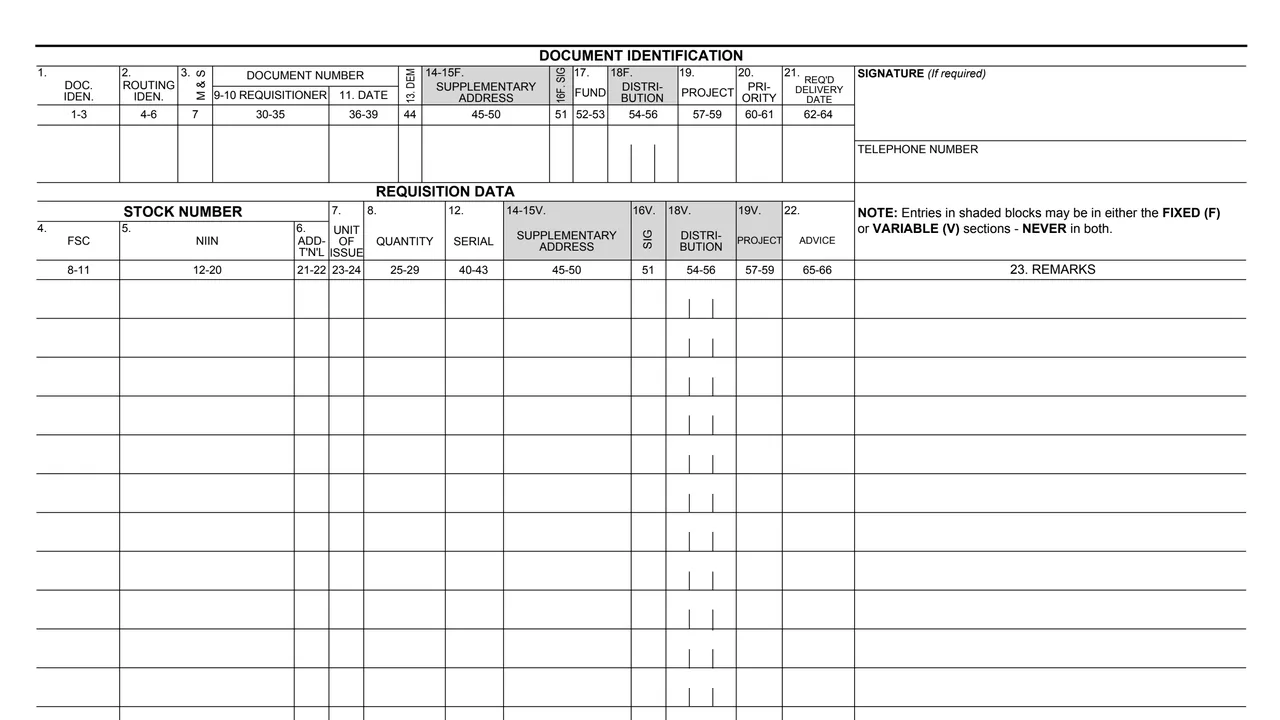
1, Doc. Iden. (1-3); 2, Routing Iden. (4-6); and 3, M & S (7).
9-10, Requisitioner (30-35); 11, Date (36-39); 13, Dem (44); 20, Priority (60-61); and 21, Req'd Delivery Date (62-64).
14-15F, Supplementary Address (45-50); 16F, Sig (51); 17, Fund (52-53); 18F, Distribution (54-56); and 19, Project (57-59).
4, FSC (8-11); 5, NIIN (12-20); and 6, ADD-T'N'L (21-22), under the Stock Number heading.
7, Unit of Issue (23-24); 8, Quantity (25-29); 12, Serial (40-43); the variable blocks 14-15V, 16V, 18V and 19V; and 22, Advice (65-66).
Block 23, Remarks, runs down the right side of the lines, below the signature and telephone number spaces.
The number range printed under each heading is shown in brackets.
Enter blocks 1 to 21 across the top row, from Doc. Iden. to Req'd Delivery Date.
On each Requisition Data line, enter the FSC in block 4 and the NIIN in block 5.
Enter the unit of issue in block 7 and the quantity in block 8 on the same line, with block 12, Serial, and block 22, Advice, where used.
The form's note says entries in shaded blocks may be in either the FIXED (F) or VARIABLE (V) sections, NEVER in both.
Use block 23 for remarks, and fill in the signature space if required and the telephone number.
The PDF has no instruction page. These steps follow the blocks as printed.
You get the real form, filled in a browser tab, with nothing standing between you and the finished PDF.
The PDF gives no filing address and no routing instructions. GSA's page lists FPMR (41 CFR) 101-26.2 as the form's authority.
The footer prints NSN 7540-00-965-2379 next to STANDARD FORM 344 (REV. 2-93).
Blocks marked F sit in the top row and blocks marked V repeat on each line. The note says shaded entries go in one section or the other, never both.
The form prints no instructions on who completes it. These are the parties and entries its blocks name.
No tool matches that search.
The footer prints STANDARD FORM 344 (REV. 2-93), Prescribed by GSA, FPMR (41 CFR) 101-26.2. GSA hosts it in its forms library.
No. The PDF is a single page with numbered blocks and one note about the fixed and variable sections. GSA's page lists FPMR (41 CFR) 101-26.2 as its authority.
Blocks marked F are in the fixed section across the top, and blocks marked V are in the variable section on each line. The form says entries in shaded blocks may be in either section, NEVER in both.
Under the Stock Number heading on each line: block 4, FSC, and block 5, NIIN, with block 6 next to them.
The signature space at the top right is marked (If required). The form does not say when one is required.