Header
Fiscal year, record group, correspondence and the printed Reports Control Number OAD-36.
GSA2151
Records Maintenance and Disposition Report
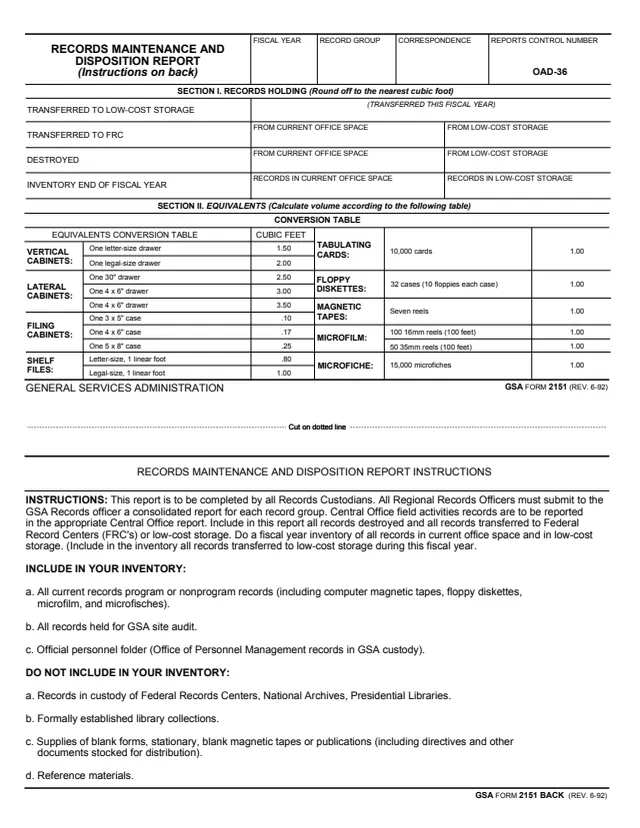
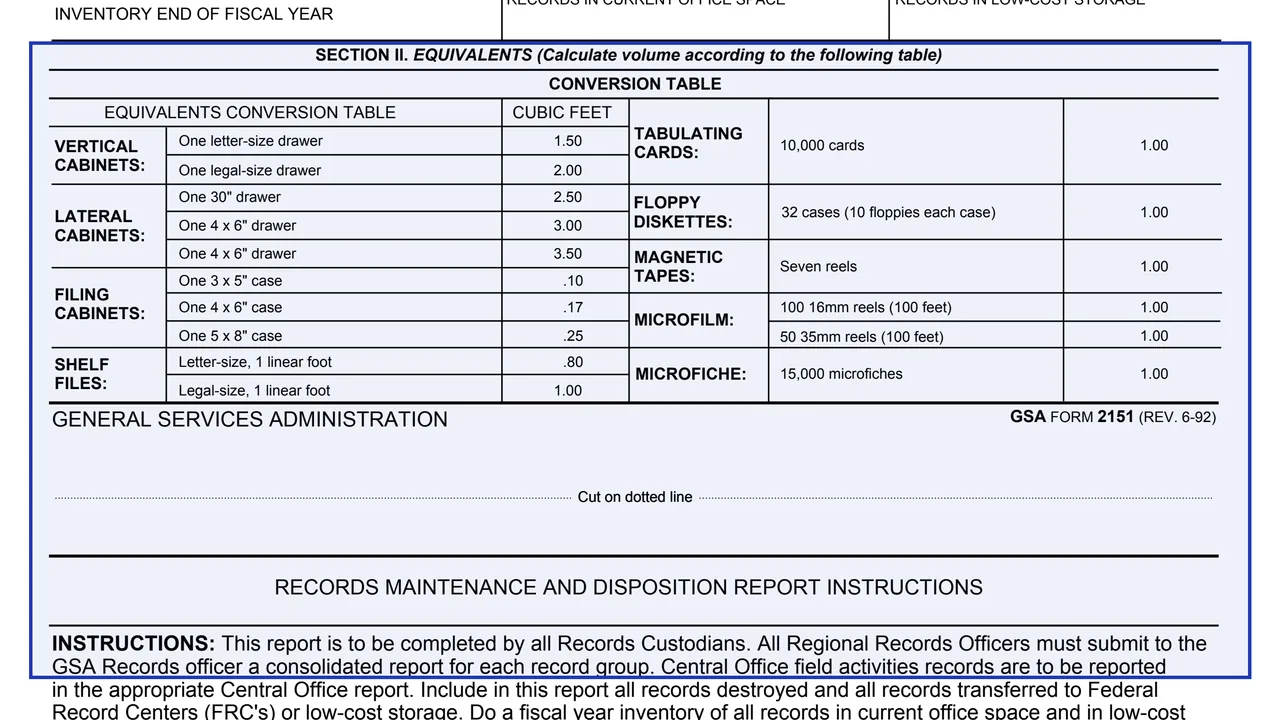
GSA Form 2151, Records Maintenance and Disposition Report, is a GSA form with instructions on the back. The footer reads GENERAL SERVICES ADMINISTRATION and GSA FORM 2151 (REV. 6-92), and the header prints Reports Control Number OAD-36. GSA hosts it in its forms library; its page lists the current revision date as 06/1992 and no authority or regulation.
The instructions say the report is to be completed by all Records Custodians, and that all Regional Records Officers must submit to the GSA Records officer a consolidated report for each record group. It covers all records destroyed and all records transferred to Federal Record Centers (FRC's) or low-cost storage, plus a fiscal year inventory of records in current office space and in low-cost storage.
Section I, Records Holding, is rounded off to the nearest cubic foot, and Section II is a conversion table for calculating volume. You can fill it out free in your browser on this page and download the result without an account.
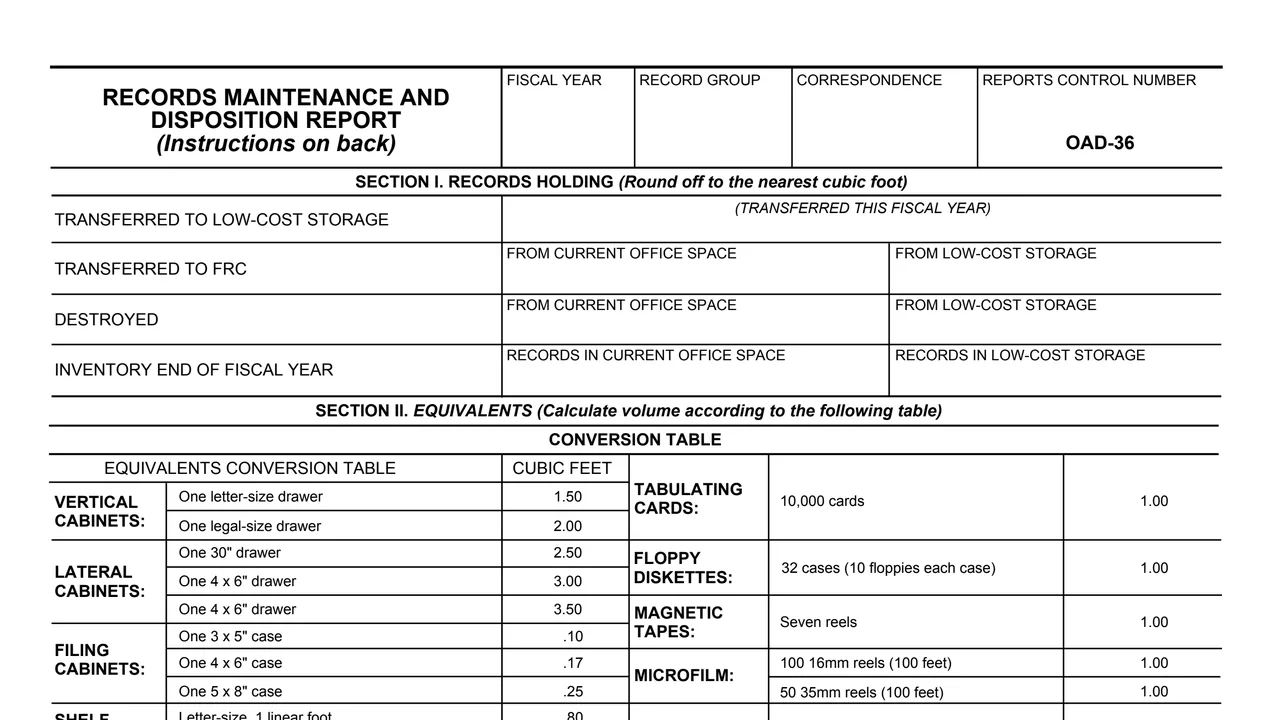
Fiscal year, record group, correspondence and the printed Reports Control Number OAD-36.
Records transferred to low-cost storage, and records transferred to an FRC from current office space and from low-cost storage.
Records destroyed from current office space and from low-cost storage.
The inventory at the end of the fiscal year of records in current office space and records in low-cost storage.
A conversion table for calculating volume, for example one letter-size drawer at 1.50 cubic feet, 10,000 tabulating cards at 1.00 and 15,000 microfiches at 1.00.
Who completes the report, what to include in the inventory and what not to include.
Enter the fiscal year, record group and correspondence. The reports control number OAD-36 is already printed.
Use the Section II table to calculate volume, and round off to the nearest cubic foot as Section I says.
Enter the records transferred to low-cost storage, transferred to an FRC and destroyed this fiscal year, by where they came from.
The instructions say to do a fiscal year inventory of all records in current office space and in low-cost storage, including records moved to low-cost storage this fiscal year.
The instructions list records not to include, such as records in custody of Federal Records Centers, National Archives or Presidential Libraries, and reference materials.
Records Custodians complete the report, and Regional Records Officers submit a consolidated report for each record group to the GSA Records officer.
You get the real form, filled in a browser tab, with nothing standing between you and the finished PDF.
The instructions say Regional Records Officers submit a consolidated report for each record group to the GSA Records officer. The form prints no address.
All current program or nonprogram records, including computer magnetic tapes, floppy diskettes, microfilm and microfiche, all records held for GSA site audit, and official personnel folders (Office of Personnel Management records in GSA custody).
Records in custody of Federal Records Centers, National Archives and Presidential Libraries, formally established library collections, supplies of blank forms, stationery, blank magnetic tapes or publications, and reference materials.
Section I is rounded off to the nearest cubic foot, with volume calculated from the Section II conversion table.
The instructions on the back name these offices.
No tool matches that search.
The footer reads GENERAL SERVICES ADMINISTRATION and GSA FORM 2151 (REV. 6-92), with Reports Control Number OAD-36 in the header. GSA hosts it in its forms library.
The instructions say the report is to be completed by all Records Custodians, and that Regional Records Officers submit a consolidated report for each record group to the GSA Records officer.
Cubic feet. Section I says to round off to the nearest cubic foot, and Section II gives equivalents such as one legal-size drawer at 2.00 cubic feet and seven reels of magnetic tape at 1.00.
The instructions list official personnel folders (Office of Personnel Management records in GSA custody) among the records to include in the inventory.
Records in custody of Federal Records Centers, National Archives and Presidential Libraries, formally established library collections, blank supplies and publications stocked for distribution, and reference materials.
A fiscal year. It reports records transferred and destroyed during the fiscal year and an inventory at the end of the fiscal year.