Items 1 to 6: certificate and facility
The Security Resolution Certificate Number, the facility name, the 8-digit Facility Location Number, the facility address, city and state or territory.
GSA1260
Security Resolution Certificate for Fire Alarm Communicators
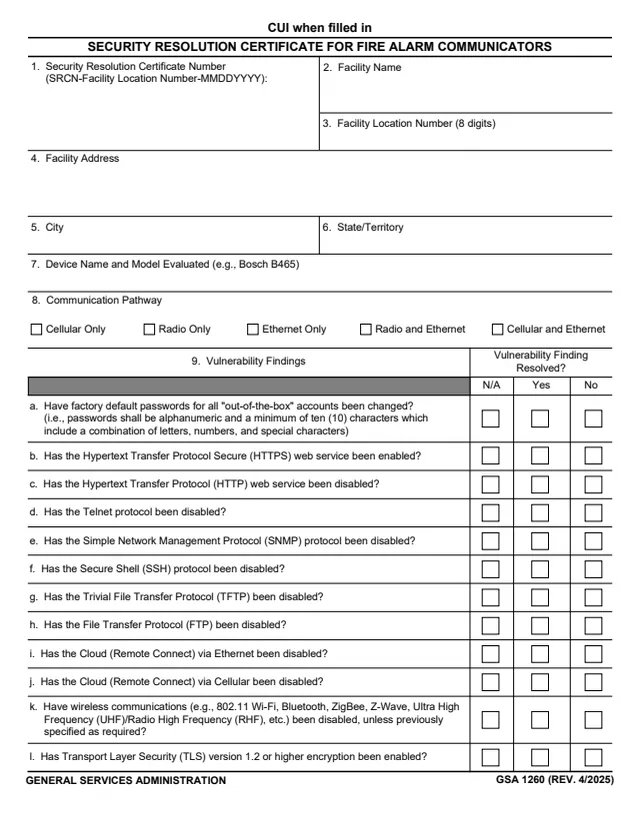
GSA Form 1260, Security Resolution Certificate for Fire Alarm Communicators, is a General Services Administration form, GSA 1260 (REV. 4/2025), hosted in GSA's forms library. Every page is marked CUI when filled in.
The certificate records one fire alarm communicator device at a GSA facility and whether each of the vulnerability findings a to t was resolved. The form says it ensures a reasonable level of assurance that the security vulnerabilities noted in the Security Assessment Report (SAR) have been resolved and implemented correctly at the subject facility during installation of the subject device. The installation technician and the GSA Approving Official both sign it, and it says it is valid only for the subject facility and the specific device.
Page 3 gives instructions for items 1 to 18. GSA's page lists a current revision date of 04/2025 and no authority or regulation. You can fill it out free in your browser on this page and download the result without an account.
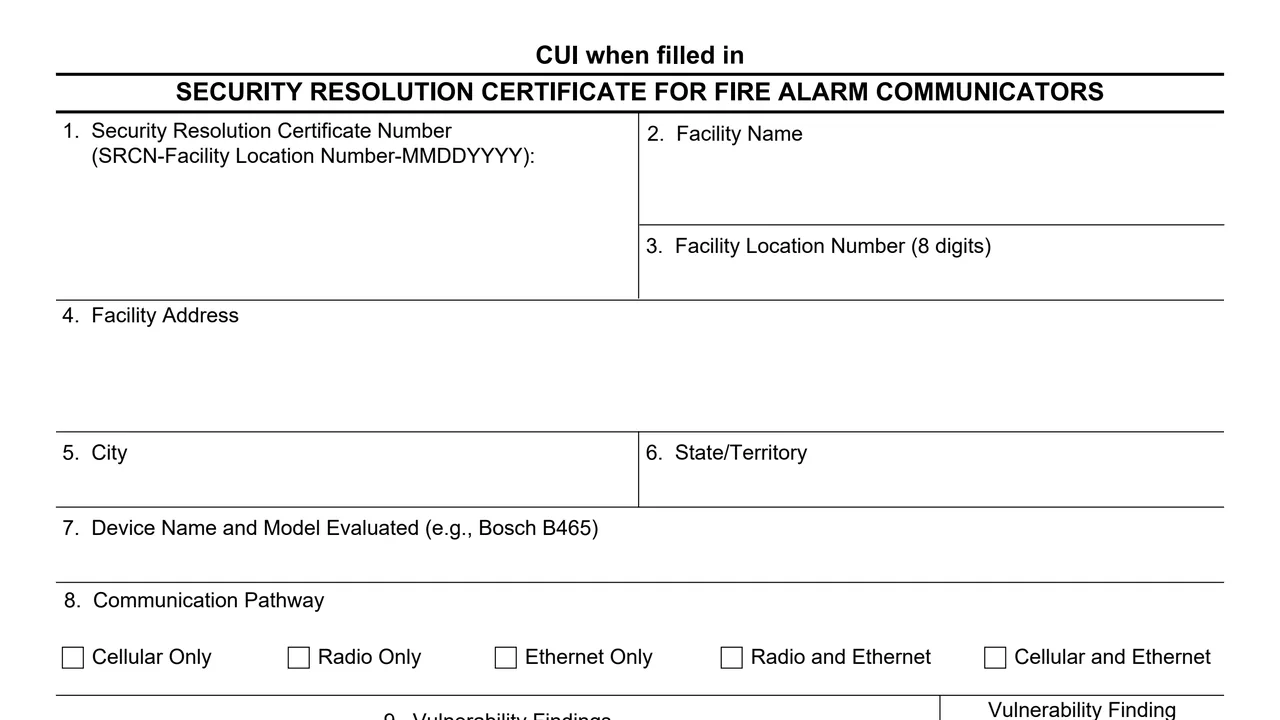
The Security Resolution Certificate Number, the facility name, the 8-digit Facility Location Number, the facility address, city and state or territory.
The device name and model evaluated, and one communication pathway: Cellular Only, Radio Only, Ethernet Only, Radio and Ethernet, or Cellular and Ethernet.
Whether factory default passwords were changed, HTTPS enabled, HTTP, Telnet, SNMP, SSH, TFTP and FTP disabled, cloud remote connect via Ethernet and cellular disabled, wireless communications disabled unless previously specified as required, and TLS 1.2 or higher enabled.
Encryption in transit at the required level (the form gives AES 256-bit), TLS 1.0 and 1.1 disabled, user management roles, the DNS and NTP settings printed on the form, the GSA warning banner, and whether all SAR findings were implemented.
Name, firm, signature, telephone number and date for the installation technician, then name, signature, telephone number and date for the GSA Approving Official.
The instructions say to begin item 1 with SRCN, followed by the 8-digit GSA Facility Location Number and the certificate date, as in the form's example SRCN-DC0031ZZ-01232022.
Use the official facility name in the Real Estate Across the United States (REXUS) system, the 8-digit Facility Location Number, the official street address and city, and the State/Territory abbreviation.
Enter the device name and model evaluated, then check one communication pathway based on the SAR report, as the item 8 instruction says.
The instructions say item 9 addresses each Vulnerability Finding, a to t, with Not Applicable (N/A), Yes or No checked for each one.
The Installation Technician enters a name, the firm and a work phone number, signs item 12 and dates item 14.
The GSA Regional Fire Protection Engineer who witnessed installation enters a name and work phone number, signs item 16 and dates item 18.
You get the real form, filled in a browser tab, with nothing standing between you and the finished PDF.
The form prints no address or routing instructions. Its approving official is the GSA Regional Fire Protection Engineer named in items 15 to 18.
Page 2 says: THIS CERTIFICATE IS VALID ONLY FOR THE SUBJECT FACILITY AND THE SPECIFIC DEVICE.
Every page carries the marking CUI when filled in.
The footer reads GSA 1260 (REV. 4/2025). GSA's page lists a current revision date of 04/2025 and no authority or regulation. The PDF prints no OMB number or privacy statement.
The instructions on page 3 name the people who complete and sign the certificate.
No tool matches that search.
The footer reads GENERAL SERVICES ADMINISTRATION and GSA 1260 (REV. 4/2025). GSA hosts it in its forms library.
The instructions identify the GSA Approving Official as the GSA Regional Fire Protection Engineer who witnessed installation of the device.
The instructions say to begin with the letters SRCN, followed by the 8-digit GSA Facility Location Number and the certificate date. The form's example is SRCN-DC0031ZZ-01232022.
The instructions say item 9 addresses each Vulnerability Finding, a to t, and that Not Applicable (N/A), Yes or No is checked for each one.
The Security Assessment Report. Item 8's pathway is checked based on the SAR report, and finding t asks whether all items outlined in the SAR findings section have been implemented as indicated.
Finding a says passwords shall be alphanumeric and a minimum of ten (10) characters which include a combination of letters, numbers, and special characters.
The form says the certificate is valid only for the subject facility and the specific device.