Identifying details
Name, Social Security number and date of birth at the top, followed by the additional instructions on entering dates.
SF144A
Statement of Prior Service - Worksheet
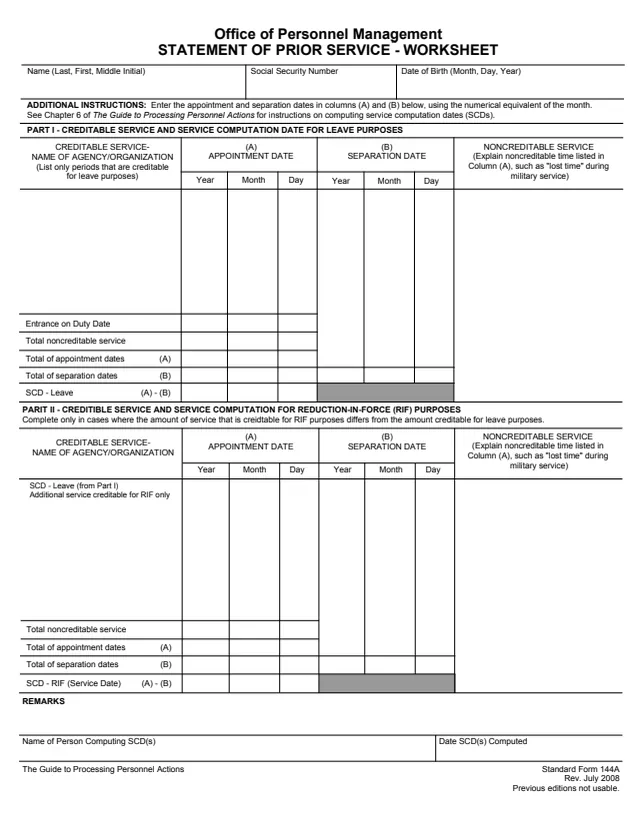
Standard Form 144A (SF 144A), Statement of Prior Service - Worksheet, is printed as a U.S. Office of Personnel Management (OPM) form. GSA hosts a copy in its forms library. This edition is Rev. July 2008, and the form says previous editions are not usable.
The worksheet is used to compute service computation dates (SCDs). Part I lists creditable service and works out the SCD for leave purposes. Part II works out the SCD for reduction-in-force (RIF) purposes and, the form says, is completed only where the service creditable for RIF differs from the service creditable for leave.
The form says to see Chapter 6 of The Guide to Processing Personnel Actions for instructions on computing SCDs. It prints no Privacy Act statement and no filing address. You can fill it out free in your browser on this page and download the result without an account.
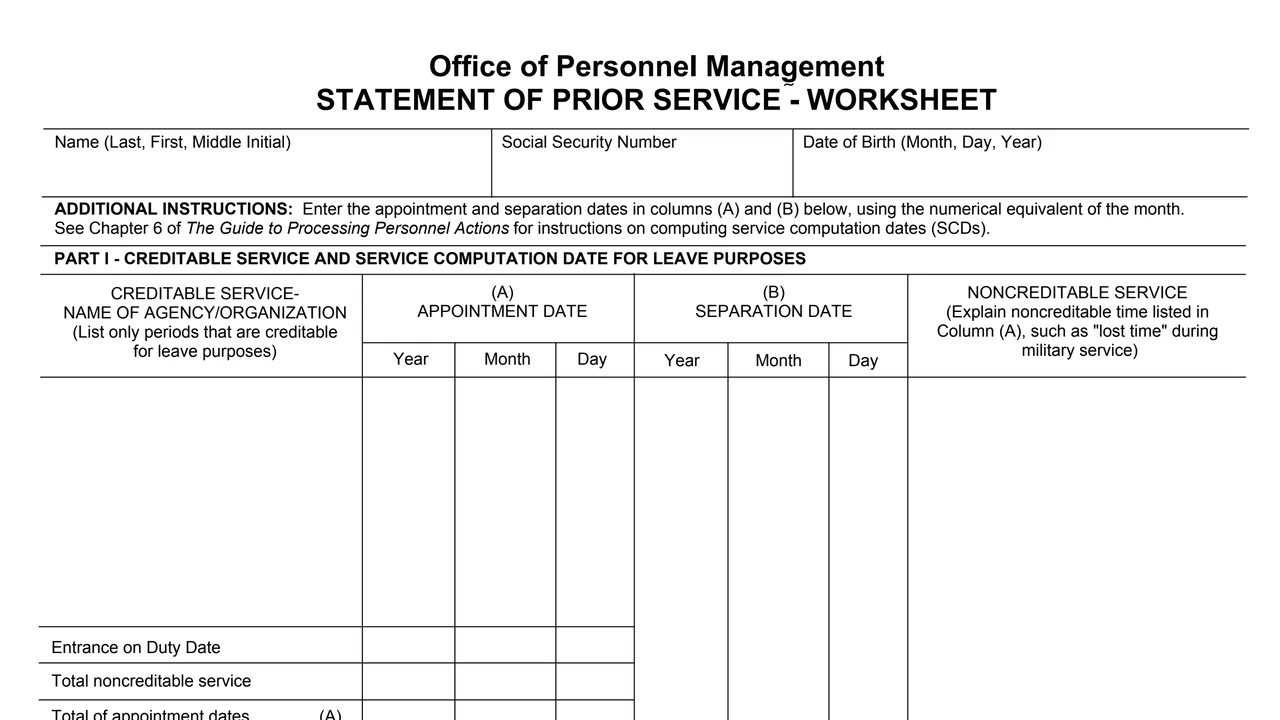
Name, Social Security number and date of birth at the top, followed by the additional instructions on entering dates.
The name of the agency or organization for each period creditable for leave purposes, with the appointment date in column (A) and the separation date in column (B) by year, month and day.
A column to explain noncreditable time listed in column (A), such as "lost time" during military service.
Entrance on duty date, total noncreditable service, the totals of appointment dates (A) and separation dates (B), and SCD - Leave shown as (A) - (B).
SCD - Leave carried from Part I, additional service creditable for RIF only, totals of columns (A) and (B), and SCD - RIF (Service Date) shown as (A) - (B).
A remarks area, the name of the person computing the SCD(s) and the date the SCD(s) were computed.
Name (last, first, middle initial), Social Security number and date of birth (month, day, year).
List only periods that are creditable for leave purposes, with the agency or organization name. The form says to enter appointment and separation dates in columns (A) and (B) using the numerical equivalent of the month.
Use the noncreditable service column to explain noncreditable time listed in column (A), and enter the total noncreditable service.
Total the appointment dates (A) and the separation dates (B). The form shows SCD - Leave as (A) - (B) and points to Chapter 6 of The Guide to Processing Personnel Actions for the method.
Only where RIF credit differs from leave credit: start from SCD - Leave, add service creditable for RIF only, and work out SCD - RIF (Service Date) as (A) - (B).
Use the remarks area if needed, then enter the name of the person computing the SCD(s) and the date the SCD(s) were computed.
You get the real form, filled in a browser tab, with nothing standing between you and the finished PDF.
The PDF prints no filing address or routing. It is a worksheet, with the name of the person computing the SCD(s) at the bottom.
The form says to see Chapter 6 of The Guide to Processing Personnel Actions for instructions on computing service computation dates. That guide is not part of the PDF.
The PDF prints no Privacy Act statement and no OMB burden notice, although it asks for a Social Security number.
The footer prints Rev. July 2008 and says previous editions are not usable.
The form names the person the worksheet is about and the person who computes the dates. It does not name a specific office.
No tool matches that search.
The form is printed under the heading Office of Personnel Management, Rev. July 2008. GSA hosts a copy in its forms library.
It is a worksheet for computing service computation dates (SCDs): SCD - Leave in Part I and, where RIF credit differs, SCD - RIF (Service Date) in Part II.
The form says Part II is completed only in cases where the amount of service creditable for RIF purposes differs from the amount creditable for leave purposes.
The form says to enter appointment and separation dates in columns (A) and (B) using the numerical equivalent of the month, in year, month and day columns.
The form points to Chapter 6 of The Guide to Processing Personnel Actions for instructions on computing SCDs.