Text pasted from Word loses its headings and lists
Markdown keeps heading levels, bullet and numbered lists and links as plain-text marks that chat assistants, Git and most note apps understand.
Turn Word, PowerPoint, Excel, HTML and PDF files into Markdown for ChatGPT, Claude or your notes, or a PDF into JSON with one entry per page.
Output format
No extractions yet
# Q3 sales report

Sales grew in every region this quarter. The full figures are in the [finance workbook](https://example.com/finance).

## Highlights

* Europe passed its target in August
* Two new resellers signed in Asia
* Returns fell to 2.1% of orders

## Revenue by region

| Region | Q2 | Q3 |
| --- | --- | --- |
| Europe | $1.20M | $1.46M |
| Asia | $0.84M | $0.97M |
| Americas | $2.05M | $2.18M |
A sample Word report. Its headings, bulleted list, link and table come out as Markdown you can paste into ChatGPT or Claude. If a table's first row isn't set as a header row in Word, the Markdown table gets an empty header.
AI Extract turns a Word, PowerPoint, Excel, HTML or PDF file into Markdown, keeping headings, lists and tables where the file stores them, so you can paste it into ChatGPT, Claude or a notes app. A PDF can also come out as JSON, with each page's text and page number. It uses document converters, not a language model.
Markdown keeps heading levels, bullet and numbered lists and links as plain-text marks that chat assistants, Git and most note apps understand.
Each sheet of an Excel file comes out as a Markdown table with its rows and columns, so a language model can tell which number belongs to which header.
The text of each slide comes out in slide order, with its title and any tables, so a deck can be searched or summarized.
Pick JSON for a PDF and each page comes back as its own entry with its page number, width and height, so a quote can point back to its page.
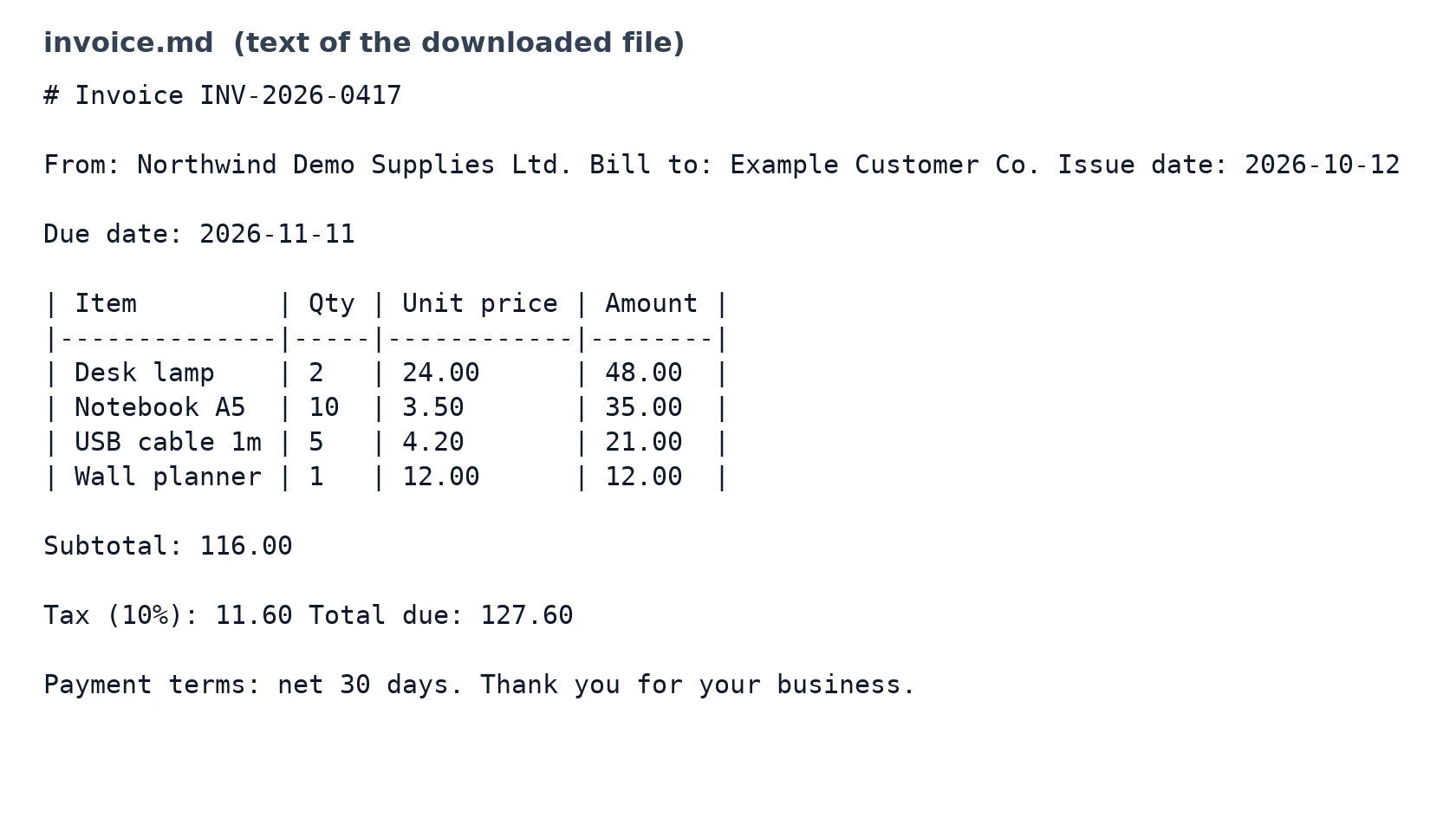
Markdown marks structure with a few characters. In our test of a one-page invoice, the Markdown file was 517 bytes and the JSON file 964 bytes.
Simple PDF tables can come back as Markdown tables: the four-column table in our invoice test came back with every row and column. Tables in scans, or with merged cells, may not.
The same short Word report, copied into a chat box and run through AI Extract, with one figure marked in each.
Pasted into a chat box
Quarterly Report 2026Revenue by regionRegionQ1Q2Americas4.20M4.85MEMEA3.10M3.42MAPAC2.05M2.61MSummaryTotal revenue grew 14.6% quarter over quarter.
Only the order of the lines ties 3.42M to EMEA and Q2.
AI Extract output, Markdown
# Quarterly Report 2026## Revenue by region| Region | Q1 | Q2 || --- | --- | --- || Americas | 4.20M | 4.85M || EMEA | 3.10M | 3.42M || APAC | 2.05M | 2.61M |## SummaryTotal revenue grew 14.6% quarter over quarter.
3.42M sits in row EMEA, column Q2.
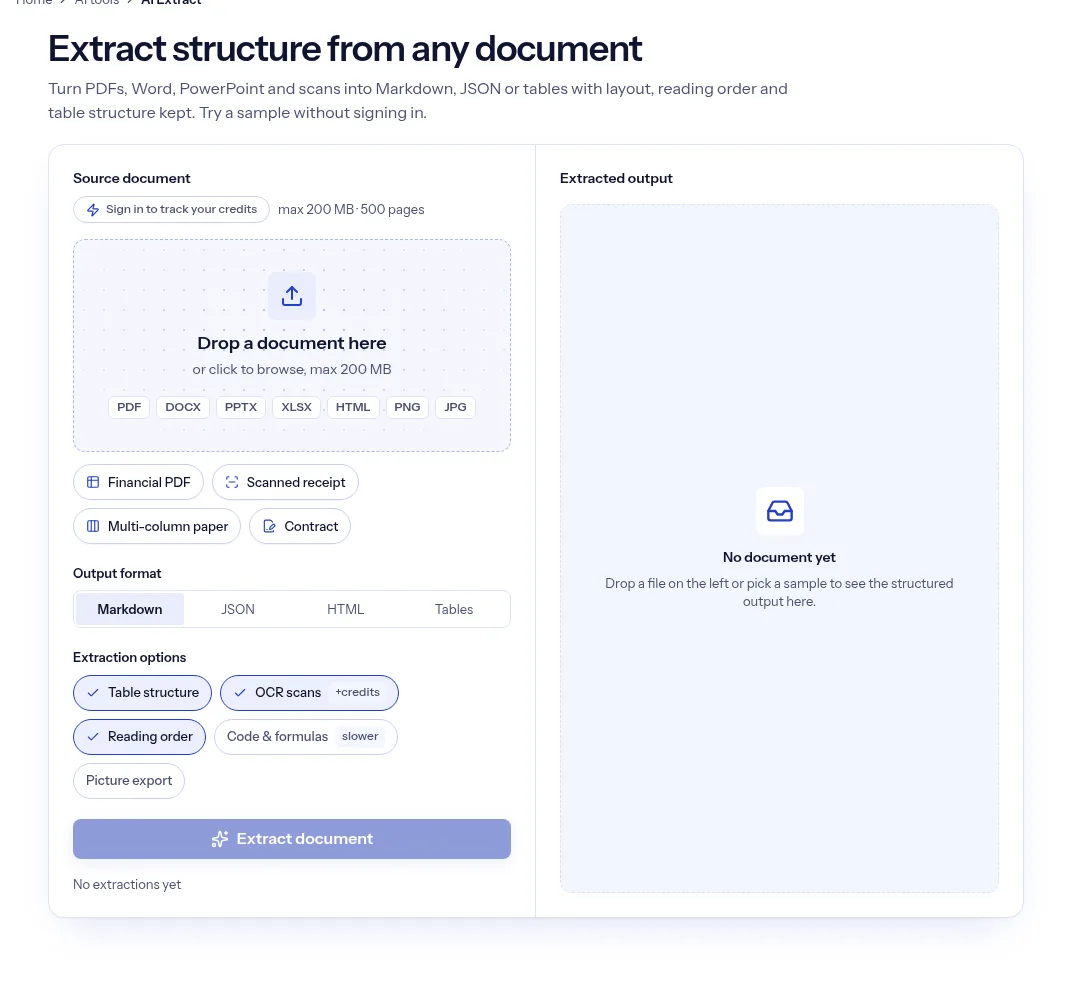
Drop a Word, PowerPoint, Excel, HTML or PDF file on the box, or click to choose one.
Markdown works for every file type. JSON is for PDFs and gives one entry per page.
Press Extract document, then copy the result or download it as a file.
An invoice PDF we made (CC0): 1 page, 8 labelled values, one table of 4 items in 4 columns
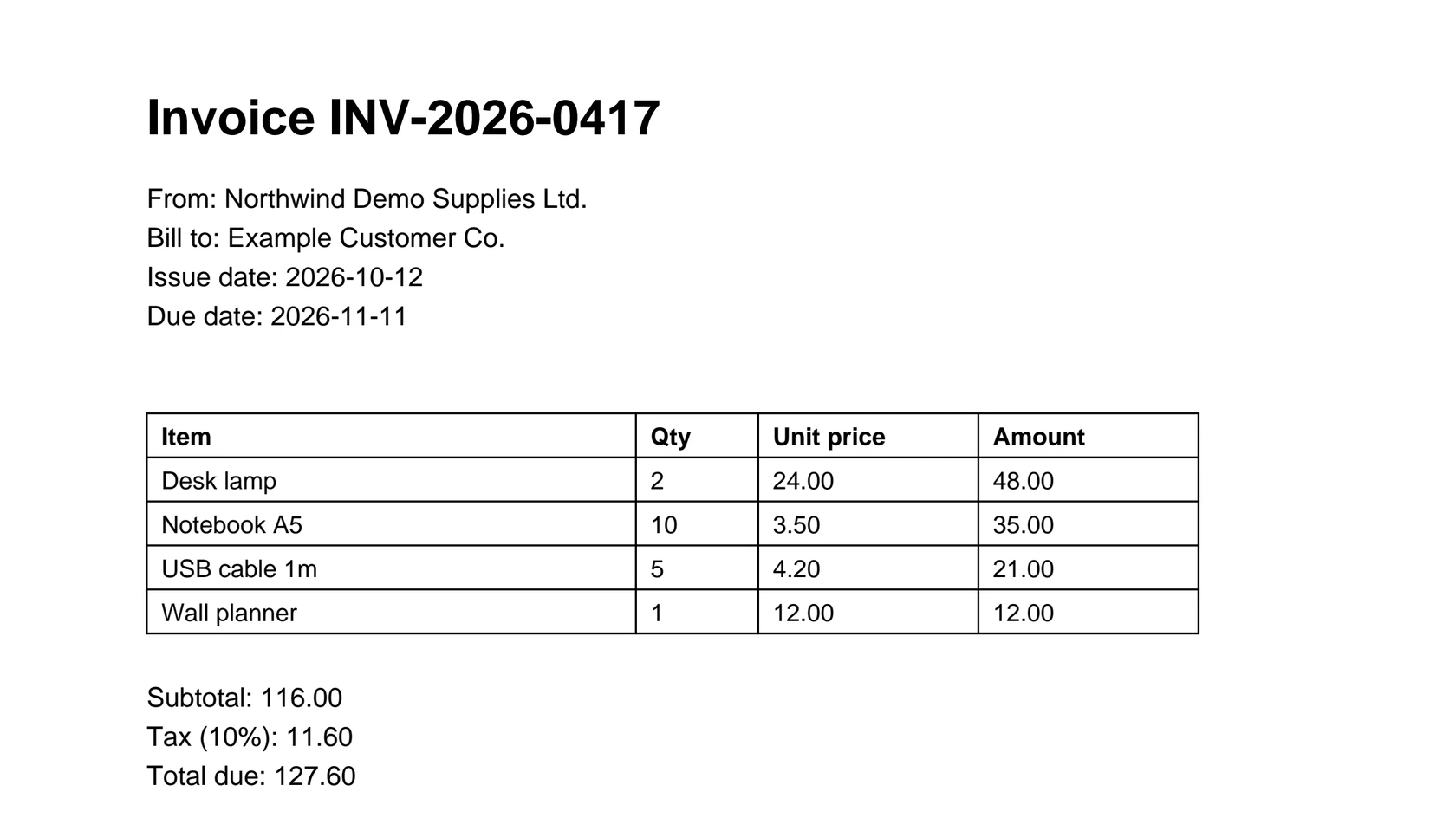
Copying from a document keeps the words and drops what holds them together: which line is a heading, which cells form a row, which page a passage is on. AI Extract writes that down as Markdown or JSON, and the same file gives the same result every time.
PDF, DOCX, PPTX, XLSX, and HTML. Images such as PNG or JPG aren't read. For a scan, run OCR PDF first and extract the PDF it gives you.
Markdown from any of these files. JSON from a PDF only: each page's text with its page number, size and rotation.
The size limit shows in the box before you start. Without an account you can extract a few files a day; signed in, each file uses credits from your plan.
It's converted on indox servers and kept in indox cloud storage. No language model reads it. Without an account it's deleted about a day after the conversion; signed in, it stays in your history for up to 180 days, or less if you choose.
| What you see | Why | What to do |
|---|---|---|
| A PNG or JPG is refused with "Couldn't extract that file" | In our test a PNG was refused: the server answered that converting PNG to Markdown is not supported, even though the box lists PNG and JPG | Use a PDF or an Office file. For a scan, run OCR PDF first, then add the result |
| Several lines run together in one paragraph | In our Markdown test, From, Bill to and Issue date came back on one line, and so did Tax and Total due. Every value was still there | Split the lines in your own script, or take JSON, where the lines of the page stay separate |
| The counters read 0 pages, 0 tables and 0 figures | In our test they showed 0 for an uploaded file whose Markdown held a table | Count in the output itself and ignore the counters for your own files |
| The JSON has no tables | In our test the JSON held page text and file properties only | Choose Markdown when you need the table |
| Another run gives a different layout | We ran each format once. AI output can vary between runs, so do not expect our numbers to repeat | Check the output against your source before you rely on it |
Convert the original to another format, or run the same extraction from your own code.
Need a Word, PDF or ePub copy instead of text? Convert the file.
Open ConvertSend files from a script, one request each, and poll for the result.
See the API exampleDeveloper API
These are the three calls the page makes: upload the file, poll the job, download the result. There is no batch endpoint, so send one request per file.
curl -X POST "https://indox.org/api/v1/pdf_handler/convert/" \
  -H "Authorization: Bearer $INDOX_API_KEY" \
  -F "[email protected]" \
  -F "target_formats=md"

# → 202 { "id": "8f3c…", "status": "pending" }
# Poll GET https://indox.org/api/v1/pdf_handler/conversion/8f3c…/ until status is "completed",
# then GET https://indox.org/api/v1/pdf_handler/8f3c…/download/
| You want to | Pick | What our test returned |
|---|---|---|
| Keep a table as a table | Markdown | The 4-column invoice table came back as a Markdown table of 5 rows by 4 columns |
| Paste the text into a note or a prompt | Markdown | 517 bytes, against 964 bytes of JSON for the same one-page invoice |
| Read the page line by line in a script | JSON | The text came as one string per page, with the page number, width and height beside it. Each table cell was its own line |
| Read the file's own properties | JSON | A metadata block listed the creator, producer and dates. Markdown leaves them out |
Turn reports, slides and handbooks into Markdown, split them at the headings and index the pieces.

Each Excel sheet becomes a Markdown table that a language model can read row by row.

Extract a PDF as JSON and keep each passage's page number, so a quote points back to its page.

Turn a Word draft or a PDF paper into Markdown for Obsidian, Notion or a Git repository, then check equations and tables against the original.
Facts checked on November 5, 2026
Word (DOCX), PowerPoint (PPTX), Excel (XLSX), HTML and PDF. Images such as PNG and JPG are not read.
No language model reads your file. AI Extract uses document converters that read the structure stored in the file, which is why the same file always gives the same result. It is built to prepare documents for AI tools such as ChatGPT and Claude.
Not directly. A scan has no text layer, so there is little or nothing to extract. Run OCR PDF first to add a text layer, then extract the PDF it gives you.
Tables in Word and Excel files come out as Markdown tables. In a PDF, simple tables can survive: in our invoice test the four-column table came back whole. Tables with merged cells, or tables in scans, may come out as lines of text.
Markdown for reading, for pasting into a chat assistant or a notes app, and for keeping tables. JSON for a PDF you want to process page by page in code.
The size limit shows in the box before you start. There is no batch endpoint: call the API once per file and poll each job.
No. You can extract a few files a day without signing in. Sign in to extract more and to keep your results in your history.
Without an account, a few extractions a day are free. Signed in, each extraction uses the same credits as a document conversion, and the box shows how many you have left.
Yes, while you need it. Without an account it is deleted about a day after the conversion. Signed in, it stays in your history for up to 180 days, and you can choose a shorter time.
AI Extract doesn't send your file to a language model, so nothing from it goes into training one.
Send the file to POST /api/v1/pdf_handler/convert/ with target_formats set to md or json. You get a job id back; poll the job until it is completed, then download the result. The example above shows curl, Python and Node.
Yes. Converters can merge lines, drop text from complex layouts or flatten a table. Compare important figures and names with the original before you rely on them.